
Intel® Rapid Start Technology User Guide
2.3. Locate the setting for Intel Rapid Start Technology, and click the check box to enable it. 2.4. Set the option for Hibernation Timer to Immediately. 2.5. Press the F10 key to save settings, exit BIOS, and restart the computer. If your computer has non-Visual BIOS or Classic Mode: 2.1.Press the F2 key during boot to enter the BIOS setup. 2.2. Scroll to the Power menu.
Download Intel® Rapid Start Technology User Guide

Information
Domain:
Source:
Link to this page:
Documents from same domain

Intel® AMT Configuration Utility User Guide
www.intel.comIntel® AMT Configuration Utility . User Guide . Version 11.0 . Document Release Date: December 17, 2015

Land Grid Array (LGA) Socket and Package …
www.intel.com3. Introduction. In this document, Intel has integrated customer feedback and developed a reference process to serve as a manufacturing enabling solution.

Microcode Revision Guide - intel.com
www.intel.comMicrocode Update Guidance Code Name Product Collection Product Names Vertical Segment CPUID Platform ID OS Update for Q2 Production Status Pre-Mitigation

U.S. Intern Relocation Guide (Including Canada)
www.intel.comFINDING HOUSING You are responsible for arranging your own housing needs, up to and including signing the lease, ordering rental furniture, paying deposits and setting up utilities.

DrMOS Specifications - Intel
www.intel.comTechnical Specifications R 7 3 Technical Specifications The feature set for the DrMOS can be divided into two major areas. They address the electrical

Intel Stratix 10
www.intel.comIntel® Stratix® 10 Intel ® StratIx® 10 Mx (DraM SySteM-In-Package) ProDuct table Notes: 1. LE counts valid in comparing across Intel FPGA devices, and …

Intel® Intel® Command Line InterfaceCommand …
www.intel.comIntel® Intel® Command Line InterfaceCommand Line InterfaceCommand Line Interface ... Intel® Command Line Interface Features and ... • Linux* command shell .

Data Sheet: MAX 3000A Programmable Logic …
www.intel.comAltera Corporation 3 MAX 3000A Programmable Logic Device Family Data Sheet The MAX 3000A architecture supports 100 % transistor-to-transistor logic

256 10 GX, MX, TX, and SX Device Family Pin …
www.intel.comIntel® Stratix® 10 GX Pin Connection Guidelines Clock and PLL Pins Note: Intel recommends that you create an Intel ® Quartus Prime design, enter your device I/O assignments, and compile the

256 10 L- and H-Tile Transceiver PHY User Guide - …
www.intel.comIntel® Stratix® 10 L- and H-Tile Transceiver PHY User Guide Subscribe Send Feedback UG-20055 | 2018.07.06 Latest document on the web: PDF | HTML
Related documents
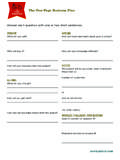
Answer each question with one or two short sentences.
100startup.com100startup.com the one-page Business plan OVERVIEW What will you sell? Who will buy it? How will your business idea help people? KA-CHING What will you charge?

Quick start for Photos – Windows Help
compass-ssl.microsoft.comQuick start Photos app Less magic, but more control Filters, contrast, and colors—oh my! 4. Dare to compare Make a change and then press-and-hold the Compare button to see the before, and let go to see the after. 2. Select the thing you want to change over here 3. Make the actual change over here Most changes require a single tap or
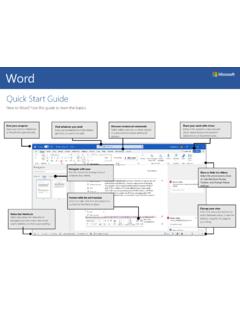
Quick Start Guide
download.microsoft.comQuick Start Guide. New to Word? Use this guide to learn the basics. Save your progress. Save your work on OneDrive or SharePoint automatically. Find whatever you need. Look up commands from the ribbon, get Help, or search the web. Discover contextual commands. Select tables, pictures, or other objects in a document to reveal additional options.
The Agile Maturity Model - ThoughtWorks
info.thoughtworks.comWe start with a discussion of the Agile Maturity Model, move on to building and releasing software, present the maturity model, and then describe how to use it. The Agile Maturity Model The Capability Maturity Model Integrated (CMMI®) is intended to institutionalize a collection of pre-defined delivery

DEBATE LANGUAGE: Professional Speaking Skills
www.cambridge.orgDEBATE LANGUAGE: Professional Speaking Skills CLARIFICATION & INFORMATION REQUESTS OPINION & PARTICIPATION REQUESTS DISAGREEMENT AGREEMENT Do you mean…? What do you mean? What does that mean? Could you clarify…? Could you repeat that?
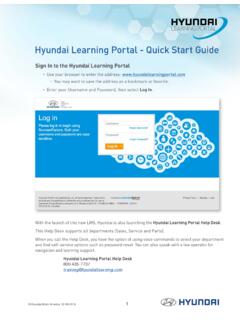
Hyundai Learning Portal - Quick Start Guide
d309r4l5dsjg4w.cloudfront.netHyundai Learning Portal - Quick Start Guide Sign In to the Hyundai Learning Portal • Use your browser to enter the address: www.hyundailearningportal.com ou may want to save the address as a bookmark or favorite.Y • Enter your Username and Password, then select Log In.

uick start Microsoft Edge
compass.microsoft.comuick start Microsoft Edge If you don’t always have internet access, add webpages that you want to read later to your Reading List and you’ll be able to get to them offline, too. 1. Add things to the list Open a webpage > select the Favorites button > Reading list > Add. 2. Open the list Hub button > Reading list .
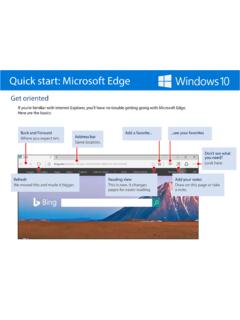
Quick start: Microsoft Edge
compass-ssl.microsoft.comQuick start: Microsoft Edge If you don’t always have internet access, add webpages that you want to read later to your Reading List and you’ll be able to get to them offline, too. 1. Add things to the list Open a webpage > select the Favorites button > Reading list > Add. 2. Open the list Hub button > Reading list .
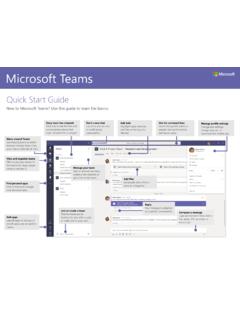
Microsoft Teams
pulse.microsoft.comStart a meeting Click Meet now under the area where you type a message to start a meeting in a channel. (If you click Reply, then Meet now , the meeting is based on that conversation.) Enter a name for the meeting, then start inviting people.