Introduction to Data Analysis Using an Excel Spreadsheet
Using an Excel Spreadsheet. I. Purpose _____ The purpose of this introductory lab is to teach you a few basic things about how to use an EXCEL 2010 spreadsheet to do simple data analysis in the labs. II. References . Read this write-up and consult the Help button in Microsoft Office Excel 2010 . III.
Download Introduction to Data Analysis Using an Excel Spreadsheet

Information
Domain:
Source:
Link to this page:
Documents from same domain
Tutorial Name Two-source interference - UMD …
www.physics.umd.eduTutorial Name Two-source interference Adapted from Tutorials in Introductory Physics, McDermott, Shaffer, and the Physics Education Group at the
Tutorial Electric Circuits I - UMD Physics
www.physics.umd.eduTutorial: Electric Circuits I Adapted in Fall 2006 from Tutorials in Introductory Physics, McDermott, Shaffer, and P.E.G., U. Wash. © Prentice Hall, Inc. First Edition, 2002.

Introduction to Quantum Mechanics - D. Griffiths
www.physics.umd.eduTitle: Introduction to Quantum Mechanics - D. Griffiths.djvu Author: hsgsj Created Date: 11/28/2009 9:22:59 PM

Lecture 5 (Feb. 6) - UMD Department of Physics
www.physics.umd.eduLecture 5 (Feb. 6) • Pressure in liquids and gases • Measuring and using pressure • Archimedes’ principle (float or sink?)

Chapter 4. Multiple Choice Concept Tests: The Force ...
www.physics.umd.edu102 Chapter 4. Multiple Choice Concept Tests: The Force Concept Inventory (FCI) I. CHAPTER OVERVIE W In the early 1980s, McDermott, 1 Viennot, 2 and other physics education researchers 3, 4 found that each student comes into a physics course not as a blank sl ate but brings into the classroom a system of common sense beliefs and …

Principles of Modern Physics - UMD Department of Physics
www.physics.umd.eduPrinciples of Modern Physics . Fall 2014 . Description: This 3 credits course is designed primarily for engineering and physical sciences students. The lectures will cover main topics on the fundamentals of modern physics, according to the schedule below. ...

Principles of Modern Physics
www.physics.umd.eduPhysics 420 . Principles of Modern Physics . Fall 2012 . Description: This 3 credits course is designed primarily for engineering students. The lectures will cover selected materials from the text on the fundamentals of modern physics, according to the schedule below.

E, D, B & H: What do they all mean? - UMD Physics
www.physics.umd.eduE~, D~, B~ & H~: What do they all mean? W. T. Hill, III Department of Physics and The Institute for Physical Science and Technology University of Maryland, College Park, Maryland 20742

IEEE TRANSACTIONS ON APPLIED ... - UMD Physics
www.physics.umd.edu2 IEEE TRANSACTIONS ON APPLIED SUPERCONDUCTIVITY Fig. 2. Optical microscope images of resonator (light grey is metallization, black is sapphire substrate, dark grey is ). White squares in the (a) image indicate position of elements defining the type of coupling. Top square repre-

IEEE TRANSACTIONS ON APPLIED ... - UMD Physics
www.physics.umd.edu2 IEEE TRANSACTIONS ON APPLIED SUPERCONDUCTIVITY Fig. 1. Optical images of four resonators measured (gray/white is aluminum metal and black is sapphire substrate). Circle 1 labels the current anti-node and voltage node of resonators and Circle 2 labels one of the two current nodes and
Related documents

Using Microsoft® Excel to Enhance Teaching and Learning
www.gtps.k12.nj.usExcel XP opens with a task pane on the right side of the screen. This window has links to most basic Excel tasks. Select the triangle at the top right side of the task pane to reveal a list of several other tasks. The task pane gives users the option to select a specific spreadsheet …
Solving simultaneous equations using matrix functions in Excel
educ.jmu.eduMatrix Algebra using Excel So how do we accomplish this in Excel? Step 1: Create matrices Step 2: Invert first matrix Select cells for the inverted matrix result for a matrix the same size as the original matrix. The use the function MMINVERSE to invert it. Once you specify the array to invert, use CTRL-CHIFT-ENTER instead of
TIPS FOR DOING STATISTICS IN EXCEL
laude.cm.utexas.eduExcel can produce a number of different kinds of graphs for you. Once you have counted up the number of scores you have in given categories, you can ask Excel to create a histogram or bar graph showing this information. 1. Create a data table on the Excel spreadsheet. Name the columns and the rows. Enter the count data into the cells. 2.
Excel Add-in Desktop Guide- i
www.library.fa.run An Excel spreadsheet. Importing Data - 5 Searching for a Field Mnemonic Searching for a field mnemonic enables you to enter a keyword into the search text field and filters according to the asset class. The List data grid then populates with all fields matching the text, as
Chapter 2 - Setting Excel Options
www2.westsussex.gov.ukExcel automatically creates a spreadsheet recovery file at the interval that you specify in minutes. You can specify a time from 1 to 120 minutes. If Excel crashes for any reason, the latest AutoRecover file will open when you next start Excel. You can then save the changes.
Steps to Creating an Epidemic Curve in MS Excel 2007
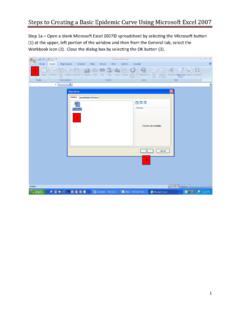
www.cdc.govSteps to Creating a Basic Epidemic Curve Using Microsoft Excel 20 07 1 Step 1a – Open a blank Microsoft Excel 2007© spreadsheet by selecting the Microsoft button (1) at the upper, left portion of the window and then from the General tab, select the Workbook icon (2). Close the dialog box by selecting the OK button (3). 1 . 2 . 3

Pipe Flow-Friction Factor Calculations with Excel
www.cedengineering.coman Excel spreadsheet solution. This course includes discussion of the Darcy-Weisbach equation and the parameters in the equation along with the U.S. and S.I. units to be used. Example calculations and sample Excel spreadsheets for making the calculations are presented and discussed. Image Credit: Wikimedia Commons
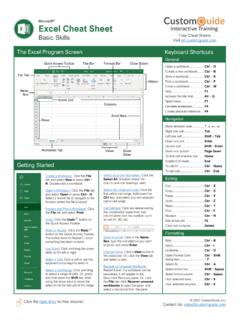
Microsoft Excel Cheat Sheet - CustomGuide
www.customguide.comExcel Cheat Sheet Basic Skills The Excel Program Screen Keyboard Shortcuts Getting Started Create a Workbook: Click the File tab and select New or press Ctrl + N. Double-click a workbook. Open a Workbook: Copy Click the File tab and select Open or press Ctrl + O. Select a recent file or navigate to the location where the file is saved.