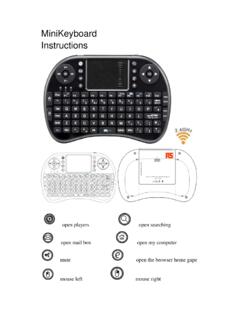
MiniKeyboard Instructions - RS Components
All wireless devices may be subject to interference, thus affecting . the performance of this product. Turn off this device in hospital . Please turn the device off in areas with “no wireless device” indication. Wireless devices may interfere withimplanted cardiac . pacemakers, hearing aids and other medical implant devices. Accessories
Download MiniKeyboard Instructions - RS Components

Information
Domain:
Source:
Link to this page:
Documents from same domain

LOCTITE 243™
docs.rs-online.comTDS LOCTITE® 243™, August-2016 For Cleanup 1. Cured product can be removed with a combination of soaking in a LOCTITE® solvent and mechanical abrasion such as a wire brush Loctite Material SpecificationLMS LMS dated June-29, 2009.

Shelf Life for Loctite Products - RS Components
docs.rs-online.comThe shelf life period for Loctite® products is one year from date of shipment from Henkel facilities or as indicated by package labeling. For optimal storage, maintain product at a temperature between 8°C (46°F) to 21°C (70°F). Storage below 8°C (46°F) or greater than 28°C (82°F) can adversely affect product properties.

AC Industrial Electric Motors Data Sheet
docs.rs-online.comThe power factor usually being referred to as cos Ø. The power factor is usually between 0.7 and 0.9, however this may vary depending on the motor size and rating. If there are many motors in an installation they will consume a lot of reactive power and will therefore have a lower power factor. Power supply authorities sometimes require the

SIM868 Hardware Design V1.00-150516 - RS Components
docs.rs-online.comSIM868 is a quad-band GSM/GPRS module that works on frequencies GSM 850MHz, EGSM 900MHz, DCS 1800MHz and PCS 1900MHz. SIM868 features GPRS multi-slot class 12/class 10 (optional) and supports
APPLICATION MKS-L MKS-SC
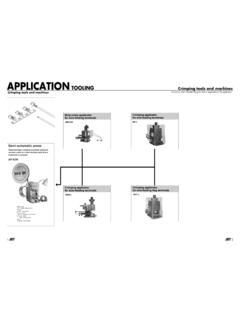
docs.rs-online.comNote: (1) These tools are for prototype tooling or repair. (2) YC tool has two crimping sections (A and B). YRS tool has also two crimping sections by inverting upper dies. Be sure to check applicable wires before use. Since the dies are fixed, the crimping height cannot be adjusted. Therefore, some of the

APC Smart-UPS X-Series 2000/2200/3000 VA Operation Manual
docs.rs-online.comSmart-UPS X 2000/2200/3000 VA 1 Overview About the UPS The APC® by Schneider Electric Smart-UPS® X is a high performance uninterruptible power supply (UPS). It provides protection for electronic equipment from utility power blackouts, brownouts, sags,

Charger Instructions for Duracell High-Speed Chargers (ALL)
docs.rs-online.com5. The charger is capable of accepting 100-240 V AV 50/60 Hz and therefore, can be used overseas with a corresponding regional plug converter. 6. If battery is fully charged and then reinserted right away into the charger, the fault Red Blinking LED indicator may occur since the battery is already fully charged 7.

Programmable Logic Controllers Beginner´s Manual
docs.rs-online.comThe programmable logic controllers of the FX1S,FX1N,FX2N,FX2NC,FX3G,FX3GC,FX3GE, FX3S,FX3U and FX3UC series are only intended for the specific applications explicitly described in this manual. All parameters and settings specified in this manual must be observed. The products described have all been designed, manufactured, tested and docu-

PLATINUM RESISTANCE THERMOMETER (PRT)
docs.rs-online.comBuy this and more at rspro.com RS PRO Sensors - PRT Guide 3 COMPARISON OF SENSOR TYPES PLATINUM RESISTANCE THERMOMETER THERMOCOUPLE THERMISTOR Sensor Platinum-wire wound or flatfilm resistor Thermoelement, two dissimilar metals/alloys Ceramic (metal oxides) Accuracy (typical values) 0.1 to 1.0°C 0.5 to 5.0°C 0.1 to 1.5°C Long term …
Data sheet 6ES7131-6BH01-0BA0
docs.rs-online.comfor standard inputs — parameterizable Yes; 0.05 / 0.1 / 0.4 / 0.8 / 1.6 / 3.2 / 12.8 / 20 ms (in each case + delay of 30 to 500 µs, depending on line length)
Related documents

Dragon Bluetooth Wireless Headset User Guide
supportcontent.nuance.com2. Select the Dragon Bluetooth wireless headset from the Microphone pull-down menu. 3. Select the spelling model that best suits you from the Spelling pull-down menu, and then choose the Accent. 4. When you have verified your choices are correct, click the Create button.

MOMENTUM True Wireless 2 - Sennheiser
assets.sennheiser.comtooth compliant devices. They are intended for wireless audio com - munication such as music playback and phone calls via Bluetooth wireless technology. It is considered improper use when the product is used for any appli - cation not named in the corresponding product documentation. Sennheiser does not accept liability for damage arising from ...
Pairing Bluetooth - d2e2oszluhwxlw.cloudfront.net
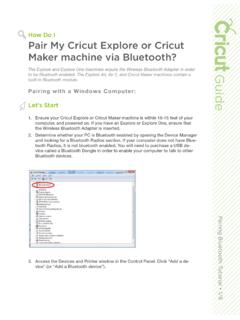
d2e2oszluhwxlw.cloudfront.netPairing Bluetooth Tutorial • 4/8 3. Open the Bluetooth® window. If Bluetooth service is turned off, click the button to turn it on. Select the Wireless Bluetooth® Adapter or Explore Air, Explore Air 2, or Cricut Maker Bluetooth module from the list of devices. (The name of your Wireless Bluetooth® Adapter is included in your packaging ...

Jan Release Notes Intel® Wireless Bluetooth®
downloadmirror.intel.comIntel® Wireless Bluetooth® . . Package Version and Supported Operating Systems . . for: Microsoft Windows® and Microsoft Windows® Supported Products and Driver Versions Intel® Wireless Adapter Windows® 10 Windows® 11 Intel® Wi-Fi 6E AX411 22.100.1.1 Intel® Wi-Fi 6E AX211 Intel® Wi-Fi 6E AX210 Intel® Wi-Fi 6 AX201

Dell Wireless Mouse and Keyboard KM717
downloads.dell.comYou could connect a third device to your wireless mouse using Bluetooth. 1 Slide the connection-mode switch on your keyboard to select the third-Bluetooth connection. 2 In Windows Search, type Bluetooth. 3 From the list that appears, click Bluetooth Settings.

Dual Band Wireless AC-3160 Bluetooth Brief - Intel
www.intel.comDual Band Wireless-AC 3160 802.11ac, dual band, 1x1, Wi-Fi + Bluetooth® adapter lets you move at the speed of life with faster speeds (up to 433
Wireless Rechargeable Touchpad T650 - Logitech
www.logitech.comLogitech Wireless Rechargeable Touchpad T650 6 Navigate Swipe three fingers to navigate within Windows 8. Swipe up to return to Windows 8 Start. Swipe left or right for back and forward. Swipe down for the desktop. In Windows 7, when software is installed, swiping up launches the application switcher. Touchpad gestures Swipe from the left edge ...

Quick Start Guide - SleepPhones
www.sleepphones.comCheck the volume on your Bluetooth ® audio player. 2 Check the volume on the wireless Bluetooth® module located inside 3 the headband. Make sure that the wireless Bluetooth ® module is charged. 4 If your Bluetooth ® device is separated from your SleepPhones Wireless headphones for more than 5 minutes, the headphones will automatically