
Packet Tracer Modify Your Thing
Step 2: Activate the Security Camera. Move the Tablet configuration window out of the way but still visible so that the Packet Tracer workspace is visible. Hold down the Alt key on the keyboard and move the mouse curser over the Security Camera icon. Notice the icon will change to the image used as the activated icon and the Security Camera status
Download Packet Tracer Modify Your Thing

Information
Domain:
Source:
Link to this page:
Documents from same domain

Packet Tracer - Logical and Physical Mode Exploration
contenthub.netacad.comencounter in Cisco Networking Academy courses will use Logical mode. You can switch between these You can switch between these modes at any time to compare the differences by clicking the Logical (Shift+L) and Physical (Shift+P)

Packet Tracer Configure End Devices
contenthub.netacad.comPacket Tracer – Configure End Devices Objectives Configure various end devices in Packet tracer. Background / Scenario In this activity you will construct a simple Packet Tracer network and complete basic configuration of end devices. Step 1: Launch Packet Tracer. a. Launch Packet Tracer on your PC or laptop computer
Introducción a la ciberseguridad Actividades y recursos ...
contenthub.netacad.comCisco y/o sus filiales. Todos los derechos reservados. Información confidencial de CiscoPágina 1 de 5 www.netacad.com Introducción a la ciberseguridad . Actividades y recursos adicionales

Packet Tracer Modify and Monitor Environmental Controls in ...
contenthub.netacad.comPacket Tracer – Modify and Monitor Environmental Controls in Packet Tracer The Smart Home Network Objectives Part 1: Explore Environmental Controls Part 2: Edit Environment Elements Background / Scenario In this activity you will use the Physical view in Packet Tracer to view and edit the evironmental controls.

Packet Tracer Create a Simple Network Using Packet Tracer
contenthub.netacad.comPart 1: Build a Simple Network in the Logical Topology Workspace Step 1: Launch Packet Tracer. a. Launch Packet Tracer on your PC or laptop computer Double click on the Packet Tracer icon on your desktop or navigate to the directory that contains the Packet Tracer executable file and launch Packet Tracer.
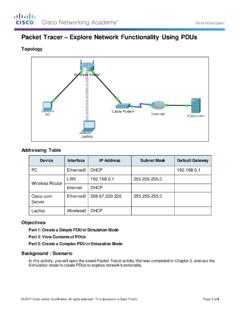
Packet Tracer Explore Network Functionality Using PDUs
contenthub.netacad.comObserve the information in the OSI Model tab. Notice that this is an outbound Layer 3 PDU and the source and destination IPv4 address is shown. Packet Tracer – …

Lab Create a Process Flowchart
contenthub.netacad.comLab – Create a Process Flowchart Objectives Part 1: Recognize Symbols Used in a Flowchart and List Logical Process to Solve a Problem Part 2: Draw the Flowchart to Illustrate the Problem Solving Process Background Flowcharts are diagrams used to represent processes or workflows. Using different shapes, boxes, and

Video Introduction to Packet Tracer
contenthub.netacad.comserver labs, we can see security with AAA, DNS, file servers, secure web browsing, email servers, and even go into IoT registration servers for our IoT devices. For now, we're going to head over to the PC directory, and then the VPN folder. In the VPN folder, there's a VPN Easy file that we can open up.

Lab - Mapping the Internet
contenthub.netacad.comLab - Mapping the Internet © 2018 Cisco and/or its affiliates. All rights reserved. This document is Cisco Public. Page 6 of 12 path, and the return time is measured ...

Packet Tracer Adding IoT Devices to a Smart Home
contenthub.netacad.comof the IoT device window, click the Advanced button. Notice more tabs become visible at the top of the window. Click the I/O Config tab. Change the Network Adapter drop down list to PT-IOT-NM-1W, which is a wireless adapter. f. Configure the Wind Detector for the wireless network.
Related documents
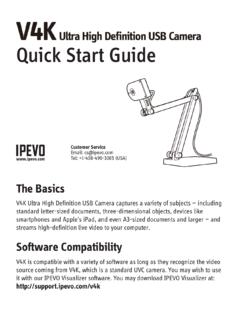
V4K Ultra High Definition USB Camera Quick Start Guide
s3-us-west-1.amazonaws.comFeb 01, 2018 · Camera Multi-jointed stand Bolts Weighted base . Tighten. 1. Focus button: Focuses the subject. 2. AutoFocus switch: Sets the focus to Single (S) for static subject, or Continuous (C) for moving subject. 3. Exposure toggle: Provides exposure customization. 4. LED indicator: Turns white if V4K is in use and providing an image. 5. Microphone:

Miniature 1080p WiFi IP Camera User Manual
s3-ap-southeast-2.amazonaws.comcamera correctly in accordance with the guidelines of the quick steps . I. Start Switch the power to ON to boot up the camera. It will take about 30-60 seconds to finish booting up. With the power switch ON, hold down the reset button for 5 seconds to restore the factory settings. 1. The blue light is the power indicator. Solid blue means the

Marine Camera Integration Guide - Garmin
static.garmin.comNOTE: You must have a dual-payload M-series FLIR camera connected to your chartplotter network to switch between views. FLIR MD-series cameras provide thermal views only. From the video screen, select Menu. Change Colors: Sets the color scheme of the infrared image. Change Scene: Sets the camera to a night, night docking, day, or man overboard ...
CS231A Course Notes 1: Camera Models - Stanford University
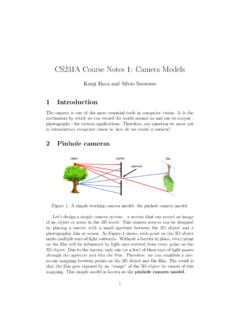
web.stanford.eduFigure 1: A simple working camera model: the pinhole camera model. Let’s design a simple camera system { a system that can record an image of an object or scene in the 3D world. This camera system can be designed by placing a barrier with a small aperture between the 3D object and a photographic lm or sensor.

Omni ision Preliminary Datasheet Advanced Information
web.mit.eduThe OV7670/OV7171 CAMERACHIPTM image sensor is a low voltage CMOS device that provides the full functionality of a single-chip VGA camera and image processor in a small footprint package. The OV7670/OV7171 provides full-frame, sub-sampled or windowed 8-bit images in a wide range of formats, controlled through the Serial Camera Control Bus (SCCB ...
Basic Image Processing with FIJI/ImageJ
www.jmu.edu2 2 DOWNLOADING FIJI/IMAGEJ FIJI is a pre-packaged version of ImageJ that is pre-configured with numerous useful plugins. Most importantly, it allows you to open image files generated by nearly any microscope/camera software.
A Flexible New Technique for Camera Calibration
www.microsoft.comcamera in a static scene, the rigidity of the scene provides in general two constraints [17, 15] on the cameras’ internal parameters from one camera displacement by using image informa-tion alone. Therefore, if images are taken by the same camera with fixed internal parameters,
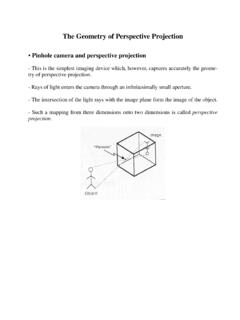
The Geometry of Perspective Projection
www.cse.unr.edu• Pinhole camera and perspective projection-This is the simplest imaging device which, however, captures accurately the geome-try of perspective projection.-Rays of light enters the camera through an infinitesimally small aperture.-The intersection of the light rays with the image plane form the image of the object.
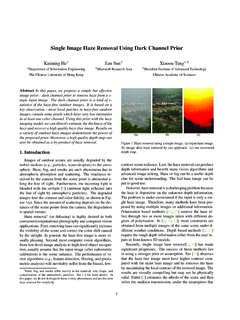
Single Image Haze Removal Using Dark Channel Prior
kaiminghe.comimage prior - dark channel prior to remove haze from a s-ingle input image. The dark channel prior is a kind of s-tatistics of the haze-free outdoor images. It is based on a ... ceived by the camera from the scene point is attenuated a-long the line of sight. Furthermore, the incoming light is blended with the airlight [6] ...