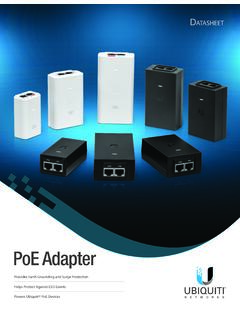
PoE Adapters Datasheet
ATASHEET Ubiquiti Networks offers Power over Ethernet (PoE) Adapters to power a variety of Ubiquiti products. The PoE Adapters are compatible with most Ubiquiti PoE devices*, including: • airFiber® • airMAX® • EdgeMAX® • ESD damage using a grounded Ubiquiti PoE Adapter, mFi® • UniFi® AP • UniFi Protect / airVision® • UniFi LED
Download PoE Adapters Datasheet

Information
Domain:
Source:
Link to this page:
Documents from same domain

Datasheet - Ubiquiti Networks
dl.ubnt.comDatasheet www.ubnt.com/airmax 3 Software airOS is an intuitive, versatile, highly developed Ubiquiti firmware technology. It is exceptionally intuitive and …

802.11ac Dual Radio Access Point
dl.ubnt.comThis Quick Start Guide is designed to guide you through ... 802.11ac Dual Radio Access Point Model: UAP-AC-LITE Gigabit PoE* (24V, 0.5A) with Mounting Bracket

Advanced Gigabit Ethernet Router - Ubiquiti …
dl.ubnt.comThis Quick Start Guide is designed to guide ... Advanced Gigabit Ethernet Router Model: ER-X EdgeRouter X Power Adapter (12V, 0.5A) Quick Start Guide

UniFi AC AP Datasheet - dl.ubnt.com
dl.ubnt.com3 D atasheet UniFi Controller Packed with Features Use the UniFi Controller to provision thousands of UniFi APs, map out networks, quickly manage

Wide-Angle 1080p Dome IP Camera with Infrared
dl.ubnt.comIntroduction Thank you for purchasing the Ubiquiti Networks® UniFi® Video Camera G3 Dome. This Quick Start Guide is designed to guide you through installation and includes warranty terms.

TOUGHCable PRO Quick Start Guide - Ubiquiti Networks
dl.ubnt.com2 TOUGHCable™ PRO Quick Start Guide TOUGHCable Box The Tension Knob is set to High by default. If necessary, the tension can be set to to Low or None. Tension Knob TOUGHCable PRO Cross-Section Conductor Insulation ESD Drain Wire

U-Installer Quick Start Guide - Ubiquiti Networks
dl.ubnt.comLEDs Wi-Fi Lights blue if the U-Installer has a Wi-Fi connection to your mobile device. Battery Four blue LEDs indicate the internal battery’s charge level: Full charge Low charge* * Recharge the battery by connecting a power source,

1080p Wireless IP Security Camera with Infrared
dl.ubnt.comIntroduction Thank you for purchasing the Ubiquiti Networks® UniFi® Video Camera G3 Micro. This Quick Start Guide is designed to guide you through installation and also includes warranty terms.

802.11n Wi-Fi Access Point - Ubiquiti Networks
dl.ubnt.comHardware Installation The UniFi AP can be mounted to the wall or ceiling. Perform the steps for the appropriate installation: Wall Mount 1. Position the Mounting Bracket at the desired location on the wall with the cable feed slot pointed towards the floor.

Rocket ac Datasheet - Ubiquiti Networks
dl.ubnt.comD atasheet 4 Technology Unlike standard Wi-Fi protocol, Ubiquiti’s Time Division Multiple Access (TDMA) airMAX ac protocol allows each client to send and receive
Related documents

User Manual: My Cloud Home and My Cloud Home Duo
documents.westerndigital.com1. Power Button 2. Reset Button 3. USB Port(s) 4. Ethernet Port 5. DC Power Connector Power Button My Cloud Home Duo (two-bay device) has a rear-facing power button. My Cloud Home (single-drive device) does not have a power button. Table 1.3 Power Button Function Device Operation Press Once System will stop all services, clear cache and shut ...

Dell Enterprise Systems Rail Sizing and Rack Compatibility ...
i.dell.comthreaded-hole rack, adapter brackets are required. 1U and 2U adapter bracket kits are available that support systems ranging from 1U to 5U in height. The adapter bracket kits include six brackets to accommodate different rail lengths, plus four sets of custom screws in 10-32, 12-24, M5 and M6 thread sizes.

2019-2020 Products compatibility Information
productinfo.shimano.comNov 13, 2019 · E-BIKE compatibility chart. C-431. 441. 441 443 446 448 449. Polymer-coated brake cable (BC-9000 / BC-R680) compatible chart. C-306. Compatibility between brake systems. C-466. Brake lever with switch compatibility. C-467 C-468 C-469. 11-speed FREEHUB compatibility. C-253. Compatibility between rear derailleur and cassette sprocket gear teeth
Zeppelin Wireless Manual - Bowers & Wilkins
www.bowerswilkins.comWireless comprise a mains power input, a 3.5mm analogue AUX input, a network socket and a micro-USB interface used for service only. A power button and a pin-hole reset button are also located on the rear of Zeppelin Wireless. Diagram 1 illustrates Zeppelin Wireless, its buttons, indicators and connection sockets.

Dell Technologies
www.delltechnologies.comWe would like to show you a description here but the site won’t allow us.

NVIdIa Quadro K6000 the PoWer to reaLIZe
www.nvidia.comCompatibility > NVIDIA GPUDirect™ Support1 > NVIDIA nView® Desktop Management Software Compatibility > 1 Stereo Connector > HDCP Support > NVIDIA Mosaic2 SPECIFICATIONS GPU Memory 12 GB GDDR5 Memory Interface 384-bit Memory Bandwidth 288 GB/s CUDA Cores 2880 System Interface PCI Express 3.0 x16 Max Power Consumption …

SolarEdge Power Optimizers Inter-Compatibility
www.solaredge.comThe following compatibility tables detail the Power Optimizer series and models that can be installed in the same PV string, during installation or in case a power optimizer is being replaced. If a cell does not contain a check mark, the relevant power …