Postscript Programming Guide - Ricoh USA
PostScript Language Printer Commands 1-3 Device Setup The page device parameters represent particular raster output device features or processing options; the values represent the current settings of those features or
Download Postscript Programming Guide - Ricoh USA

Information
Domain:
Source:
Link to this page:
Documents from same domain
White Paper - Smart Operation Panel ver. 2 - Ricoh
rfg-esource.ricoh-usa.com4-1. Network connection functions by SOP ... Ricoh’s strategy is to offer our customers a new level of usability. We want to leverage the
GCPV1.1&2.0 Administrator Configuration Guide …
rfg-esource.ricoh-usa.comFor GCP Configuration Guide Page 1 Ricoh App. for Google Cloud Print Administrator Configuration Guide January 15, ... Switching between Proxy and Non-proxy Network ...

23-May-18 PERIOD OF ASSURED PARTS …
rfg-esource.ricoh-usa.com5/23/2018 As of: 23-May-18 = Support Provided Ricoh Model Savin Model Lanier / Gestetner Model Introduction Date Discontinuance Date Final Month of Assured Parts

The 3D Parts Catalog - Ricoh
rfg-esource.ricoh-usa.com- Individual parts images are displayed as pop-ups when the cursor is placed over an item in the List view. - The List view contains the quantity, name, and in the case of service parts, the P/N for each part.

Network Security White Paper - Ricoh
rfg-esource.ricoh-usa.comNetwork Security White Paper ver. J.1.4 2 NOTICE: This document may not be reproduced or distributed in whole or in part, for any purpose or in any fashion without the prior written consent of Ricoh Company limited. Ricoh Company limited retains the ... M075 Aficio SP C320DN SP C320DN SP C320DN SP C320DN

White Paper - Device Security - Ricoh
rfg-esource.ricoh-usa.comM075 Aficio SP C320DN SP C320DN SP C320DN SP C320DN D094 Aficio MP W3601 3406WD N/a LW426 ... Device Security White Paper Page 2 of 92 ... respectively), which were designed and developed by Ricoh Co. Ltd. (herein referred to as Ricoh), as well
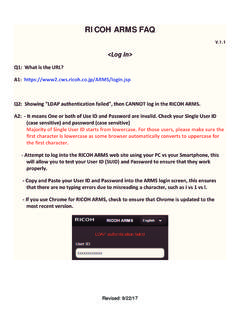
RICOH ARMS FAQs - rfg-esource.ricoh-usa.com
rfg-esource.ricoh-usa.comRevised: 9/22/17 Case B: Input correct 11 digits serial and, it is NOT connected to @Remote or connected @Remote but under monitored mode by Appliance. Result B: Same as Result A above. Case C: Input correct 11 digits serial and it is connected to @Remote under managed mode (HTTPS or SNMP). Result C-1: If it is authorized to see, the result is depending on the connection type.

Ricoh Technology Services Instructor Led Training Guide
rfg-esource.ricoh-usa.comDec 29, 2021 · Ricoh Technology Services Instructor Led Training Guide . 073035 Overview This document is provided to aid the Service Manager in planning an appropriate learning path for the Service Professional with a concentration on service training for Ricoh’s black and white,
RICOH ARMS User Manual
rfg-esource.ricoh-usa.comRICOH Family Group Users can apply for ARMS with their Office365 Account . Please contact to ARMS/@Remote administration team in your company for the application. [RICOH Family Group Dealer Users] Single User ID and Ricoh ARMS access can be obtained by completing the Ricoh ARMS Training in RLI. The expiration date of Ricoh Group Service Account ...
Related documents
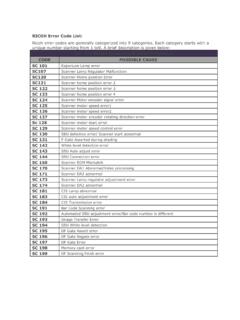
RICOH Error Code List - mtechsinfo.com
mtechsinfo.comRICOH Error Code List: Ricoh error codes are generally categorized into 9 categories. Each category starts with a unique number starting from 1 to9.
Ricoh Technology Services Instructor Led Training Guide
rfg-esource.ricoh-usa.comDec 29, 2021 · Ricoh Technology Services Instructor Led Training Guide . 073035 Overview This document is provided to aid the Service Manager in planning an appropriate learning path for the Service Professional with a concentration on service training for Ricoh’s black and white,

SP C250SF/SP C252SF - Ricoh
support.ricoh.comThe following guides are available for the RICOH SP C252SF: • Getting Started Guide (this document). • Operating Instructions – This comprehensive guide (on CD) explains how to use the machine, for example, how to configure system settings, and how to copy, print, scan and fax. The guide also contains
Firmware Update Guide - Ricoh
support.ricoh.comBefore starting the firmware update, download the firmware to your local computer from the RICOH website. 1. Open a web browser. 2. Access the "Support & Downloads" page on the RICOH website. ... Firmware Update Guide 6. DUP065 To check the IP address of the printer, press the [Menu] key, and then select [Host Interface].
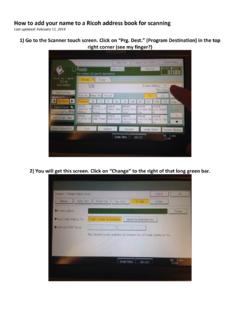
How to add your name to a Ricoh address book for scanning
www.mynwresd.orgHow to add your name to a Ricoh address book for scanning Last updated: February 11, 2014 1) Go to the Scanner touch screen. Click on “Prg. Dest.” (Program Destination) in the top right corner (see my finger?) 2) You will get this screen.

RICOH Ri 1000 - Ricoh DTG Printers
ricohdtg.comOct 30, 2018 · Detail for 8) If the printer has written a cartridge to 0% erroneously and the cartridge cannot be recovered (keeps at 0% even after restart) Then check the carriage to make sure the feelers that indicate if a damper or tank inside the carriage
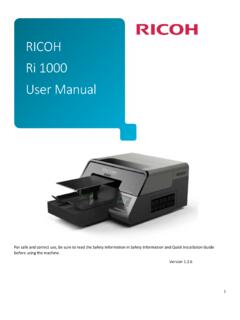
RICOH Ri 1000 User Manual - Ricoh DTG Printers
ricohdtg.comFor safe and correct use, be sure to read the Safety Information in Safety Information and Quick Installation Guide before using the machine. Version 1.2.6 . RICOH . Ri 1000 . User Manual . 2 . Rev. Date Author Description 1.0 09/28/2018 J. Manzano …

Caplio 500SE Software User Guide - kansastag.gov
www.kansastag.govthe “Camera User Guide”. Caution This section explains how to download still images and movies using RICOH Gate La. For information on how to download still images and movies using DeskTopBinder Lite or Auto Document Link, which are installed as standard applications, see the “Auto Document Link Guide”.