
Programming and Troubleshooting Guide 1 Mastercode 2
If programming is unsuccessful, the “X” pattern will flash three times with three beeps. Make sure the user code is not a duplicate and that it is between 4 and 8 digits during your next attempt. Make sure the lock has room for an additional code. If all user codes are filled, delete a code to make room for this one.
Download Programming and Troubleshooting Guide 1 Mastercode 2

Information
Domain:
Source:
Link to this page:
Documents from same domain

Installation and User Guide
kwiksetprodstorage.blob.core.windows.netProgramming timeout after five seconds. Attempt programming procedure again. Unsuccessful programming. Keypad flashes red 15 times with 15 beeps* Three incorrect codes entered within one minute. Re-enter code after 60 second keypad lockout. Keypad flashes red with fast beeping sound for three to four seconds. Low battery. Replace batteries.
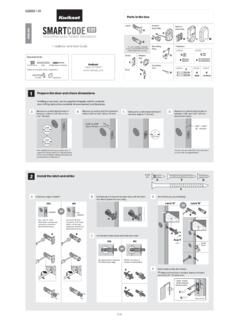
Interior A Assembly ENGLISH F W B Installation and User Guide
kwiksetprodstorage.blob.core.windows.netCAUTION: Prevent unauthorized entry. Since anyone with access to the back panel can change the user codes, you must restrict access to the back panel and routinely check the user codes to ensure they have not been altered without your knowledge. The use of a mastercode can help protect your system’s settings.
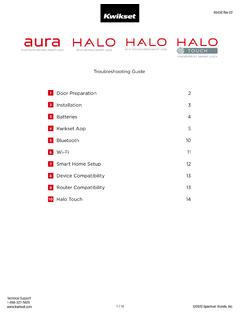
Troubleshooting Guide 1 Door Preparation 2
kwiksetprodstorage.blob.core.windows.netHanding, or latch calibration, is the way that the smart lock learns the orientation of your door (left- or right-handed). A1: The first time the battery is inserted, the lock will perform automatic calibration, or “handing.” You will know the handing is taking place when the latch bolt retracts and extends on its own.

Programming and Troubleshooting Guide 1 Mastercode 2
kwiksetprodstorage.blob.core.windows.net1. Keep door open. Press and HOLD the Program button until the keypad flashes green (about 5 seconds). 2. Enter new Mastercode. 3. Press Lock button once. 4. Re-enter Mastercode. 5. Press Lock button once. If programming is successful, the keypad will flash green once with one beep. If programming is unsuccessful, the keypad will flash red ...

Rev 03 Parts List - .NET Framework
kwiksetprodstorage.blob.core.windows.net4 Install exterior assembly A Route the cable below the latch. Insert the torque blade through the horizontal slot in the latch. D G Secure the mounting plate with the supplied screws. IMPORTANT: Hold the exterior assembly on the outside firmly (or have a second

264 Contemporary ENGLISH Electronic Deadbolt
kwiksetprodstorage.blob.core.windows.netIMPORTANT: Make sure the latch bolt is fully retracted (in the unlocked position). A2 Optional: Remove square corner face and replace with round corner face (if needed). Ensure A2 snaps into place. A2 A Install latch in door with supplied screws. 1 / 4 ENGLISH 66882 Rev 02 Installation and User Guide Kwikset Technical Support 1-800-327-5625 www ...

A B C - .NET Framework
kwiksetprodstorage.blob.core.windows.netwant to operate the lock. For new purchases, the current key is the one that was supplied in the box with the purchased lockset. The new key must be the same key type (KW1) as the current key. Consult your local hardware store for more information. Before performing this procedure, make sure the lock is installed on the door. Re-key the lock while
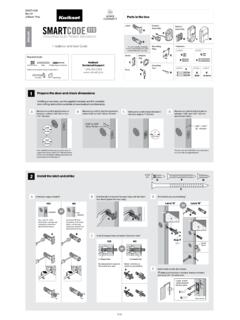
Interior A Assembly F ENGLISH W K L M B Installation and ...
kwiksetprodstorage.blob.core.windows.netand Troubleshooting Guide on the SmartCode 910 page at www.kwikset.com. 2x One green flash with one beep* Three red flashes with three beeps* Two beeps* or or Programming time out. Make sure not to pause for more than 5 seconds during programming. Tip: You can press the Lock button before entering your user code to light up the keypad at night.
Related documents
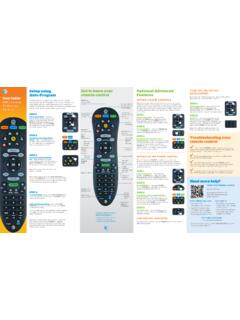
Get to know your Optional Advanced Auto-Program remote ...
www.att.comAudio device programming: Let go of the FASt ForWArD key when the device mutes. Press mute to unmute the device. Use the volume keys to verify that the remote control is controlling the volume. If it does not work properly, repeat this process. note: If TV programming is interrupted or inactive for more than 10 seconds, the PoWer key will flash
PROGRAMMING GUIDE - DMP
buy.dmp.comCONTROL PANEL PROGRAMMING GUIDE Contains programming Instructions for use with the Model XR500, XR500N, XR500E Series Control Panels XR500FC, XR500NFC Series Fire Control Panels When using the XR500 Series panel for any UL, NFPA, CSFM, or other listing organization’s approved methods, refer to this

PROGRAMMING OF FINITE DIFFERENCE METHODS IN …
www.math.uci.eduPROGRAMMING OF FINITE DIFFERENCE METHODS IN MATLAB 5 to store the function. For the matrix-free implementation, the coordinate consistent system, i.e., ndgrid, is more intuitive since the stencil is realized by subscripts. Let us use a matrix u(1:m,1:n) to store the function. The following double loops will compute Aufor all interior nodes.

Assembly Language Programming - UTEP
www.ece.utep.eduprogramming directly. We will start from assembly language but use high-level C language to help understand it. Compiler often directly generates machine code. The assembly language stage is often skipped… Adapted from notes from BYU ECE124 12
Remote Codes - Device codes for programming the ... - Bell
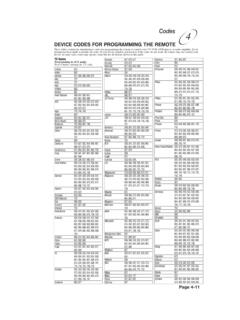
support.bell.caPage 4-11 Codes 4 TV Codes Programming in AUX mode: Press 0 before entering the TV code. A Mark 670 Action 662 Admiral 521, 605, 668, 669, 675 Aiko 727
PROGRAMMING WORKBOOK - Penn State College of …
www.engr.psu.eduThis programming manual is meant as a supplementary teaching aid to users of the HAAS Mill. The information in this workbook may apply in whole or in part to the operation of other CNC machines. Its use is intended only as an aid in the operation of the HAAS Milling Machine. For a complete explanation and an in-depth descrip-

Learning Arduino with C Programming
c-stem.ucdavis.eduwould be such that the code from a Ch program can be copied and paste into the Arduino programming environment and function the same way, creating a smooth transition from ChIDE to the Arduino IDE. This gives students easy experience with different programming environments and the dynamic nature of programming and programming languages.

Omnibus Codes – Commercial Medical Policy
www.uhcprovider.com0417T Programming device evaluation (in person) with iterative adjustment of the implantable device to test the function of the device and select optimal permanent programmed values with analysis, including review and report, implantable cardiac