
USER GUIDE - Logitech
Mode selector switch 3-position rotary switch with tristate LED to indicate program mode. 3 Fire Buttons Backlit buttons conveniently positioned on joystick head for instant access in the heat of the battle. 2 x 8-way hat switches -1 pre-defined as point of view; select from multiple view perspectives and assign frequently used commands.
Download USER GUIDE - Logitech

Information
Domain:
Source:
Link to this page:
Documents from same domain

Activities Want to know more? - Logitech
www.logitech.comLogitech Gaming Software - Help Center file:///E|/Help/en_US/front_page.htm[4/28/2014 8:07:32 PM] Activities... Want to know more? Create a new profile Getting started

On - logitech.com
www.logitech.com1 2 Logitech® Wireless Mouse M217 Setup Guide Guide d’installation English Mac® OS X Users: When plugging in the Unifying receiver, the Keyboard Assistant

圧倒される 超・高解像度 - logitech.com
www.logitech.comLogicool BRIO Ultra HD 4K画像センサー 4K(Ultra HD)@ 30 fps、1080p(フルHD)@ 30/ 60 fps および 720p(HD)@ 30/60/90 fpsを含めた複 数の解像度をサポートし、お使いのアプリケーションや

SMALL GROUPS. BIG POTENTIAL. - Logitech
www.logitech.comSmall group video conferencing deserves more than huddling around PC webcams or begging for time on overbooked conference room systems. The ConferenceCam BCC950

Logicool ゲーム ソフトウェア - logitech.com
www.logitech.com快適な作業および安全性 file:///E¦/Help/ja_JP/comfort_and_safety.htm[4/26/2014 9:19:02 PM] 快適な作業および安全性 ここでは快適な作業 ...

Logitech® USB Headset H390
www.logitech.comEnglish Know your product 1. USB Headset H390 2. Microphone boom 3. Microphone 4. Volume controls (+/–) 5. Mute button 6. Mute light 7. USB connector

SUPER-WIDE FIELD OF VIEW FOR SMALL SPACES.
www.logitech.comMeetUp’s integrated audio is optimized for huddle room acoustics and delivers an exceptional sound experience. Three horizontally-aimed beamforming mics and

Introducing the Logitech MeetUp
www.logitech.com3 TalkingPointz July 21, 2017 What’s a MeetUp? Logitech currently offers three small room conferencing products in its ConferenceCam lineup .

Setup Guide Guide d’installation Logitech® HD …
www.logitech.com4 English English 5 Getting started with Logitech® HD Pro Webcam C920 Thank you for buying your c920! Use this guide to set up and begin using your Logitech webcam.

Logitech Addresses and Phone Numbers
www.logitech.comLogitech ® G 27 Racing Wheel © 2013 Logitech. All rights reserved. Logitech, the Logitech logo, and other Logitech marks are owned by Logitech …
Related documents
Electronic Control Transmission (ECT)
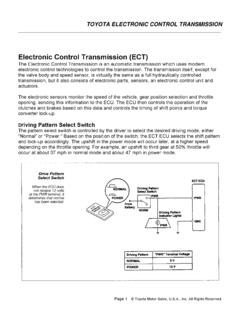
autoshop101.comO/D Main Switch OFF When the O/D switch is in the OFF position, the electrical contacts are actually closed and current from the battery flows to ground and 0 volts is present at the OD2 terminal as shown below. At the same time, the O/D OFF indicator is illuminated.
Engine Lamp Identification Guide. - Cummins Inc.
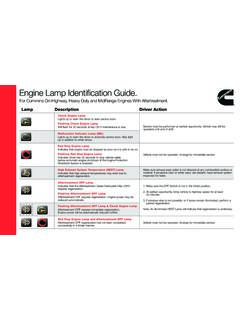
www.cummins.com1. Make sure the DPF Switch is not in the Inhibit position. 2. At earliest opportunity, bring vehicle to highway speed for at least 20 minutes. 3. If previous step is not possible, or if lamps remain illuminated, perform a parked regeneration. Note: An illuminated HEST Lamp will indicate that regeneration is underway.

AT-LP120XUSB User Manual - Audio-Technica
www.audio-technica.com3 Pre-amplifier selector switch If using an amplifier with a PHONO input jack, set this switch to the PHONO position. If connecting to the AUX jack of an amplifier, set this switch to the LINE position. 4 Stereo output terminals Connect the RCA audio cable. Connect it to either the amplifier's PHONO input jack or its line input jack.
LASER RANGEFINDER OWNER’S GUIDE
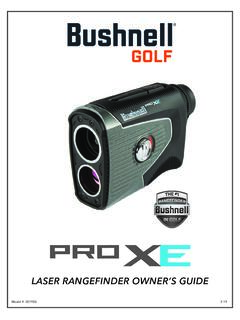
www.bushnellgolf.comSlope Switch 5 3 4 2 6 1 1 BITE MAGNET HOW OUR DIGITAL TECHNOLOGY WORKS ... Your Pro XE display incorporates the following illuminated indicators (refer to display image at right): 1. Aiming Circle (surrounding crosshairs indicate laser transmission) 2. Elements Mode 3. Battery Level 4. “Play As” Distance (based on Slope/Elements)

IK0800219 - Accelerator Position Sensor/IdleValidation ...
static.nhtsa.govTitle: Accelerator Position Sensor/IdleValidation Switch APS / IVS Diagnostics NavPakŽ, CEC equipped engine control systems Applies To: All NavPakŽ, CEC equipped engines 1998 through 2003, including T444E, DT466E and 530E engines. Vehicles included, but not limited to, would be: 2000,3400,3800,4000FBC,4000 8000, 4300,4400,7400,7500, 8500, CE Bus,RE Bus, FE Bus
Wireless Illuminated Keyboard K800 Quick Start ... - Logitech
www.logitech.comSlide the keyboard’s Off/On switch to Off and then On The keyboard’s battery status indicator LEDs should light up 2. Confirm that the keyboard is charged The battery status indicator is red when the battery is low 3. Try plugging the Unifying receiver into another USB port 4. Move the Unifying receiver closer to the keyboard 5.