
User guide - VZW
4 5 The Basics Phone Overview -- Open View 1 Earpiece - Allows you to hear the caller and automated prompts. 2 Soft Keys - Allows you to select the corresponding command at the lower left or right displayed in the screen. 3 Send Key - Allows you to make and answer calls. Press from standby mode to access your call history (all calls, missed calls, dialed calls and received …
Download User guide - VZW

Information
Domain:
Source:
Link to this page:
Documents from same domain
User Guide - Verizon Wireless
ss7.vzw.comUser Guide. LTE INTERNET AND ... used in this user manual are the property of Novatel Wireless or their respective owners. ... to the Verizon Wireless customer’s ...
User Guide - Verizon Wireless
ss7.vzw.com©2015 Verizon Wireless, Inc. ... used in this user manual are the property of Verizon Wireless or their respective owners. ... Device Support Page & User Guide ...
User Guide - Verizon Wireless
ss7.vzw.comLG and the LG logo are ... • Descriptions and screen images in this user guide may differ ... The top of the Settings screen shows the name of the gizmo user and ...

User Guide - Verizon Wireless
ss7.vzw.comUser Guide Guía del Usuario GH68-44385R Printed in USA User Guide. SMARTPHONE User Manual Please read this manual before operating your device
Contents
ss7.vzw.comContents Chapter 1: What’s next ... In addition to the user guide, ... The Safety & Comfort Guide contains information for both HP and Compaq devices.
Contents
ss7.vzw.comContents Backing up and recovering using HP Recovery Manager ... Help and Support User Guides 574400-001_HP.book ... In addition to the user guide, ...
User Guide - Verizon Wireless
ss7.vzw.comNote: The instructions in this user’s guide are based on a default Display Theme setting of Vapor (see page 38). If you change Display Theme to a different setting,
HP Elite x2 1012 G1 TabletHP Elite x2 1012 G1 Tablet …
ss7.vzw.comHP Elite x2 1012 G1 Tablet HP Elite x2 1012 G1 Tablet with Advanced ... HP Elite x2 1012 G1 Tablet with Travel Keyboard Maintenance and Service Guide IMPORTANT! This document is intended for HP authorized service providers only. ... during operation. The device and the AC adapter comply with the user-accessible surface temperature limits ...

User Guide - Verizon Wireless
ss7.vzw.com*You can find your HP Limited Warranty located with the user guides on your product and/or on the CD or DVD provided in the box. In some countries or regions, HP may provide a printed warranty in the box. For countries or regions where the warranty is not provided ... User Guide Hewlett Packard ...

User Guide - Verizon Wireless
ss7.vzw.com2 Images and screenshots used in this manual may differ from the actual product. Content in this manual may differ from the actual product or software.
Related documents
Tools >
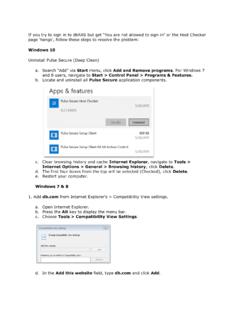
dbrasweb.db.comAdd db.com from Internet Explorer’s > Compatibility View settings. a. Open Internet Explorer. b. Press the Alt key to display the menu bar. c. Choose Tools > Compatibility View Settings. d. In the Add this website field, type db.com and click Add. 2. Perform a Deep Clean of the system. This will completely remove Host Checker and

My Passport Wireless Pro & My Passport Wireless SSD
documents.westerndigital.comNote: Compatibility may vary depending on your computer’s hardware configuration and operating system. For highest performance and reliability, always install the latest software update. Web Browsers Internet Explorer 10.0 and later on supported Windows computers Safari 6.0 and later on supported Mac computers

NVIDIA NVS 310 GPU: The New Vision in Productivity
images.nvidia.comand display settings for systems spread across your corporate environments. Every NVS 310 is tested on leading business applications and designed with the ideal balance of performance and power to meet your most demanding business needs. Enjoy full compatibility with industry-leading business applications such as Microsoft Office

ProTools Shortcuts Guide - Avid Technology
resources.avid.comPro Tools Shortcuts Guide iii ... Options, and Settings that appear on-screen are in a different font. The following symbols are used to highlight important information: ... uals, browse the Compatibility documents for system requirements, search the online Knowledge Base or

STEPS for correcting Compatibility view settings
tslhr.tatasteel.co.inSTEPS for correcting Compatibility view settings 1. Click on Tools 2. Click on Compatibility View Settings . 3. If website field is blank, Copy paste the link of the website, if website link is already there move to step 4 4. Click on Add 5. Click on …

U-Verse® TV, Internet and Phone User Guide | ATT102410735 …
www.att.comFix it now! Support tools. 3 Select Manage my Wi-Fi.e’ll display the information right there W for you! Go . Wi-Fi 1. Go to your computer’s Wireless Network Settings and refresh the network list . 2. Select your Wi-Fi Network Name from the list . 3. Enter the Wi-Fi Password in the Password field to connect to your network .

ConsumerCellular
www.consumercellular.com5 6 1 Getting started..... 1.1 set-up Removing or installing the back cover Inserting or removing the sIm card The SiM card and battery are normally pre-installed for you.

Government Travel Charge Card (GTCC) Training Guide
www.dcms.uscg.milTo change this in Internet Explorer, you need to click on Tools, Compatibility View Settings. When the screen below appears, ensure that the site is not listed in the “Websites you’ve added to Compatibility View:” and that the two boxes below for “Display intranet sites in Compatibility View” and “Use