
VA Once Quick Reference User Guide
Internet Explorer (IE) in order to access VA-ONCE. Other browsers ... next to the search bar and looks like a piece of paper torn in half horizontally. In IE 11, click the cog icon. It is ... the screen when the Help Tab is selected is also a link for Keyboard shortcuts, if you prefer using the keyboard to the mouse.
Download VA Once Quick Reference User Guide

Information
Domain:
Source:
Link to this page:
Documents from same domain

Veteran Information Portal: Obtaining Your …
www.benefits.va.gov3 Step 4: Enter the information requested on the Contact Information screen.If you wish to receive information by email, be sure to select “Yes” to the last question on the screen.
State Fees and Charges Deviations Change Sheet …
www.benefits.va.govState Fees and Charges Deviations Change Sheet . Date Change May 23, 2017 TX: Tax Certificates: Change from $4 Per Taxing Authority on Refi Loans to $10
U.S. Department of Veterans Affairs Veterans …
www.benefits.va.govU.S. Department of Veterans Affairs Veterans Benefits Administration VA Loan Electronic Reporting Interface VA Servicer Guide FINAL Version 1.2
Chapter 7. Loans Requiring Special Underwriting, …
www.benefits.va.govVA Pamphlet 26-7, Revised Chapter 7-Loans Requiring Special Underwriting, Guaranty and Other Considerations 7-3 1. Joint Loans, Continued c. Terminology
VA Loan Full File Loan Review - File Upload …
www.benefits.va.govVeterans Benefits Administration Circular 26-16-12 . Department of Veterans Affairs April 11, 2016

Harry W. Colmery Veterans Educational Assistance Act of ...
www.benefits.va.govReserve Component Service under 10 U.S.C 12304a and 12304b counts toward Post-9/11 GI Bill: VA will consider time National Guard and Reserve members spend called to service on or after June 30, 2008, as active duty to establish Post-9/11 ... VA will prorate the monthly housing allowance under the Post-9/11 GI Bill.
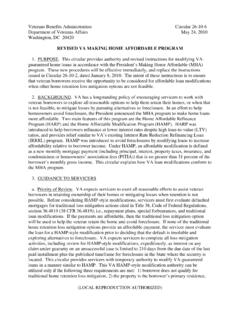
REVISED VA MAKING HOME AFFORDABLE PROGRAM
www.benefits.va.govhome retention loss mitigation options provide an affordable payment, the servicer must evaluate the loan for a HAMP-style modification prior to deciding that the default is insoluble and exploring alternatives to foreclosure.
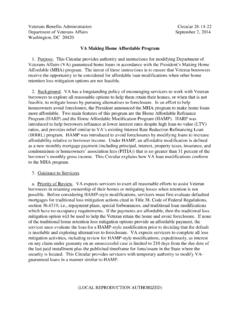
VA Making Home Affordable Program
www.benefits.va.govVA Making Home Affordable Program . 1. Purpose. This Circular provides authority and instructions for modifying Department of Veterans Affairs (VA) guaranteed home loans in accordance with the President’s Making Home ... Under HAMP, an affordable modification is defined as a new monthly mortgage payment (including principal, interest ...
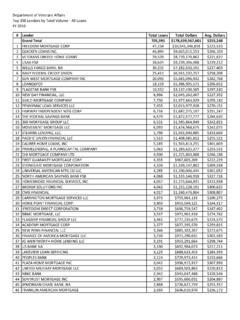
# Lender Total Loans Total Dollars Avg. Dollars Grand ...
www.benefits.va.gov107 first community mortgage inc 1,135 $247,838,759 $218,360 108 PROSPERITY HOME MORTGAGE LLC 1,130 $375,687,204 $332,467 109 VILLAGE CAPITAL & INVESTMENTS LLC 1,122 $180,256,542 $160,656

ANNUAL BENEFITS REPORT
www.benefits.va.govThe Annual Benefits Report (ABR) clearly summarizes the benefit programs delivered by VBA, identifies the current level of program participation by eligible persons, and profiles the beneficiaries.
Related documents
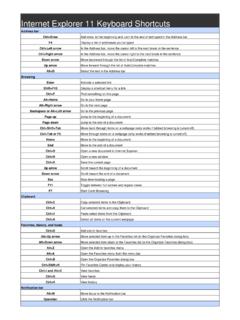
Internet Explorer 11 Keyboard Shortcuts
shortcutmania.comInternet Explorer 11 Keyboard Shortcuts Address bar Ctrl+Enter Add www. to the beginning and .com to the end of text typed in the Address bar F4 Display a list of addresses you've typed Ctrl+Left arrow In the Address bar, move the cursor left to the next break in the sentence

INTERNET SHORTCUTS AND PINNED SITE SHORTCUTS IN …
www.aztcs.org"INTERNET EXPLORER 9" AND "INTERNET EXPLORER 10" IN "WINDOWS.." High-level Executive Summary: In "Internet Explorer 9" and "Internet Explorer 10", you now can make both a .WEBSITE "Pinned Site Shortcuts" and .URL "Internet Shortcuts". By default, when you drag a Favicon, a hyperlink, or a tab from "Internet Explorer 9", you

Epic Keyboard Shortcuts - University of Virginia
hit.healthsystem.virginia.eduEpic Keyboard Shortcuts Use these keyboard shortcuts to navigate through Epic to complete daily documentation and chart review. Any time you see a word with a letter underlined you can use the ALT+ the underlined letter to select that button or open an activity. For example, from the Patient Lists workspace, when a My List folder is selected,
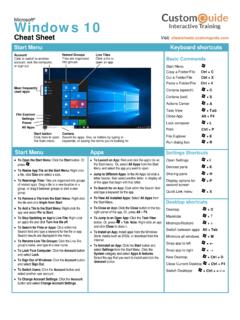
Start Menu Keyboard shortcuts - University of Florida
it.ufsa.ufl.eduFile Explorer + E . Run dialog box + R . Settings Shortcuts . Open Settings + I . Devices pane + K . Sharing pane • + H . Display options for• + P. second screenof related apps. Drag a tile to a new location in a . Quick Link menu + X . Desktop shortcuts . Desktop + D. Maximize + ↑ Minimize/Restore + ↓ Switch between apps . Alt + Tab

EchoLink User’s Guide
secure.echolink.orgEchoLink User's Guide settings. Unless you have a specific reason to begin with different settings, choose the "Import these settings" option.
FRO Online Guide
www.froonline.mcss.gov.on.caUsing Internet Explorer with JAWS When using Internet Explorer and the JAWS screen reader to access FRO Online, there are a few different key combinations to use when navigating with a keyboard. For navigation between the screen tabs and view tabs, you need to first press JAWS Key +Alt + M followed by JAWS Key + Alt + Arrow Keys ( or →).

X56 HOTAS - Logitech
www.logitech.com7 English Windows® 7 1. Click on the ‘Windows’ icon from the system tray. Hover over the All Programs menu. Click the ‘Games’ folder and then the ‘Games Explorer’ icon 2. Click the ‘Tools’ option (with downward facing arrow) from the list across the top of the window. From the dropdown list, click ‘Input Devices’ 3. From the Game Controllers window, you should see the …
X56 HOTAS - Logitech
www.logitech.comEnglish 7 Windows® 7 1. Click on the ‘Windows’ icon from the system tray. Hover over the All Programs menu. Click the ‘Games’ folder and then the ‘Games Explorer’ icon 2. Click the ‘Tools’ option (with downward facing arrow) from the list across the top of the window. From the dropdown list, click ‘Input Devices’ 3. From the Game Controllers window, you should see the …

UG038 PCS New user guide - NHS Greater Glasgow and Clyde
www.nhsggc.org.uk4.1 EMIS PCS main menu The EMIS PCS main menu is the first screen displayed when you log on to EMIS PCS. When you are logged on, click the Modules button or press F3 at any time to access the main menu. Note: The main menu for your EMIS PCS system may vary slightly from the one shown below: you may have access to more or fewer system modules.