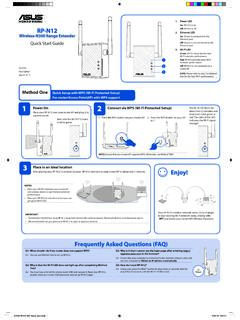
Wireless-N300 Range Extender On Quick Start Guide
Wi-Fi extender performance. Red: RP-N12 provides poor Wi-Fi extender performance. Off: RP-N12 is not connected to a router/AP. Quick Setup with WPS (Wi-Fi Protected Setup) For router/Access Point(AP) with WPS support Power On Place your RP-N12 near your router/AP and plug it to a power outlet. Wait until the Wi-Fi LED starts to blink green.
Download Wireless-N300 Range Extender On Quick Start Guide

Information
Domain:
Source:
Link to this page:
Documents from same domain

RT-AC66U - Asus
dlcdnet.asus.comRT-AC66U Dual Band 3x3 802.11AC Gigabit Router User Guide

Cerberus - Asus
dlcdnet.asus.comCable type/ cable length 2m braided cable Key cap material ABS Media keys Media keys for volume control, play/pause, previous track, and next track Macro keys 12 Macro keys (F1~F12) with macro enable/ disable mode Special feature 1 Windows key lock Dimension 471 x 186 x 41 mm ( LxWxH) Weight 1100 g Operating system Microsoft® Windows® 10/8.1/7/XP
Notebook PC User Manual - Asus
dlcdnet.asus.comCharge Your Batteries If you intend to use battery power, be sure to fully charge your battery pack and any optional battery packs before going on long trips. Remember that the power adapter charges the battery pack as long as it is plugged into the computer and an AC power source. Be

Z170 PRO GAMING - Asus
dlcdnet.asus.com- 1 x SATA Express port (gray, compatible with 2 x SATA 6.0 Gb/s ports) - 1 x M.2 Socket 3 with M Key, type 2242/2260/2280/22110 storage devices support (both SATA & PCIE 3.0 x4 mode)* - 4 x SATA 6.0 Gb/s ports (gray) - Supports Intel® Smart Response Technology** * When the M.2 Socket 3 is operating in SATA mode, SATA port 1 will be disabled.
RT-AC1900 Dual Band
dlcdnet.asus.comcordless phones, transformers, heavy-duty motors, fluorescent lights, microwave ovens, refrigerators, and other industrial equipment to prevent signal interference or loss. • Always update to the latest firmware. Visit the ASUS website at
Wireless-AC5300 Tri-band Gigabit Router - Asus
dlcdnet.asus.comRT-AC5300 has a WPS (Wi-Fi Protected Setup) button for you to connect your wireless client to RT-AC5300’s network without entering password. To connect to the wireless network through WPS: 1. Press the WPS button at the left side of RT-AC5300. Refer to the section A quick look for the location of the WPS button). 2.
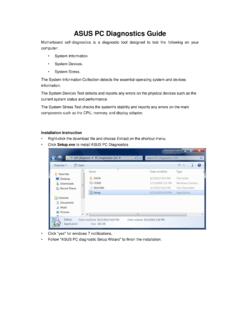
ASUS PC Diagnostics Guide
dlcdnet.asus.comresources, Driver version, TCP/IP settings, and Current network status. Motherboard information This information includes such as Manufacturer, Model, BIOS version, BIOS release date, Onboard ports, and Onboard slots. Display Adapter information This information includes such as Manufacturer, Model, Video memory size, VBIOS
P8Z77-M - Asus
dlcdnet.asus.comYou may obtain the complete corresponding source code (as defined in the GPL) for the GPL Software, and/or the complete corresponding source code of the LGPL Software (with the complete machine-readable “work that uses the Library”) for a period of three years after our last shipment of the product

Z170-A - Asus
dlcdnet.asus.comvi このマニュアルの表記について 本書には、製品を安全にお使いいただき、お客様や他の人々への危害や財産への損害を ...

RT-N12 Series - Asus
dlcdnet.asus.com3 Network configuration using the web GUI 22 ... • Place the wireless router at the center of your network for maximum wireless coverage. ... • Web browser such as Microsoft Internet Explorer, Mozilla Firefox, Apple Safari, or Google Chrome NOTE:
Related documents

User Guide AC1200 Max Wi-Fi Range Extender
downloads.linksys.comSep 01, 2016 · b) Click the Wi-Fi Protected Setup button on the extender’s Wi-Fi Protected Setup screen, OR press and hold the Wi-Fi Protected Setup button on the back of the extender for one second. When the connection is complete, the Wi-Fi Protected Setup light on the extender will be solid for 10 seconds.
AC1900 Wi-Fi Range Extender - Linksys
downloads.linksys.comSep 06, 2016 · Wireless range extenders repeat existing Wi-Fi signals. Wired range extenders (access points) create new Wi -Fi hotspots when connected to a router or access point with an Ethernet cable. Both scenarios require a router with a working Internet connection. Before starting setup, decide whether you want to use your RE7000 as a wireless range extender

RE210 AC750 Wi-Fi Range Extender - TP-Link
static.tp-link.comAC750 Wi -Fi Range Extender. Model No.: RE210 . Trademark: TP-LINK . We declare under our own responsibility that the above products satisfy all the technical regulations applicable to the product within the scope of Council Directives:

TL-WPA4220 AV600 Powerline Wi-Fi Extender
static.tp-link.comCongratulations on your purchase of this outstanding AV600 Powerline Wi-Fi Extender. This device is not only a 600Mbps powerline Ethernet adapter which transforms your house’s existing electrical wiring into a ubiquitous networking infrastructure, but also a 300Mbps Wi-Fi Access Point which creates a
AT&T Smart Wi-Fi Extender
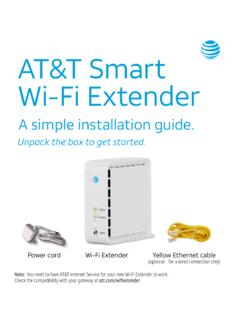
www.att.comWi-Fi . Extender closer to the . Wi-Fi Gateway. Solid red light. Bad location. Flashing red light. Out of range. If you’re having trouble pairing your Extender with your . gateway, you can use the included Ethernet cable to connect . your extender to your gateway and pair them manually. If you still have an issue, check your AT&T Internet ...

Setting up your Smart Wi-Fi Extender - AT&T Official Site
www.att.comSetting up your Smart Wi-Fi Extender Choose 1 of 4 simple setup options 1 Connect with AT&T’s Smart Home Manager app 2 Connect with seamless pairing ... Wi-Fi signal is out of range. Light will flash . up to 5 minutes while connecting Check all cables and cords.
N300 DUAL-BAND Wi-Fi RANGE EXTENDER User Manual
www.belkin.comsolid blue: The Range Extender is connected to the Wi-Fi® network. solid amber: The Range Extender is connected to the Wi-Fi network but is experiencing a weak signal. The weak signal may be either the 2.4GHz or 5GHz band. A weak signal may lead to performance problems. Consider moving the Range Extender closer to the wireless router. blinking ...

Universal WiFi Range Extender WN3000RP Installation Guide
www.downloads.netgear.comOption 1: Connecting with WPS (Wi-Fi Protected Setup) WPS lets you easily join a secure Wi-Fi network without typing the network name and password. The WPS button is a physical button on the Wi-Fi router, gateway, or access point.