
Word 2019 Intermediate Quick Reference - CustomGuide
Quick Reference Guide Elements of a Table Insert a Table: Click the Insert tab, click the Table button, and select the number of rows and columns that you want. Add a Row or Column: Click in a cell next to where you want to add a row or column. Click the Table Tools Layout tab, then click Insert Above , Insert Below , Insert Left , or Insert Right
Download Word 2019 Intermediate Quick Reference - CustomGuide

Information
Domain:
Source:
Link to this page:
Documents from same domain

Microsoft PowerPoint 2013 - CustomGuide
www.customguide.comMicrosoft® PowerPoint 2013 Quick Reference Card The PowerPoint 2013 Screen Keyboard Shortcuts The Fundamentals To Create a New Presentation: Click the File tab, click New.

Word 2013 Quick Reference - SharePoint Training
www.customguide.comMicrosoftWord 2013 ® Quick Reference Card The Word 2013 Screen Keyboard Shortcuts General Open a Document Ctrl + O Create New Ctrl + N …

Quick Reference Card Visit: qr.customguide
www.customguide.comMicrosoftWord 2016 ® Quick Reference Card The Word 2016 Screen Keyboard Shortcuts General Open a Document Ctrl + O Create New Ctrl + N …

Windows 10 Quick Reference - CustomGuide
www.customguide.comMicrosoft® Windows 10 Quick Reference Card Start Menu Keyboard shortcuts Basic Commands Start Menu Copy a Folder/File Ctrl + C Cut a Folder/File Ctrl + X

Your Organization’s Name Here - SharePoint Training
www.customguide.com©CustomGuide 2015 3 Table of Contents Table of Contents ..... 3

Project 2013 Quick Reference - CustomGuide
www.customguide.comMicrosoft® Project 2013 Quick Reference Card Project 2013 Screen Common Views To Display a View: Select the View tab and choose from the Task Views available.

Windows 8 Quick Reference - CustomGuide
www.customguide.comicrosof inos uic eference Car For Personal Use Only ustomuide Contact Us at info@customguide.com for organizational use. Free Quick References! Visit: qr.customguide.com The Start Screen

Word 2007 Quick Reference - SharePoint Training
www.customguide.comMicrosoft® Word 2007 Quick Reference Card Word 2007 Screen [Grab your reader’s attention with a great quote from the Shortcuts The Fundamentals Open a Document …

uic eference Car Free Quick References! - …
www.customguide.comicrosof nc uic eference Car For Personal Use Only ustomuide Contact Us at info@customguide.com for organizational use. Free Quick References! Visit: qr.customguide.com The Lync 2013 Window

Excel 2013 Quick Reference - CustomGuide
www.customguide.comMicrosoftExcel 2013 ® Quick Reference Card The Excel 2013 Screen Keyboard Shortcuts Close button General Open a Workbook Ctrl + O Create New Ctrl + N
Related documents
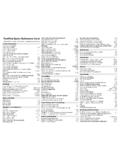
TextPad Quick Reference Card - John Bokma
johnbokma.comInvoke the document selector F11 Scrolling and Scroll Bars Scroll the view up one line, without moving the cursor c-↓ Scroll the view down one line, without moving the cursor c-↑ Locks cursor position when scrolling with page up/down keys Scroll Lock Display/hide the horizontal scroll bar c-Q-H Display/hide the vertical scroll bar c-Q-V

Qualys API Quick Reference
www.qualys.comWeb Application .....45 Authentication .....46

RS485 Quick Guide - Analog Devices
www.analog.comRS485 Quick Guide RS485 conveys data differentially over a terminated twisted pair, permitting up to 10Mbps data rates. The standard specifies electrical characteristics of a driver and receiver, and does not specify any data protocol or connectors. RS485 is popular for inexpensive local

C-172 CESSNA SKYHAWK Quick Reference Normal …
www.bergstromaircraft.comC-172 CESSNA SKYHAWK Quick Reference Normal Operating Checklist For use only with an approved Cessna checklist REMEMBER TO CLOSE YOUR VFR FLIGHT PLAN !

Quick Reference E4OD/4R100 - .NET Framework
atracom.blob.core.windows.netIDENTIFICATION TAG LINE PRESSURE TAP Gear ODs 2 Line Pressure - kPa Idle psi 50- 65 70- 100 50- 65 70- 100 Line Pressure - kPa 1689- 1998 -1276

Free Gmail Quick Reference - CustomGuide
www.customguide.comQuick Reference Guide The Gmail Inbox View Your Email Open an Email: Click an email in the inbox. Return to the Inbox: While viewing an email, click the Back to Inbox button on the toolbar. Open an Email in a Separate Window: Click an email in the inbox to open it, then click the In new window button. Toggle Read Status: While hovering your mouse
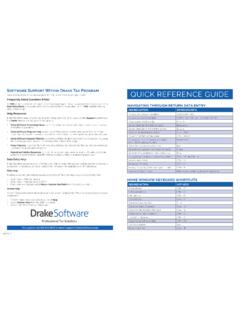
QUICK REFERENCE GUIDE - Drake Software
www.drakesoftware.comData Entry Menu or by typing FAQ into the selector field and pressing ENTER. FAQ content varies by state and package. Help Resources Drake Tax offers many ways for you to get the help you need. When you click the Support button from the …

Quick Reference Guide - Drake Software
www.drakesoftware.comQUICK REFERENCE GUIDE navigating through return data entry DESIRED ACTION KEYBOARD KEYS Move cursor forward one field Tab, Enter, or Down Arrow ... Data Entry Menu or by typing FAQ into the selector field and pressing ENTER. FAQ content varies by state and package. Help Resources. Drake Tax offers many ways for you to get the help you need ...