Example: bankruptcy
How to update your application online
the bottom of each screen to get there. STEP 7 . SAVE & CONTINUE EDIT REMOVE . Change your answers, as needed, by selecting Edit or Remove, or by using the drop-downs. Verify your changes show correctly. Then, select Save & Continue. STEP 8 . SUBMIT APPLICATION . Once you’ve gone through your entire application and reported your changes, select
Tags:
Information
Domain:
Source:
Link to this page:
Documents from same domain
How to find your - HealthCare.gov
www.healthcare.govthe screen. Click Open. • Safari users: When the pop-up appears, select Open With, and then OK. Save the file to your . computer: • Chrome users: Click the download icon at the top right (it looks like a downward facing arrow). Locate where you want to save it on your computer, and click Save. • Safari users: Click File in

Appeal Request Form - Individual A - HealthCare.gov
www.healthcare.govTo request appeal forms and notices in an alternate format like braille, large print, data CD, audio CD, or to request a qualified reader, you can call the Marketplace Appeals Center at 1-855-231-1751.

SHOP Employer Eligibility Appeal Request
www.healthcare.govTo request appeal forms and notices in an alternate format like Braille, large print, data CD, audio CD, or to request a qualified reader, you can call the Marketplace Appeals Center at 1-855-231-1751.

Employer Coverage Tool - healthcare.gov
www.healthcare.govTell us about the health coverage offered by this employer. 14. Does the employer offer a health plan that meets the minimum value standard *? YES (Go to question 15.)

9 Permanent Resident Green Card I-551 - HealthCare.gov
www.healthcare.gov9 permanent resident green card i-551 alien registration number. card number (may be located on the back) card number (may be located on the front)
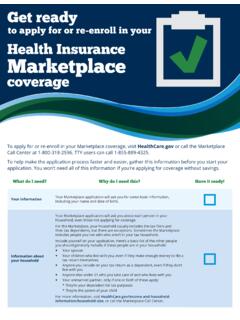
to apply for or re-enroll in your Health Insurance Marketplace
www.healthcare.govTo apply for or re-enroll in your Marketplace coverage, visit HealthCare.gov or call the Marketplace Call Center at 1-800-318-2596. TTY users can call 1-855-889-4325. To help make the application process faster and easier, gather this information before you start your

Marketplace Appeal Request A Form - HealthCare.gov
www.healthcare.govMarketplace Appeal Request A Form (06/2019) Questions? Call the Marketplace Appeals Center at . 1-855-231-1751. Monday-Friday from 7 a.m. - 8:30 p.m. Eastern Time (TTY 1-855-739-2231) Page 1 of 6. Marketplace Appeal Request Form • Include any documents you have to help your appeal (Step 4). • Have all tax filers on the application sign the ...

Qualified Small Employer Health Reimbursement …
www.healthcare.govyou (and any household members who are also provided the QSEHRA) aren’t eligible for a premium tax credit to lower the cost of Marketplace coverage for you and your household members. You’ll use your employer’s QSEHRA to help pay your premiums. If you’re starting your Marketplace application and don’t want to see if you

NATURALIZATION CERTIFICATE NUMBER ALIEN …
www.healthcare.govNUMBER. ALIEN REGISTRATION NUMBER. 735 8320 No. 12 345 678 . Title: 13 Certificate of Naturalization Author: CMS Created Date: 4/8/2014 12:26:53 PM ...

How to upload documents - HealthCare.gov
www.healthcare.govHow to upload documents to confirm your income or other information Before you start Make sure the documents you’re going to upload are located on your computer. Be sure they follow. Find out which documents you can submit.
Related documents

General Login System (GLS) Instructions
eweb.sba.govInstructions 1 . 1. Overview 3 2. SBA Account Login 4 3. Request User ID 5 4. GLS Sign In 6 5. Update Password 7 6. Welcome Screen 8 7. Update Profile 9 8. Request Application Access 12 9. E8(a), HUBZone, and WOSB Access 14 10. Application Access Approval Process 15 11. Application Access 16 Table of Contents ...

Operating Instructions (Remote Panel Operation) The ...
support.ricoh.comOperating Instructions (Remote Panel Operation) Introduction The administrator can use from a browser “Remote Panel Operation” to monitor or operate the device remotely within the administrator’s network. ... When the screen is released from being hidden, it is displayed again.
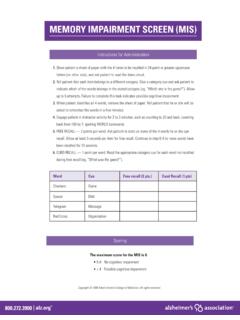
Memory Impairment Screen (MIS)
www.alz.orgMEMORY IMPAIRMENT SCREEN (MIS) Instructions for Administration Word Cue Free recall (2 pts.) Cued Recall (1 pts) Checkers Game Saucer Dish Telegram Message Red Cross Organization Scoring The maximum score for the MIS is 8. • 5-8 No cognitive impairment • ≤ 4 Possible cognitive impairment

Citrix Access Gateway (MD Portal) Remote Set-Up Instructions
home.smh.comRemote Set-Up Instructions First go to SMH.com typing into your address Bar ... You should now see the Citrix Access Gateway login screen Enter your login credentials given to you (usually last name, first initial for your login name) please call 941-917-6107 for help .
Samsung Galaxy A32 5G User Manual - Sprint
www.sprint.comA touch screen responds best to a light touch from the pad of your finger or a capacitive stylus. Using excessive force or a metallic object on the touch screen may damage the surface of the screen and the damage will not be covered by the warranty.
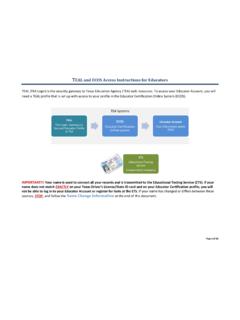
TEAL and ECOS Access Instructions for Educators
secure.sbec.state.tx.usTEAL and ECOS Access Instructions for Educators Page 1 of 18 . TEAL (TEA Login) is the security gateway to Texas Education Agency (TEA) web resources. To access your Educator Account, you will need a TEAL profile that is set up with access to your profile in the Educator Certification Online System (ECOS).

Go to https://ipay.adp.com/iPay/login.jsf select Register Now
www.ccsiinc.comthis step, be sure to make note of your USER ID which will be provided to you on the screen. At Step 5, you will need to enter contact information – PLEASE USE A PERSONAL EMAIL ADDRESS, NOT A WORK EMAIL. This is used to retrieve pay statements and W-2s, so in the event your assignment has ended, you need to

Create a Pearson VUE Account / Testing Profile
www.pearsonvue.comFeb 26, 2015 · Last updated: February 26, 2015 Page 2 of 11 3. Once you have agreed, please begin to create your profile by entering the information as shown below. Choose the “Next” button once all information has been entered.
NIH and Other PHS Agency Research Performance Progress ...
grants.nih.govNIH RPPR Instruction Guide 2 May 22, 2017 NIH and Other PHS Agency Research Performance Progress . Report (RPPR) Instructional Guide . May 22, 2017 . Note: The forms used in the RPPR system have been approved by OMB through March 2020 and the

Move Your OneNote Notebooks to Your OneDrive Cloud …
www.uwsp.eduMethod 1: Move OneNote Notebook Sections to a New Cloud Notebook Use these steps to move selected Section tabs from your original Notebook to a Notebook in your OneDrive Sync Client. Moving individual Sections allows you to separate them into different Notebooks or aggregate Sections from multiple