Transcription of INTRODUCING SCOUT GPS LINK - Toyota
1 1 INTRODUCING SCOUT GPS LINKWith the new SCOUT GPS Link1 app, you can get cell phone-driven navigation, voice-activated search and more delivered right to your vehicle s multimedia display. Available exclusively on model year 2016 Toyota vehicles equipped with Entune Audio Plus, SCOUT GPS Link provides you with directions, traffic-based commute information and hands-free voice command capabilities. It keeps track of where you ve driven and lets you save your favorite destinations. Easy-to-read with automatic day and night modes, SCOUT GPS Link connects your car to your smartphone and to the who purchase a 2016 Toyota with Entune Audio Plus can download the SCOUT GPS Link app from the Apple app store or Google the app is installed on your phone, connect it via Bluetooth to your vehicle s multimedia system. Entune will prompt you to install SCOUT GPS Link on the note that SCOUT GPS Link utilizes your cell phone data See the next page for detailed instructions on how to get the SCOUT GPS Link app and how to set it up on your Entune Audio Plus TO GET THE APPTurn-by-Turn DirectionsWith SCOUT GPS Link, you can save your favorite destinations and get voice-prompted turn-by-turn ConvenienceSearch, directions and other important on-road functions are easy to access with Entune s steering wheel-activated voice Route to Home & WorkWant to get directions for the quickest way to home or work based on current traffic conditions?
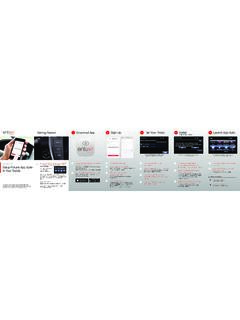
2 With SCOUT GPS Link, all it takes is the push of a Prices Near YouNeed gas, fast? Search for the closest gas stations in SCOUT s search screen and, where available, view gas prices before you Subscription until 2024No subscription for SCOUT GPS Link will be required until after December 31, FEATURESSCOUT GPS LINKOn-screen turn-by-turn directions via cell phoneConnect your smartphone to your vehicle s Entune system via Bluetooth .If you need help in pairing your smartphone via Bluetooth, follow the instructions on this the SCOUT GPS Link app from the Apple app store (iPhone) or Google Play2 (Android) to your the SCOUT GPS Link app on your initializing the app on your smartphone, the vehicle touch-screen display will prompt you to update your Entune system. Touch Now to begin.(Once the update begins, you can select Download in Background to use other Entune functions)After the update finishes downloading, you will need to install it.
3 Select Install to complete the installation onto your Entune the installation is complete, the SCOUT GPS button will appear on the Apps screen. You re ready to start getting turn-by-turn directions4 from SCOUT GPS access SCOUT GPS Link1 on your Entune system, you will need a compatible iPhone 5 or Android smartphone that is connected to the Entune system via Bluetooth . The SCOUT GPS Link app must be running on your smartphone. This app utilizes your smartphone s data use SCOUT GPS Link on your Entune system, the app needs to be loaded on both your smartphone and the Entune system. Please park your vehicle and follow the directions below to set up SCOUT GPS Link in your TO SET UP SCOUT GPS LINK IN YOUR VEHICLE12 One of these screens or the map screen will appear on your smartphone when the app has been successfully initialized.(To use SCOUT GPS Link on your smartphone or in the vehicle, you must allow the app to access your location.)
4 Create a SCOUT account (optional) or touch Skip to initialize the your smartphone, touch Let s get started! to begin.(If you are already a registered SCOUT user, select I am already a member to sign in and initialize the app.)34567 SCOUT GPS LINKOn-screen turn-by-turn directions via cell phone3 With the introduction of SCOUT GPS Link1, navigation guidance will soon be available on most trim levels of all eighteen 2016 Toyota models as part of an Entune Premium Audio system or linked to the Entune Audio Plus system on model year 2016 vehicles via your AUDIO PLUS WITH SCOUT ENTUNE PREMIUM4 RunnerYESYESC amryYESYESC orollaYESYEST acomaYESYESMODELENTUNE AUDIO PLUS WITH SCOUT ENTUNE PREMIUMT undraYESYESP rius vNOYESS equoiaYESYESBRINGING DIRECTION TO MORE DRIVERS, WITH ENTUNE AND SCOUT 1. SCOUT and Telenav are registered trademarks of Telenav, Inc. 2. Google Play is a registered trademark of Google Inc. 3. Be sure to obey traffic regulations and maintain awareness of road and traffic conditions at all times.
5 Apps/services vary by phone/carrier; functionality depends on many factors. Select apps use large amounts of data; you are responsible for charges. Apps and services subject to change. See for details. 4. Availability & accuracy of the information provided by SCOUT GPS Link is dependent upon many factors. Use common sense when relying on information provided. Services & programming subject to change. Services not available in every city or roadway. 5. iPhone is a registered trademark of Apple, Inc. All rights are two SCOUT apps SCOUT and SCOUT GPS Link. Only SCOUT GPS Link provides turn-by-turn directions4 when synced up with Entune Audio Plus on model year 2016 note that SCOUT GPS Link utilizes your cell phone data THE RIGHT APPSCOUT GPS LINKOn-screen turn-by-turn directions via cell pho