Transcription of LaserJet Enterprise flow MFP M525c - hp.com
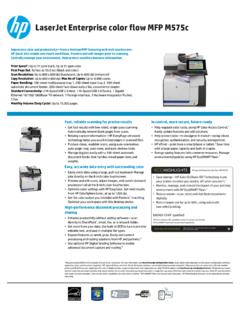
1 LaserJet Enterprise flow MFP M525c Accelerate processes and turn paper documents into dynamic digital files, using advanced workflow tools in a desktop MFP. Versatile scanning, processing, routing, and retrieval tools boost productivity. Simplify management and strengthen security. Print Speed:1 Up to 42 ppm black (letter); Up to 40 ppm black (A4); First page out black: As fast as sec Scan Speed: Up to 600 x 600 dpi (hardware); Scan Type: Flatbed, ADF. Copy Resolution: Up to 600 x 600 dpi (flatbed), 300 x 600 dpi (ADF). Fax Speed: kbps; 3 sec per page (Letter).
2 Paper Handling: 100-sheet multipurpose tray, 500-sheet input tray 2, 100-sheet automatic document feeder, 250-sheet output bin, 100-sheet rear output bin, convenience stapler Standard Connectivity: 2 Hi-Speed USB Host; 1 Hi-Speed USB Device; 1 Gigabit Ethernet 10/100/1000 Base-TX network; 1 Foreign Interface; 1 Hardware Integration Pocket; 2 Internal USB. Host; 1 Fax Monthly Volume (Duty Cycle): Up to 75,000 pages Fast, reliable scanning for precise results In control, more secure, future-ready Get fast results with two-sided, single-pass scanning and Manage printing environments efficiently with HP Web rapid speeds.
3 Automatically remove blank pages. Easily update features and add solutions. Reliably capture information HP EveryPage ultrasonic Help protect data in storage or in transit using robust technology helps you avoid missed pages in scanned files. encryption, authentication, and security management. Produce clean, readable scans, using auto-orientation, HP ePrint print from a smartphone or Save time auto-crop, auto-tone, and auto-deskew tools. with a large paper capacity and built-in stapler. Manage big jobs easily with a 100-sheet automatic Energy-saving features help conserve resources.
4 Manage document feeder that handles mixed paper sizes and environmental policies, using HP EcoSMART weights. Easy, accurate data entry and one-touch controls HP LaserJet Enterprise flow MFP M525c Capture and route documents more reliably. Enter data right at the device, using a large, pull-out keyboard. Save energy HP Auto-On/Auto-Off Technology turns Manage imaging and printing jobs with ease on the your printer on when you need it, off when you don' adjustable, 8-inch HP Easy Select color touchscreen. Monitor, manage, and control the impact of your printing Preview and edit scans, use advanced image cleanup, and environment with HP EcoSMART launch one-touch processes all at the touchscreen.
5 Reduce waste scan, store and distribute documents Optimize your work environment this desktop-size device digitally. fits conveniently in almost any space. Reduce paper use by up to 50%, using automatic High-performance document processing and two-sided printing. sharing ENERGY STAR qualified Enhance productivity without adding software scan 1. HP Auto-On/Auto-Off capabilities subject to printer and settings. directly to SharePoint , email, fax, or a network folder. 2. HP EcoSMART Fleet must be purchased separately. Get more from your data. Use built-in OCR to turn scans into Please recycle your computing hardware and printing supplies.
6 Find out how at our website. editable text, and save in multiple file types. Expand features as needs grow. Easily add content processing and routing solutions from HP and Use optional HP Digital Sending Software to enable advanced document capture and 1. Measured using ISO/IEC 24734, excludes first set of test documents. For more information see Exact speed varies depending on the system configuration, software application, driver, and document complexity. 2HP Capture & Route, and other HP and third-party solutions, not included; please purchase separately.
7 3 Requires an Internet connection to HP web-enabled printer and HP ePrint account registration (for a list of eligible printers, supported documents and image types and other HP ePrint details, see ). Mobile devices require Internet connection and email capability. May require wireless access point. Separately purchased data plans or usage fees may apply. Print times and connection speeds may vary. Some HP LaserJet printers may require firmware upgrades. 4HP EcoSMART Fleet must be purchased separately. 5HP Digital Sending Software not included; please purchase separately.
8 6HP Web Jetadmin is free and can be downloaded at LaserJet Enterprise flow MFP M525c TECHNICAL SPECIFICATIONS AUTO DOCUMENT FEEDER Standard, 100 sheets CAPACITY. FUNCTIONS Print, copy, scan, fax, digital send, easy access USB drive, (optional advanced digital send, wireless). PRINT HANDLING 100-sheet multipurpose tray, 500-sheet input tray 2, 100-sheet automatic document feeder, STANDARD PRINTER HP PCL 6, HP PCL 5c (HP PCL 5c driver available from the Web only), HP Postscript Level 3 emulation, 250-sheet output bin, 100-sheet rear output bin, convenience stapler LANGUAGES native PDF printing (v ).
9 Input Capacity: Up to 600 sheets, Up to 10 envelopes;. PRINT SPEED1 Black (Letter): Up to 42 ppm; Black (A4): Up to 40 ppm; First Page Out Black: As fast as sec Output Capacity: Up to 250 sheets, Up to 10 envelopes PRINT RESOLUTION HP FastRes 1200 (1200 dpi quality), 600 x 600 dpi with HP Resolution Enhancement technology POWER Power Supply Type: Built-in power supply;. (BLACK) Power Consumption3: 780 watts (Printing), 785 watts (Copying), 30 watts (Ready), watts (Sleep), watts (Auto-Off), watts (Off);. PRINT TECHNOLOGY HP ProRes 1200 (1200 x 1200 dpi), HP FastRes 1200 (1200 dpi quality), HP Resolution Enhancement Typical Electricity Consumption (TEC) Number: kWh/Week RESOLUTION technology, 600 x 600 dpi, 300 x300 dpi SOFTWARE INCLUDED Windows Installer, HP PCL 6 discrete driver, Mac Installer, HP Postscript emulation driver PRINT TECHNOLOGY Laser COMPATIBLE OPERATING Microsoft Windows 7, Windows Vista , Windows XP (SP2+), Windows 8, Windows Server 2003.
10 NUMBER OF PRINT 1 (black). SYSTEMS (SP1+), Windows Server 2008 (32 and 64-bit), Windows Server 2008 R2 (64-bit); Mac OS X , CARTRIDGES. ; For the latest operating system support see: Citrix and Windows Terminal Services (. PRINTER SMART HP ePrint, Apple AirPrint , Open Extensibility Platform, FutureSmart Firmware, Instant-on Technology, ); Novell ( ); Linux ( );. SOFTWARE FEATURES HP Auto-On/Auto-Off, print preview, print multiple pages per sheet (2, 4, 6, 9, 16), collation, UNIX ( , , watermarks, store print jobs, job separator ); SAP device types ( , ); HP ePrint Mobile Driver DUTY CYCLE (MONTHLY) Up to 75,000 pages ( ).