Transcription of Quick Reference Install Guide Remote start, 6-pin ...
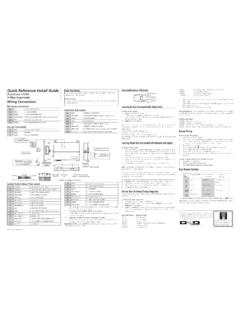
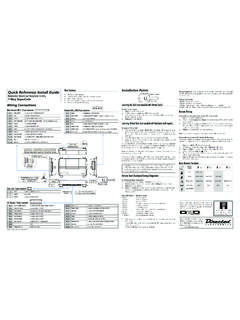
1 2013 Directed. All rights Reference Install GuideRemote start with Keyless EntryModel 4105 Control Button(Valet Switch)Door Lock/unlockHarnessEnd ViewAntennaAntennaLED (Programmingindicator)Parking light jumpersPrimary HarnessRemote start HarnessHeavyGaugeRelayEnd ViewSide ViewSide ViewTop ViewSatellite HarnessD2 DESPW iring ConnectionsMain Harness, 9-pin connector1 LIGHT GREEN BLACK(-) 200mA FACTORY ALARM DISARM2 GREEN/WHITE(-) 200mA FACTORY ALARM REARM3 YELLOW(+) IGNITION OUT (TO ALARM) 4 WHITE/BLUE(-) ACTIVATION INPUT 5 ORANGE(-) 500mA GROUND WHEN LOCKED/ANTI-GRIND OUTPUT6 BROWN(-)
2 200mA HORN OUTPUT7 RED/WHITE(-) 200mA TRUNK RELEASE OUTPUT8 BLACKGROUND9 WHITE(+/-) LIGHT FLASH OUTPUTDoor Lock, 3-pin connector1 BLUE(-) UNLOCK 2 EMPTYNOT USED3 GREEN (-) LOCK Remote start , 6-pin connector1 RED(+) (30A) HIGH CURRENT 12V INPUT2 PINK/WHITEOUTPUT TO SECOND IGNITION/ACCESSORY CIRCUIT3 RED(+) (30A) HIGH CURRENT 12V INPUT 4 ORANGEOUTPUT TO ACCESSORY CIRCUIT5 PURPLEOUTPUT TO STARTER CIRCUIT 6 PINKOUTPUT TO PRIMARY IGNITION CIRCUIT Satellite harness, 4-pin connector1 BLUE(-) 200mA STATUS OUTPUT2 ORANGE(-) 200mA ACCESSORY OUTPUT3 PURPLE(-) 200mA STARTER OUTPUT4 PINK(-) 200mA IGNITION OUTPUTR emote start harness, 5-pin connector1 BLACK/WHITE(-) NEUTRAL SAFETY SWITCH INPUT2 VIOLET/WHITETACHOMETER INPUT WIRE3 BROWN (+) BRAKE SHUTDOWN INPUT WIRE4 GRAY(-) HOOD PIN SWITCH SHUTDOWN WIRE5 BLUE/WHITE(-) 200 mA 2ND STATUS/REAR DEFOGGERI mportant: NEVER connect a 200mA low current output directly to a motor or high current device WITHOUT a PointsTach LearningTo learn the tach signal:1.
3 start the vehicle with the Within 5 seconds, press and hold the Valet After 3 seconds the LED will light constant when the tach signal is Release the Valet : This unit can learn the tachometer with the analog input or through d2d using an interface module. The unit confirms which source is used by flashing the parking lights. When programming tach learning with: Analog, the parking lights flash one time. D2D interface module, the parking lights flash the tachometer input on the system is connected to the vehicle, the d2d tachometer input is TachNote: Virtual tach is not recommended for diesel vehiclesTo program Virtual Tach:1.
4 After the Install is complete, Remote start the car. 2. If the car does not start on the first attempt, let the Remote start attempt Once the car starts, let it run until the parking lights come When the parking lights come on, shut off the Remote start with the Remote - that s it! Virtual Tach is programmed. Virtual Tach handles disengaging the starter motor during Remote starting it does not address over-rev. If the customer wants to have the over-rev protection capabil-ity, the tach wire must be connected. This may involve more installation shop charges than initially : If the Virtual Tach mode over cranks or doesn't crank the vehicle long enough to start and run the car, use the Bitwriter to add or subtract the starter output time.
5 You can adjust the output time in incre-ments of 50msec of the learned time using the Bitwriter. Reset and DeletionIf a feature/virtual tach needs to be reset or the Remote controls need to be deleted, use the following Turn the ignition to the ON position (The heavy gauge pink wire must be con-nected).2. Within 10 seconds, press and release the Valet button: 2 times if you want to delete remotes, 3 times to reset features or 4 times to reset virtual tach. These features are described next. Delete remotes: This feature erases all remotes from the memory of the system. This is useful in cases when a customer s Remote is lost or : This does not reset the programmed features of the system or reset the Virtual Tach setting.
6 Reset Features: This resets all features of the system to the factory default settings. Note: This feature does not delete the remotes from the system or reset the Virtual Tach setting Virtual Tach Reset: Deletes all previously learned values for Virtual Tach, and on the next Remote start sequence the unit begins virtual tach : The Zap feature on the Bitwriter does not reset the Virtual tach Once you have selected the function step, press the Valet button once more and hold it. The LED flashes and the horn honks to confirm the selected func-tional step. Do not release the Valet button4.
7 While holding the Valet button, press the AUX button on the Remote control. The horn honks to confirm that the feature has been successfully reset. Once the feature is reset, the Valet button can be routine exits if any of the following occurs: The ignition is turned off There is no activity for 30 seconds The valet button is pressed too many timesRemote start Shutdown DiagnosticsShutdown diagnostics: If the Remote start activates but fails to stay running, the re-mote start module has the ability to inform you of what may have caused the Remote start failure.
8 Before performing shutdown diagnostics it is important that you let the Remote start shut off on its own let it attempt to start 3 times then shut down, if this is not done the unit will report the shutdown you used to shut off the Remote : Shutdown diagnostics does not report if the vehicles factory immobilizer is causing the perform shutdown diagnostics:1. With the ignition Off, press and hold the Valet Tu r n the ignition On and then back Off while holding the Valet Release the Valet Press and release the Valet button. The LED flashes to report the last shutdown for one minute or until the ignition is turned on, as shown in the following table:LED Flashes Shutdown Mode1 flash Timed out 2 flashes Over-rev shutdown 3 flashes Low or no RPM, low battery (voltage and virtual tach modes)4 flashes Transmitter shutdown (or optional push button)5 flashes (-) Hood Shutdown (5 pin Gray wire) 6 flashes (+) Shutdown (5 pin Brown wire)7 flashes (-) Neutral safety shutdown (5 pin Black/White wire)8 flashes Wait-to- start timed out 2013 Directed.
9 All rights 2013-06 Programming System FeaturesThe System Features Learn Routine dictates how the unit operates. It is possible to access and change most of the feature settings using the Valet button. 1. Tu r n the ignition on, then off. 2. Select a Menu. Press and hold the Valet button. The number of LED flashes and horn honks indicates the menu number. A single LED flash and honk indicates menu 1. Two LED flashes and 2 honks indicates menu 2. 3. When the desired menu LED flashes and honks are heard, release the Valet Select a Feature. Press and release the Valet button the number of times corresponding to the feature you wish to change.
10 Then press and hold one more time to select the feature. The LED flashes and the horn honks to indicate which feature is Program the Feature. While holding the Valet button, you can program the feature using the Remote control. For features with only two options; AUX = option 1 while AUX = option 2. For features with more than two options; AUX selects the options in ascending LED flashes and the horn honks indicating which option is selected. Once a feature is programmed: Other features can be programmed within the same menu Another menu can be selected The learn routine can be exited if programming is completeTo access another feature in the same menu:1.