Example: stock market
TV Connector - Phonak
ook interferentie die ongewenst functioneren kan veroorzaken. Kennisgeving 2: Wijzigingen of aanpassingen die aan dit apparaat worden toegebracht zonder uitdrukkelijke toestemming van Sonova AG, kunnen de FCC-machtiging voor het bedienen van dit apparaat ongeldig maken. Kennisgeving 3: Dit apparaat is getest en voldoet aan de beperkingen
Tags:
Information
Domain:
Source:
Link to this page:
Documents from same domain
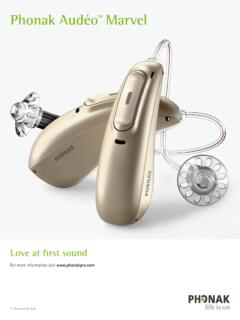
Phonak Audéo TM Marvel
www.phonak.comPhonak Audéo M Bluetooth® versions Direct calls / audio streaming Bluetooth® 4.2 wireless technology and most older Bluetooth phones The Bluetooth® word mark and logos are registered trademarks owned by Bluetooth SIG, Inc.

myPhonak 4
www.phonak.comlow energy (BT-LE) capability and is compatible with iPhone® 5s and newer running iOS® Version 12.0 or newer. myPhonak can be used on Google Mobile Services (GMS) certified Android™ devices supporting Bluetooth® 4.2 and Android OS 7.0 and newer. Contents Quick overview 3 Installing the myPhonak app 5

TV Connector - Phonak
www.phonak.com6 7 2.1 Device description 1 Connect button 2 Indicator light (LED) 3 microUSB power socket 4 Audio socket for optical (Toslink) or analog (3.5mm jack) cable 5 Power button 6 Volume up and down buttons (calibration) 2 4 5 1 6 6 TV Connector 3 Hearing aid Up to 15 meters (50 ft) Line-of-sight between your hearing aids and
Sample IEP Goals and Learning Objectives for GAP
www.phonak.comIEP goals for high school students may include all areas of the content standards (reading, writing, speaking, listening, and language). When getting started, however, the speaking and listening standards are an important place to start. Some sample IEP goals which are aligned to content standards illustrates how this works.

User Guide - Phonak
www.phonak.comc. Start over with step 1 (opposite). Connecting the power supply to the docking station 1. Place the docking station next to your TV / audio device and connect the smaller end of the charging cable to the power input of the docking station . 2. Plug the larger end of the charging cable into the universal power supply. 3.

Phonak AudéoTM B-R
www.phonak.com2 3 Your hearing aid & charger details Hearing aid model Earpieces c Audéo B90-R c Dome c Audéo B70-R c SlimTip c Audéo B50-R c cShell Charging accessories c Charger Case RIC incl. power supply c Power Pack c Mini Charger RIC incl. power supply If no box is checked and you do not know the model of your hearing aid or charging accessories,

Roger OnTM - Find the best hearing aid solution | Phonak
www.phonak.com10.1 Connect to a hearing aid or Roger receiver 36 10.2 Connect another microphone 39 10.3 Disconnecting Roger devices 41 11. Using in a large group 42 11.1 Using multiple microphones 43 12. Reset 44 13. Shipping mode 45 14. Care and maintenance 46 15. roubleshootingT 48 16. Compliance information 52 17. Information and explanation of symbols ...

Gebrauchsanleitung TV Connector - Phonak
www.phonak.com2 Inhalt 1. Willkommen 4 2. Lernen Sie Ihren TV Connector kennen 5 3. Erste Schritte 8 3.1 Vorbereiten des Netzteils 8 3.2 Unterstützte Audioanschlüsse 10 3.3 Anschließen von Audiogeräten 11 3.4 Optional: Anschließen von Audiogeräten mithilfe der optischen Buchse 12 3.5 Verbinden des TV Connector mit den Hörgeräten 13 4.

Phonak Audéo TM P
www.phonak.comlithium-ion battery. The Power Pack contains a built-in and non-removable rechargeable lithium-polymer battery. Please also read safety information regarding handling rechargeable hearing aids (chapter 23). * Incl. power supply and USB cable (< 3 m)

User Guide TV Connector - Phonak
www.phonak.comUser Guide TV Connector. 2 Contents 1. Welcome 4 2. Getting to know your TV Connector 5 3. Getting started 8 3.1 Setting up the power supply 8 3.2 Supported audio connections 10 3.3 Connecting to an audio device 11 3.4 Optional: Connecting to …
Related documents

De Functiemogelijkhedenlijst (FML)
www.whiplash-info.nlfunctioneren, in staat te stellen om in arbeid te functioneren. 0 nee, er gelden geen specifieke voorwaarden voor het sociaal functioneren in arbeid 1 ja, de cliënt is aangewezen op werk waarin meestal weinig of geen rechtstreeks ~ contact met klanten vereist is (sommige beroepen in de dienstverlening)
MATRIX SECUNDAIR ONDERWIJS 2e GRAAD
onderwijs.vlaanderen.bemaatschappelijk functioneren en participeren in een omgeving waar ondersteuning is voorzien én op tewerkstelling in een omgeving waar ondersteuning is voorzien. STEM Technologische wetenschappen en engineering Bouw-en hout wetenschappen Informatie- en communicatietechnologie Mechatronica
LEERPLAN BASISONDERWIJS - GO
pro.g-o.beZelfconcept en sociaal functioneren 15 Gezonde en veilige levensstijl 18 4.2. Bewegingsdoelen (motorische competenties) 21 KLUS(CE) 21 Oplossen van bewegingsproblemen 22 Psychomotoriek 23 Klein-motorische vaardigheden 26 Groot-motorische vaardigheden 26 5. Minimale materiële vereisten 39 5.1. Bewegingsruimten 39 5.2. Bewegingsmateriaal 39 6.

HET ERNSTIG ZIEKE KIND - ALSG
www.alsg.orgNeurologisch functioneren Bewustzijnsniveau Een snelle beoordeling van het bewustzijnsniveau van een patiënt kan gebeuren door hem in te delen in een van de volgende categorieën: 7:8

Toekomstbestendige beroepen in de verpleging en verzorging
www.venvn.nlfunctioneren kritisch. Je maakt dit bespreekbaar en bent je bewust van je eigen morele en ethische waarden en gaat daar professioneel mee om. 5 Maatschappelijk handelen • Je kunt met kennis van epidemiologie, preventie en gezondheidsvoorlichting interventies uitvoeren op het vlak van individuele en collectieve preventie en ...