Example: biology
User Manual - Electronics & Appliances: Tablets ...
BN46-00098M-01 User Manual ME65B ME75B This product is designed to be used in South Korea only, and the quality cannot be guaranteed in other countries.
Information
Domain:
Source:
Link to this page:
Documents from same domain

Global Network - samsung.com
www.samsung.comCzech Samsung Electronics Czech (SECZ), Praha Tel: 420-225-020-710 Latvia Samsung Electronics Baltics (SEB), Riga Tel: 371-6750-8500 MIDDLE EAST & AFRICA

White Paper Samsung V-NAND technology
www.samsung.comSamsung V-NAND technology Yield more capacity, performance, endurance and power efficiency White Paper
PRODUCT SELECTION GUIDE - samsung.com
www.samsung.comDDR4 4Gb (D die) based 0 = IDT 2 = Montage PB = DDR4-2133(15-15-15) 5 = IDT 4 = Montage RC = DDR4-2400(17-17-17)

Windows 8.1 Update Step-by-Step Guide - Samsung
www.samsung.com– Your current Windows settings, personal files, and some applications will be kept. – Make sure to back up important data to an external hard drive prior to the update.

Electric Range - samsung.com
www.samsung.comfeatures of your new range Enhanced convenience. Better cooking. Easy maintenance. Your new electric range has been designed to bring you these benefits and more.

imagine a versatile laser MFP ready for any …
www.samsung.comimagine smart scanner Samsung’s Scan to E-mail solution is a powerful productivity tool for any small to medium sized enterprise or workgroup within a larger
Samsung SSD 840 PRO Series. datasheet
www.samsung.com- 5 - MZ-7PD128 datasheet MZ-7PD512 840 PRO Series Rev. 1.0 MZ-7PD256 1.0 General Description The Samsung SSD 840 PRO is a high-performance SSD (Solid State Drive) designed for power users.
Samsung Multifunction Printer's Practical Use Guide
www.samsung.com3 P rint Watermark printing • Add a watermark to your document. Samsung Anyweb Print • Print only the areas that you have selected on your web
SAMSUNG'S GUIDE TO DLNA
www.samsung.comHere’s how to set up your Samsung 7-series plasma or 7-, 8-, or 9-series LCD HDTV to operate on a home media network or connect to a networked PC.
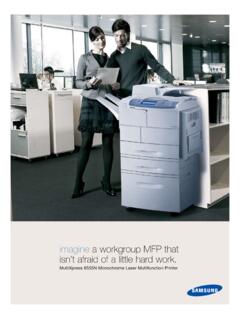
imagine a workgroup MFP that isn’t afraid of a little …
www.samsung.comMultiXpress 6555N Monochrome Laser Multifunction Printer imagine a workgroup MFP that isn’t afraid of a little hard work.
Related documents

Ambassador Auctioneers A u c t i o n C a t a l o g u …
ambassadorauctions.co.zalot item description qty vat auction price notes 240 sansui 49" led tv 1 241 sansui 42" plasma tv 1 242 samsung 46" led tv 1 243 hi sense 43" led tv 1 244 p-vision 40" led tv 1 245 lg 32" lcd tv 1 246 sinotec 32" led tv 1 247 samsung 32" led tv 1 248 lg 32" lcd tv 1 249 lg 42" plasma tv 1 250 lg 42" lcd tv 1 251 lg 42" lcd tv 1 252 lg 60" plasma tv 1 253 samsung 32" led tv …

E-MANUAL - SAMSUNG PRODUCT SUPPORT …
support-us.samsung.comPicture Options Basic Sound Settings 97 Changing the Sound Mode 98 Adjusting the Sound Settings 98 Auto Volume 98 TV Installation Type 98 Resetting the Sound

Smart TV e lettori Blu-Ray Samsung abilitati a …
www.mediasetpremium.itue22k5400akxzt ue55ku6470uxzt ue32k5500akxzt ue43ku6500uxzt ue40k5500akxzt ue49ku6500uxzt ue49k5500akxzt ue55ku6500uxzt ue55k5500akxzt ue65ku6500uxzt
TV connection guide - Optimum
www.optimum.netSamsung Model (Cont.) 3 4 5 • Plug the power cord from the AC power input on the digital cable box into the wall outlet or surge protector. The blue light on the front of the box will indicate the power is on. Press the power button in the lower left corner of

www.hificorp.co.za
www.hificorp.co.zasino-tec 32" led tv sn_ sinÖtec led tv while 3799 television stocks 2699 39" led w 39" led tv sinotec ss" uhd tv 55" ss" smart led tv sav 3999

OOOOoooaA? - Jumbo Remote Control, The Jumbo …
www.jumboremotecontrol.comSLEEP SETTING: This feature will automatically turn off your TV after the set specified time. 1. Press and hold SLEEP button for 3 seconds until the LED light turns to solid on.
Start - URC Support
www.urcsupport.comThis equipment has been tested and found to comply with the limits for a Class B digital device, pursuant to part 15 of the FCC rules. These limits are designed to provide