
Contents
Thank you for purchasing the MSI® H510M PRO/ H510M-A PRO/H510M BOMBER/ B560M PRO-E/ B560M PLUS/ B560M-X motherboard. This User Guide gives information about board layout, component overview, BIOS setup and software installation.
Download Contents

Information
Domain:
Source:
Link to this page:
Documents from same domain
Optix Series - download.msi.com
download.msi.com3 Stand Base with Screw 4 Wall Mount Screws x 4 5 Stand Screws x 4 6 VESA Cover 7 Power Cord ... 15 Camera Cradle with Rotatable Ball Head * Contact your place of purchase or local distributor if any of the items is damaged or ... It doesn’t support data transmition function. 5 USB3.1 Gen1 Type B Upstream Port For USB Upstream Cable.
Optix Series - download.msi.com
download.msi.com(2014/35/EU), ErP Directive (2009/125/EC) and RoHS directive (2011/65/ EU) This product has been tested and found to comply with the harmonized standards for Information Technology Equipment published under Directives of Official Journal of
Optix Series - download.msi.com
download.msi.comto Electromagnetic Compatibility (2014/30/EU), Low-voltage Directive (2014/35/EU), ErP Directive (2009/125/EC) and RoHS directive (2011/65/ EU) This product has been tested and found to comply with the harmonized standards for Information Technology Equipment published under Directives of Official Journal of the European Union

Quick Start - download.msi.com
download.msi.comAudio y Realtek® ALC892 Codec 7.1-Channel High Definition Audio Back Panel Connectors y 1x PS/2 keyboard/ mouse combo port y 2x USB 2.0 Type-A ports y 1x VGA port y 1x DVI-D port y 1x DisplayPort y 1x USB 3.1 Gen2 Type-A port y 1x USB 3.1 Gen2 Type-C port y 1x LAN (RJ45) port y 2x USB 3.1 Gen1 Type-A ports y 6x audio jacks Continued on next page
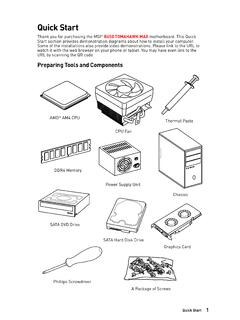
Quick Start - download.msi.com
download.msi.comInternal Connectors y 1x 24-pin ATX main power connector y 1x 8-pin ATX 12V power connector y 6x SATA 6Gb/s connectors y 2x USB 2.0 connectors (support additional 4 USB 2.0 ports) y 1x USB 3.2 Gen1 connectors (support additional 2 USB 3.2 Gen1 ports) y 1x 4-pin CPU fan connector y 1x 4-pin water-pump-fan connector y 4x 4-pin system fan connectors

Contents
download.msi.com4x USB 3.2 Gen 1 5Gbps Type-A ports on the back panel Internal Connectors ∙ 1x 24-pin ATX main power connector ∙ 1x 4-pin ATX 12V power connector ∙ 4x SATA 6Gb/s connectors ∙ 1x M.2 slots (M-Key) ∙ 1x USB 3.2 Gen 1 5Gbps connector (supports additional 2 …

Inleiding - download.msi.com
download.msi.comInleiding 4 5 1. Webcam/ Webcam-LED/ interne microfoon • Deze ingebouwde webcam kan worden gebruikt voor beeld, video-opname, conferencing, enz. • De webcam-LED indicator die zich naast de webcam bevindt, licht op wanneer de webcamfunctie wordt geactiveerd en de LED gaat uit als deze functie wordt uitgeschakeld.

Quick Start - download.msi.com
download.msi.comBIOS Features ∙ 1x 256 Mb flash ∙ UEFI AMI BIOS ∙ ACPI 6.0, SMBIOS 2.8 ∙ Multi-language Software ∙ Drivers ∙ DRAGON CENTER ∙ MSI APP Player (BlueStacks) ∙ Open Broadcaster Software (OBS) ∙ CPU-Z MSI GAMING ∙ Google Chrome™, Google Toolbar, Google Drive ∙ Norton™ Internet Security Solution Dragon Center Features ∙ ...

User's Manual
download.msi.comEuropean Union: Batteries, battery packs, and accumulators should not be disposed of as unsorted household waste. Please use the . public collection system to return, recycle, or treat …

CREATOR CENTER User Guide - download.msi.com
download.msi.comThe screenshots for the UI in this user guide are for reference only and the actual UI design may vary. Operation Panel Information Bar Display System ... Base Clock frequency (BCLK). You can also fill out the value in the input box. ... Please refer to the instructions on page 28.
Related documents
CREATOR CENTER User Guide - download.msi.com
download.msi.comThe screenshots for the UI in this user guide are for reference only and the actual UI design may vary. Operation Panel Information Bar Display System Profile Picture/ Login/ Logout Display Creator Mode Status. Main Menu Sub Menu Information Bar Display MSI product currently in use. Click to enter the control page. Display mode currently applied.

ADSelfService Plus Login Agent Installation Guide
info.manageengine.com1. Using MSI package: To install the login agent manually, you must run the MSI package of the login agent provided with ADSelfService Plus on each user’s machine. The MSI package can be found in the installation directory (by default: C:\Program Files\ManageEngine\ADSelfService Plus\bin). To install the login agent manually, follow the below ...

Selecting a SSD
ssd.borecraft.comMSI Spatium M390 Mushkin Helix-L Patriot Scorch Plextor P300 Samsung 980 Non-PRO SP P32A80 SP P34A60 Team MP32/MP33/Z330 WD SN500/SN550 WD SN570 WD SN750 SE ADATA S40G ADATA SX8100/S7 ADATA SX8800 Kingston A2000 Intel 670p Sabrent Rocket Q 8200/S11 ADATA SX8200/S11 Pro ADATA S50 Lite (Gen4) Addlink S70 Corsair MP510 …

Super Charger - storage-asset.msi.com
storage-asset.msi.comUser Guide. 2 Super Charger er uie Super Charger Super Charger provides i-Pad, i-Phone and iPod charging function. ... The MSI Super Charger is a Windows resident program capable of revising power supply mode of your USB port. Once an iPad is connected to your USB port the Super Charger sends a signal to initiate its charging circuit. Enabling ...

Last Modified: 2021-03-10
www.cisco.comIT Administrator Guide for Mass Deployment of the Cisco Webex Meetings Desktop and Productivity Tools (39.10 and Later) First Published: 2019-11-01 Last Modified: 2021-03-10 Americas Headquarters

UNDERSTANDING MSI-H/dMMR - Merck.com
www.merck.comMSI-H/dMMR A GUIDE FOR PATIENTS, CAREGIVERS AND ADVOCATES Our understanding of cancer is always growing. Recently, scientists uncovered new uses for biomarkers called MicroSatellite Instability High (MSI-H) or MisMatch Repair deficiency (dMMR).

MiCollab Client Quick Reference Guide Q
www.una.eduMiCollab Client Quick Reference GuideQ About MiCollab Client MiCollab Client is a software comm unications product integrated with the advanced call management features of MiVoice Business, MiVoice MX-One, MiVoice 5000, and MiVoice Office. MiCollab Client converges the call control capabilities of Mitel