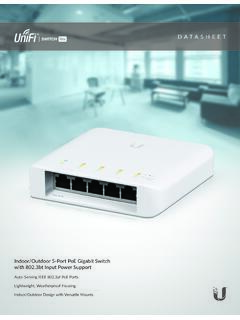
DATASHEET - Ubiquiti
The USW-Flex features five Gigabit RJ45 ports to deliver robust performance and intelligent switching for your network. Port 1 provides PoE input while ports 2-4 offer 802.3af PoE and provide up to 15W of power for your PoE devices. Products requiring 802.3af, such as G3 Flex cameras, are supported. Indoor/Outdoor Design
Download DATASHEET - Ubiquiti

Information
Domain:
Source:
Link to this page:
Documents from same domain

Datasheet - Ubiquiti Networks
dl.ubnt.comDatasheet www.ubnt.com/airmax 3 Software airOS is an intuitive, versatile, highly developed Ubiquiti firmware technology. It is exceptionally intuitive and …

802.11ac Dual Radio Access Point
dl.ubnt.comThis Quick Start Guide is designed to guide you through ... 802.11ac Dual Radio Access Point Model: UAP-AC-LITE Gigabit PoE* (24V, 0.5A) with Mounting Bracket

Advanced Gigabit Ethernet Router - Ubiquiti …
dl.ubnt.comThis Quick Start Guide is designed to guide ... Advanced Gigabit Ethernet Router Model: ER-X EdgeRouter X Power Adapter (12V, 0.5A) Quick Start Guide

UniFi AC AP Datasheet - dl.ubnt.com
dl.ubnt.com3 D atasheet UniFi Controller Packed with Features Use the UniFi Controller to provision thousands of UniFi APs, map out networks, quickly manage

Wide-Angle 1080p Dome IP Camera with Infrared
dl.ubnt.comIntroduction Thank you for purchasing the Ubiquiti Networks® UniFi® Video Camera G3 Dome. This Quick Start Guide is designed to guide you through installation and includes warranty terms.

TOUGHCable PRO Quick Start Guide - Ubiquiti Networks
dl.ubnt.com2 TOUGHCable™ PRO Quick Start Guide TOUGHCable Box The Tension Knob is set to High by default. If necessary, the tension can be set to to Low or None. Tension Knob TOUGHCable PRO Cross-Section Conductor Insulation ESD Drain Wire

U-Installer Quick Start Guide - Ubiquiti Networks
dl.ubnt.comLEDs Wi-Fi Lights blue if the U-Installer has a Wi-Fi connection to your mobile device. Battery Four blue LEDs indicate the internal battery’s charge level: Full charge Low charge* * Recharge the battery by connecting a power source,

1080p Wireless IP Security Camera with Infrared
dl.ubnt.comIntroduction Thank you for purchasing the Ubiquiti Networks® UniFi® Video Camera G3 Micro. This Quick Start Guide is designed to guide you through installation and also includes warranty terms.

802.11n Wi-Fi Access Point - Ubiquiti Networks
dl.ubnt.comHardware Installation The UniFi AP can be mounted to the wall or ceiling. Perform the steps for the appropriate installation: Wall Mount 1. Position the Mounting Bracket at the desired location on the wall with the cable feed slot pointed towards the floor.

Rocket ac Datasheet - Ubiquiti Networks
dl.ubnt.comD atasheet 4 Technology Unlike standard Wi-Fi protocol, Ubiquiti’s Time Division Multiple Access (TDMA) airMAX ac protocol allows each client to send and receive
Related documents

HP 12c Financial Calculator Quick Start Guide
h10032.www1.hp.comkey. Pressing R is optional after entering a number, if the next key pressed is an operation. Each time you press an operation or function key in RPN, the answer is calculated immediately and displayed. For example, suppose you wanted to add two numbers in RPN, 1 and 2. Press 1R2;.
Nighthawk LTE Mobile
www.downloads.netgear.comFirmware updates with new features and bug fixes are available at downloadcenter.netgear.com. Some products regularly check the site and download new firmware, or you can check for and download new firmware manually. If the features or behavior of your product does not match what is described in this manual, you might need to update …

ASCO Optional Construction Features
www.emerson.comSpecify these features by adding the indicated prefixes to the valve catalog number. For those prefixes marked with a “ l” or for optional RedHat electrical features not covered here, contact your local sales office. Table 2 lists the suffixes for optional construction features avail-able for each valve Series. Specify these features by ...

Features Product Description - Reliable Sprinkler
www.reliablesprinkler.comFeatures • Standard Coverage, Concealed Pendent (K2.8, 4.2, 5.6, & 8.0 [40, 60, 80, & 115 metric]) • Flat concealed cover plate available in a variety of finishes. • Available with Stainless Steel Clad cover plate (see Table I). • 3/4-inch (19 mm) cover plate adjustment. • Cover plate available with optional gasket. Product Description

REDCap Surveys - Advanced Features
www.urmc.rochester.edu• Optional notification when survey is completed . Surveys vs. Data Forms ... but all other REDCap features (reports/exports, Training Videos, File Repository, Data Quality checks, ... survey with this set of questions only and specify the condition in the survey queue e.g. [gender] = “1”. Participant View: