
Forcepoint VPN Client
VPN Client can connect to Forcepoint NGFW Firewall/VPN gateways only. Virtual IP addresses for the Forcepoint VPN Client The primary access method for production use is the Virtual Adapter feature. This feature allows the Forcepoint VPN Client to have a second, virtual IP address that is independent of the end-user computer address in the local ...
Download Forcepoint VPN Client

Information
Domain:
Source:
Link to this page:
Documents from same domain

TRITON Appliances Getting Started Guide - …
www.websense.comTRITON Appliances 2 TRITON Appliances: Getting Started Supported software TRITON appliances support: TRITON AP-EMAIL with integrated data loss prevention TRITON AP-WEB with integrated data loss prevention Web Filter & Security — V5000 and VMware virtual appliance TRITON AP-DATA Protector Mobile Agent Email Gateway for …
Websense: PAC File Best Practices
www.websense.comProxy Auto-Configuration Best Practices 2 component) and is required to support the hybrid web filtering feature of Web Security Gateway Anywhere. A PAC file is a JavaScript function definition for FindProxyForURL(url, host).
PAC File Best Practices for TRITON AP-WEB
www.websense.comPAC File Best Practices 3 TRITON AP-WEB PAC File Best Practices Why use a PAC file? In explicit proxy and Web Hybrid module deployments of TRITON AP-WEB, using a

Endpoint Solutions Installation and Deployment …
www.websense.comInstallation and Deployment Guide 3 a hotspot, but the user has not finished registration, it removes its proxy settings until the gateway has successfully opened.

Creating Custom Block Pages - Forcepoint
www.websense.comCreating Custom Block Pages 3 The block page is created from a multiple files that are stored with each instance of Filtering Service in your network.
Installation and Deployment Guide - Forcepoint
www.websense.comInstallation and Deployment Guide 3 For supported browsers, TRITON AP-ENDPOINT Web manipulates proxy settings in real time. For example, if TRITON AP-ENDPOINT Web detects it is at a hotspot, but the user has not finished registration, it …
Introduction to machine learning - Forcepoint
www.websense.comMachine learning is a branch of artificial intelligence, comprising algorithms and techniques that allow computers to learn from examples instead of pre-defined rules. As a user of Websense ® Data Security, you can provide examples that train the

Introduction to Forcepoint DLP Machine Learning
www.websense.comIntroduction to Machine Learning for Forcepoint DLP 3 ensemble of documents as counterexamples. (See Negative examples consisting of “All documents”, page 4, and Positive examples, page 3.) For text-based data, some of the algorithms automatically create an optimal “weighted
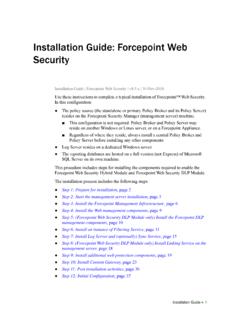
Installation Instructions: Forcepoint Web Security
www.websense.comGuide and gather information as instructed under “Gather data for firstboot”. Step 2: Start the management server installation Before installing management server components on a supported Windows server,
Stonesoft VPN Client 2.0 for Mac User Guide - websense.com
www.websense.comIntroduction | 3 Introduction This guide provides end-user instructions for installing and using Stonesoft® VPN Client for Mac OS X. The Stonesoft VPN Client is a software application that runs on your Mac.
Related documents

Xerox Device Agent User Guide
www.office.xerox.comXerox® Device Agent User Guide 1 Introduction Product Overview The Xerox® Device Agent enables Xerox to monitor and assess output devices on your network, and provides continuing asset management information. Xerox® Device Agent is a Microsoft Windows® device management client that uses Microsoft® SQL Server® CE Edition to provide automated …

Configuring a DNS client and the Name Service Switch in ...
www.timwort.orgConfiguring a DNS client and Name Service Switch manually in Solaris 11. In Solaris 11 the /etc/resolv.conf is automatically populated by the dns/client service and manual edits will be lost when the dns/client service is started or restarted. To set values for the /etc/resolv.conf administrators must set properties in the dns/client service.

Cisco 200 Series 8-port Smart Switches Administration Guide
www.cisco.comDomain Name System 142 Configuring DNS Servers 143 Configuring Global DNS Settings 143 Adding DNS Servers 144 Hostname Mapping 144 Configuring Static DNS Mappings 144 Viewing and Deleting Dynamic DNS Entries 145 Chapter 10: Security 146 RADIUS 146 Configuring Global RADIUS Settings 147 Adding a RADIUS Server 147 Password Strength 149

Horizon Installation - VMware Horizon 2106
docs.vmware.comConfiguring Horizon Client Connections88. Configure the Secure Tunnel and PCoIP Secure Gateway89. Configure the Blast Secure Gateway90. Set the External URLs for Horizon Connection Server Instances92. Give Preference to DNS Names When Horizon Connection Server Returns Address Information... Information93.

Specialist - Implementation Engineer, PowerScale Version 3
education.dellemc.comConfiguring Identity Management and Authorization (10%) • Compare and contrast between uses of RBAC and ZRBAC • Explain the nature and use of user identifiers and ID mapping • Describe POSIX and ACL permission rubrics Configuring Client Access to Data (13%) • Describe OneFS caching levels and use cases
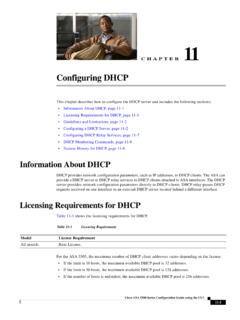
Configuring DHCP - Cisco
www.cisco.comChapter 11 Configuring DHCP Configuring a DHCP Server Enabling the DHCP Server The ASA can act as a DHCP server. DHCP is a protocol that provides network settings to hosts, including the host IP address, the default gateway, and a DNS server. Note The ASA DHCP server does not support BOOTP requests. In multiple context mode, you cannot enable

DNS Traffic Management using the BIG-IP LTM
www.f5.comDNS Traffic Management using the BIG-IP Local Traffic Manager DEPLOYMENT GUIDE Version 1.1. Important: This guide has been archived. While the content in this guide is still valid for the products and versions listed in the document, it is no longer being updated and may refer to F5 or third party products or versions that have reached end-of-l\

Configuring Sierra Wireless AirLink Modem
www.sierrawireless.comConfiguring your Sierra Wireless AirLink modem for IP Manager and DNS If you have a fleet of Sierra Wireless AirLink modems or even if you only have one, it can be difficult to keep track of the current IP addresses, especially if the addresses aren’t static
Related search queries
Xerox Device Agent, Xerox® Device Agent, Xerox, Client, Configuring a DNS client and, Cisco, 8-port Smart Switches Administration Guide, Domain Name System, Configuring DNS, Configuring, Configuring Client, A DNS, DNS Traffic Management using the BIG, Configuring Sierra Wireless AirLink Modem, Sierra Wireless AirLink modem