
User guide - document.resmed.com
Subject to the terms and conditions below, ResMed grants you, the owner and/or user of this device, a perpetual, nonexclusive, non- sublicensable, personal, limited license to use t- he ResMed Software solely in connection with the use of this device.
Download User guide - document.resmed.com

Information
Domain:
Source:
Link to this page:
Documents from same domain

Indications for use System requirements Compatible ResMed ...
document.resmed.com• Android™ 5.0 and later. Compatible ResMed devices • AirSense 11 • AirSense 10 • AirCurve 10. Note: Bluetooth features are only available on AirSense 11. Security : Built-in security features, steps you take to protect your smart device against malware, and keeping
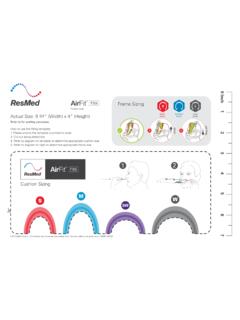
AirFit F30i - Fitting guide - ResMed
document.resmed.comTitle: AirFit F30i - Fitting guide Created Date: 8/13/2019 10:03:58 PM
Sleep Lab Titration Guide - ResMed
document.resmed.comFemale patients with mild to moderate OSA weighing more than weighing more than 66 lb (30 kg) 4–20 cm H 2O AutoSet/APAP (automatic positive airway pressure) Automatically adjusts pressure in response to flow limitation, snore and obstructive apneas OSA Patients weighing more than 66 lb (30 kg) 4–20 cm H 2O VAuto Automatically adjusts ...

Travel Compliance Letter for ResMed Therapy Devices
document.resmed.comPage 3 of 4 ResMed Corp 9001 Spectrum Center Blvd. San Diego, CA 92123 USA T 1 800 424 0737 F 1 858 836 5000 ResMed Pty Ltd 1 Elizabeth Macarthur Drive Bella Vista NSW 2153 Australia T +61 (2) 8884 1000 F +61 (2) 8884 2000 ResMed (UK) Ltd 8 Wimpole Street, London W1G 9SP, UK T +44 (1235) 862 997 F +44 (1235) 831 336 ResMed.com ...
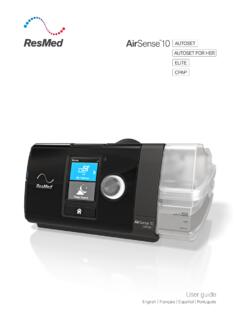
User guide - ResMed
document.resmed.comThe AirSense 10 CPAP device is indicated for the treatment of obstructive sleep apnea (OSA) in patients weighing more than 66 lb (30 kg). It is intended for home and hospital use. The humidifier is intended for single patient use in the home environment and re. use in a - hospital/institutional environment. Contraindications
Home Oxygen Qualifying Guidelines - ResMed
document.resmed.comThe qualifying blood gas study/oxygen saturation test was performed by a physician, qualified provider or supplier of laboratory services that is registered and able to bill for the test, and the necessity for such testing must be documented in the patient’s medical record. C. All three qualifying exercise tests should be performed during the ...

User guide - ResMed
document.resmed.com• The Astral device may be used in the vicinity of electronic article surveillance (EAS) systems during mobile situations when attached to th e patient or patient’s wheelchair. The Astral device may experience interference in the vicinity of EAS. Keep the Astral device at least 8” (20 cm) away from the EAS.

User guide - ResMed
document.resmed.comWhen Pressure Relief is enabled, you may find it easier to breathe out. This can help you get used to therapy. SmartStart* When SmartStart is enabled, therapy starts automatically when you breathe into your mask. When you remove your mask, it stops automatically after a

S9 Series AutoSet & Elite - ResMed
document.resmed.com• Do not wash the air tubing in a washing machine or dishwasher. Weekly: 1. Remove the air tubing from the S9 device and the mask. 2. Wash the air tubing in warm water using mild detergent. 3. Rinse thoroughly, hang, and allow to dry. 4. Before next use, reconnect the air tubing to the air outlet and mask. Monthly: 1.

User guide - ResMed
document.resmed.comUsing this guide Please read the entire guide before use. When following instructions, refer to the images at the front and back of the guide. Intended use The AirFit P10 channels airflow noninvasively to a patient from a positive airway pressure (PAP) device such as a continuous positive airway pressure (CPAP) or bilevel device. The AirFit P10 is:
Related documents
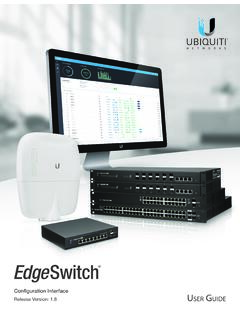
EdgeSwitch User Guide - Ubiquiti
dl.ubnt.comThis User Guide is designed to provide details about how to set up and use the EdgeSwitch® Configuration Interface, version 1.8 or above. This interface manages the EdgeSwitch and EdgeSwitch X models, which this User Guide will collectively refer to as EdgeSwitch. The EdgeSwitch XP models use a different user interface.
LabelManager User Guide - DYMO
download.dymo.comUse only the power adapter listed in this user guide: Adapter model DSA-6PFG-12 Fc 120050 (note: “c” can be EU, UP, UK, US, UJ, JP, CH, IN, AU, KA, KR, AN, AR, BZ, SA, AF or CA) from Dee Van Enterprise Co., Ltd. The charging adapter is only used for recharging the battery pack; the charging adapter cannot be used to power the labelmaker.
MobileLabeler User Guide - DYMO
download.dymo.comUser Guide Safety Precautions for Lithium-Polymer Rechargeable Battery Battery Type: LiPolymer 7.4V 1500mAh 11.1Wh Improper handling of a lithium-polymer rechargeable battery may cause leakage, heat, smoke, an explosion, or fire. This could cause deterioration of performance or failure.

Aptio 5.x AFU User Guide - Intel
downloadmirror.intel.comAMI Software Utility User Guide Aptio ®5.x AFU User Guide for Intel Server Board M10JNP2SB Document Revision 1.28 3/15/2020 American Megatrends International LLC
Verizon LTE Network Extender user guide v1.7 - VZW
scache.vzw.comLTE Network Extender User Guide Verizon LTE Network Extender User Guide v1.7 4 © 2020 Verizon, All Rights Reserved. 1.2 Your Network Extender
Shared: User Administrator User Guide - Concur Training
www.concurtraining.comNOTE: This guide covers the functionality of the User Administration – Add a User and User Permissions links. For information on the other links under User Administration, refer to the Concur Travel: Company Administration User Guide.