
vSphere Troubleshooting - VMware vSphere 6
vSphere Troubleshooting describes troubleshooting issues and procedures for vCenter Server implementations and related components. Intended Audience This information is for anyone who wants to troubleshoot virtual machines, ESXi hosts, clusters, and related storage solutions. The information in this book is for experienced Windows or Linux
Download vSphere Troubleshooting - VMware vSphere 6

Information
Domain:
Source:
Link to this page:
Documents from same domain

vSphere Networking - VMware vSphere 6
docs.vmware.comEnable LACP 5.1 Support on an Uplink Port Group 82 Limitations of the LACP Support on a vSphere Distributed Switch 83 6 Backing Up and Restoring Networking Configurations 85

VMware User Environment Manager Administration Guide
docs.vmware.comVMware User Environment Manager Administration Guide ... Windows Explorer and view settings Explorer layout and details pane. 4 Browse to and select a location for the configuration file. ... VMware User Environment Manager Administration Guide, application. and files.

vSphere Storage - VMware vSphere 6
docs.vmware.comSetting LUN Allocations for iSCSI 69 Network Configuration and Authentication 70 ... General Boot from iSCSI SAN Recommendations 111 vSphere Storage VMware, Inc. 4. Prepare the iSCSI SAN 112 Configure Independent Hardware iSCSI Adapter for SAN Boot 113 ... Guide.. target ...

vSphere Storage - VMware vSphere 6
docs.vmware.comvSphere Storage VMware vSphere 6.5 VMware ESXi 6.5 vCenter Server 6.5 ... 9 Using ESXi with iSCSI SAN 63 iSCSI SAN Concepts 63 How Virtual Machines Access Data on an iSCSI SAN 68 10 Configuring iSCSI Adapters and ... Task instructions in this guide are based on the vSphere Web Client. You can also perform most of the tasks

VMware Horizon Client for Linux User Guide - VMware ...
docs.vmware.comThis document, VMware Horizon Client for Linux User Guide, explains how to use VMware Horizon ... n Instructions about whether to turn on a VPN (virtual private network) connection. n Name of server on which you have unauthenticated access to remote applications.

VMware Horizon Client for Windows User Guide - VMware ...
docs.vmware.comVMware Horizon Client for Windows User Guide 04 JAN 2018 VMware Horizon Client for Windows 4.7. VMware Horizon Client for Windows User Guide VMware, Inc. 2 ... n Instructions about whether to turn on a VPN (virtual private network) connection. n Server name to use for connecting to the server.

vSphere Storage - VMware vSphere 6
docs.vmware.comvSphere Storage describes virtualized and software-defined storage technologies that VMware ESXi™ and VMware vCenter Server offer, and explains how to configure and use these technologies.

VMware Horizon Client for Windows 10 UWP Installation and ...
docs.vmware.comVMware Horizon Client for Windows 10 UWP Installation and Setup Guide VMware, Inc. 7. n If you are using a security server, verify that you are using the latest maintenance releases of ... VMware Horizon Client for Windows 10 UWP Installation and Setup Guide.

Management vSphere Resource - VMware Docs Home
docs.vmware.comAbout vSphere Resource Management 7 1 Getting Started with Resource Management 8 Resource Types 8 Resource Providers 8 ... Getting Started with Resource Management 1 ... Shares specify the relative importance of a virtual machine (or resource pool). ...

vSphere Storage - VMware vSphere 6
docs.vmware.comVMware vSphere 6.5 VMware ESXi 6.5 vCenter Server 6.5. vSphere Storage ... vSphere Storage VMware, Inc. 5. Configuring VMFS Pointer Block Cache 199 18 Understanding Multipathing and Failover 201 ... See Target and Device Representations and Chapter 14 Managing Storage Devices.
Related documents

Operating Instructions Troubleshooting
support.ricoh.comTroubleshooting Provides a guide to solving common problems, and explains how to replace paper, toner, and other consumables. Security Reference This manual is for administrators of the machine. It explains security func-tions that the administrators can use to protect data from being tampered with, or prevent the machine from unauthorized use.

CAN-Bus Troubleshooting Guide - ESD Electronics Inc
www.esd-electronics-usa.comNormally the voltage should be between 2.0 V and 4.0 V. If it is lower than 2.0 V or higher than 4.0 V, it is possible that one or more nodes have faulty transceivers. For a voltage lower than 2.0 V please check CAN_H and CAN_L conductors for continuity. For a voltage higher than 4.0 V…
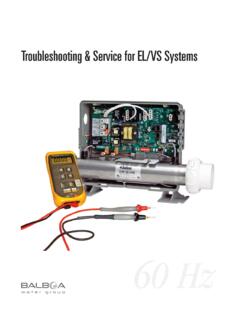
Troubleshooting & Service for EL/VS Systems
balboadirect.comG.F.C.I. Troubleshooting IF CORRECT WIRING IS VERIFIED UÊCheck to see if the proper G.F.C.I. is installed. UÊCheck the label in the system box near TB1 to determine the maximum amperage draw for the system. UÊBe sure the G.F.C.I. is rated for more amperage than the system will draw. UÊFor a 240 V dedicated system, a 2-pole G.F.C.I. with no
Practical LC-MS Troubleshooting and Maintenance: A Primer
genome.duke.eduHigh V Power Supply Fail Pass 4. MS/MS Fragmentation Go to #4 Pass Key Most Common Causes for Failure ontinued next page… MS System: A Troubleshooting Workflow 2. Signal Stability Check (Signal should not show significant decrease in ~minutes)
Joint Knowledge Online CAC Login Troubleshooting Guide
jko.jten.milEnsure only TLS v 1.0 is checked Open the “Tools – Internet Options” menu item in Internet Explorer and then click the Advanced tab NOTE: If you are unable to open “Tools- Internet Options” menu item, please contact your local help desk.
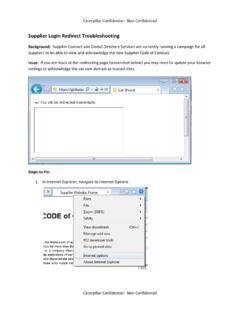
Supplier Login Redirect Troubleshooting - Cat
supplierconnect.cat.comSupplier Login Redirect Troubleshooting Background: Supplier Connect and Global Directory Services are currently running a campaign for all Suppliers to be able to view and acknowledge the new Supplier Code of Conduct. Issue: If you are stuck at the redirecting page (screenshot below) you may need to update your browser
Port Channels and Trunking - cisco.com
www.cisco.comCisco Nexus 1000V Troubleshooting Guide, Release 4.0(4)SV1(1) OL-19427-05 Chapter 7 Port Channels and Trunking Initial Troubleshooting Checklist Trunking Overview Trunking, also known as VLAN trunking, enables inte rconnected ports to transmit and receive frames in more than one VLAN, over the same physical link.
CAN-Bus Troubleshooting Guide
www.esd-electronics-usa.comNormally the voltage should be between 2.0 V and 4.0 V. If it is lower than 2.0 V or higher than 4.0 V, it is possible that one or more nodes have faulty transceivers. For a voltage lower than 2.0 V please check CAN_H and CAN_L conductors for continuity. For a voltage higher than 4.0 V, please check for excessive voltage.

HDHomeRun Troubleshooting Guide (20090415)
www.silicondust.comSymptom: Ethernet LED flashing, connected directly to PC (Windows). 1. Check that the IP address of the network interface is either: Set to “Obtain an IP address automatically” The "obtain an IP address automatically" setting can take up to 3 minutes to choose an AutoIP address.