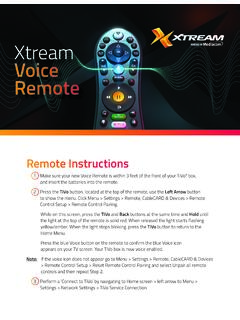
Xtream Voice Remote
Remote Instructions 1 Make sure your new Voice Remote is within 3 feet of the front of your TiVo® box, and insert the batteries into the remote. 2 Press the TiVo button, located at the top of the remote, use the Left Arrow button to show the menu. Click Menu > Settings > Remote, CableCARD & Devices > Remote Control Setup > Remote Control Pairing.
Download Xtream Voice Remote

Information
Domain:
Source:
Link to this page:
Documents from same domain

Sagemcom F@st 3896
mediacomcc.custhelp.comIP v4/v6 of SWANTM middleware ensures to the F@st 3896 its readiness for all major scenarios of IPv6 network migration. SWANTM modular architecture allows easy third parties application integration for operator to easily differentiate: GUI, Web services or even new features developped over SWANTM SDK. INTERFACES • Network: - DOCSIS 3.1 2x2
CGNVM DOCSIS 3.0 eMTA WiFi Gateway User’s Guide
mediacomcc.custhelp.comCGNVM DOCSIS 3.0 eMTA WiFi Gateway User’s Guide. Version 1.0 - 02/2015 SW Version CGNVM_4.5.10.10T3-MGCP-150429
TECHNICOLOR WIRELESS GATEWAY - CGM4231 OPERATIONS …
mediacomcc.custhelp.com1/8/2018 Proprietary and Confidential - Technicolor 2 Revision History Revision Date Description Draft 1.0 1/8/2018 Initial draft
CGA4131 BUSINESS GATEWAY OPERATIONS GUIDE
mediacomcc.custhelp.comweb page user interface accessible by the user or remotely by the MSO by SNMP/TR-069. The Technicolor CGA4131 offers the following features: • Compliance with DOCSIS 3.0 and 3.1 standards to deliver high-end performance and reliability • …

WELCOME TO
mediacomcc.custhelp.comThe TiVo experience instantly gives you total control of the TV programming you love, and much more! The TiVo digital video recorder (DVR) connects to your Internet service giving you access to an entire universe of on-demand movies, TV shows, and web videos (and you can stream shows from your TiVo DVR to every room in your home!).

Remote control features
mediacomcc.custhelp.comthe TiVo button of the remote control) flashes red when it sends the IR command, then the activity indicator flashes amber while it attempts to find and pair with a DVR. The TiVo remote control in New Pairing Mode usually pairs in less than a second after the first key press.

Touchstone TG3452 Telephony Gateway
mediacomcc.custhelp.comWhether you’re checking out streaming media, downloading new software, checking your email, or talking with friends on the phone, the Touchstone TG3452 Telephony Gateway brings it all to you faster and more ... The product shall be cleaned using only a damp, lint-free, cloth. No solvents or cleaning

ACCESS CAblE gAtEwAy MARlIN l
mediacomcc.custhelp.comACCESS CAblE gAtEwAy MARlIN l CGA4236 Dual-Band Wi-Fi 6 Smart Ultra-Broadband Cable Gateway with Voice for above Gigabit Speeds Features at a Glance DOCSIS® 3.1 compliant Backward compatible with DOCSIS®/EuroDOCSIS® 3.0 2 x 2 OFDM(A) bonded channels in DOCSIS 3.1 mode 32 x 8 bonded channels in DOCSIS/EuroDOCSIS 3.0 mode
Related documents
Start - URC Support
www.urcsupport.comProgram remote for Aim Anywhere or to control your TV or audio device. Pr ess an d h ol te S up bn ( t 3 seconds) until the Status LED changes from red to gr en. Press the CONTOUR button. Follow the on-screen instructions to enter the 3-digit code that appears. Once the code is correctly entered, your CONTOUR Remote is paired with the device. A B C

OWNER’S MANUAL Magic Remote - LG Electronics
www.lg.comusing the Wheel button. (up/down/left/right) Press the up, down, left or right button to scroll the menu. If you press buttons while the pointer is in use, the pointer will disappear from the screen and Magic Remote will operate like a general remote control. To display the pointer on the screen again, shake Magic Remote to the left and right.
Using Your TiVo Remote Control
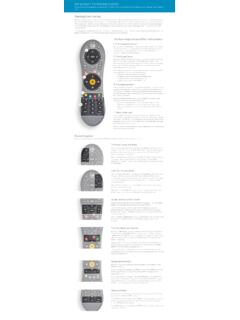
www.tivo.comAlso, the button at the top of the remote is the distinctively-shaped TiVo button. The bottom of the remote has a line of three buttons in a row. Feel for the large button in the shape of the TiVo logo and you’ll know you’re at the top. The TiVo button will take you to the TiVo TiVo Central – the starting point for the TiVo menu system.

KRONOS Remote Access Instructions v3 - UW Blogs Network
blogs.uw.edubutton. 3. You may confirm that you are connected by viewing an icon in your System Tray (right bottom corner) that looks like a golden colored lock. 4. If this icon does not appear in the system tray, click on the Start button that is displayed on the screen where it notates Client Application Sessions -Network Connect. 5.

Owner's Guide - Operation of Remote Control …
www.trane.comTEMP button TEMP Do not drop or throw the remote control; Do not let any liquid in the remote control. Note: Be Press sure that there are no obstructions between receiver and remote controller; Do not put the remote control directly in sunlight or any place where it is very hot. Each time you press this button, a mode is
Pico 4-Button Wireless Remote Spec (369847)
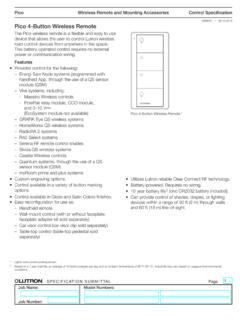
www.lutron.comWireless Remote and Mounting Accessories SPECIFICATION SUBMITTAL Page Job Name: Job Number: Model Numbers: Pico Control Specification 369847j 1 09.19.2018 Pico 4-Button Wireless Remote The Pico wireless remote is a flexible and easy to use device that allows the user to control Lutron wireless load-control devices from anywhere in the space.
3-BUTTON REMOTE CONTROLS MODELS 953EV, 953EVC, …
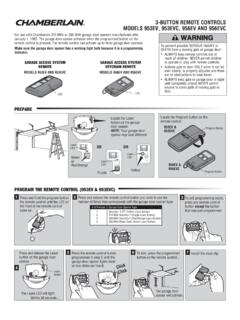
pdf.lowes.combutton on the garage door opener. 3 To exit programming mode, press any remote control button except the button that was just programmed. Press the remote control button 7 Install the visor clip. programmed in step 2 until the garage door opener lights flash or two clicks are heard. To test, press the programmed button on the remote control ...
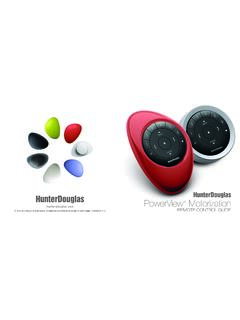
PowerView Remote Control Guide - Hunter Douglas
cdn.hunterdouglas.comPebble™ Remote and Surface Remote combine fashion with function for precise control of your Hunter Douglas window coverings. Artfully designed, PowerView remotes allow you to control natural light throughout your home with the press of a button. The following pages provide all the details on how to set up and operate both remote styles.

Remote Control - DISH
www.dish.comYou will hear three beeps from the remote control, indicating it has paired with your DISH receiver AUX input SAT TV 4 Press the SAT button on the side of the remote control 3 Open the front panel of your DISH receiver, and press the SYS INFO button SYS INFO 2 Replace the back cover 54.0 PULL 1 Remove the back cover by pushing the latch

) All Off function key Channel Up and Down Recall key ...
www.kmart.com.auHold the remote in a straight line in front of your TV at a distance less than 1 meter.\r2\) Press and hold the TV device mode button and the power button on the remote control until the red light indicator lights up constantly.\r3\) Press the power button. \r4\) The TV device mode button will blink continuously in red, meaning that the remote ...