Transcription of 5 steps to developing an effective training plan
1 5 steps to developing an effective training planBy Linda KilmartinThe most successful implementations of Adobe Document Cloud eSign services involve training end users on the technology and new workflows they will incorporate into their daily activities. While Document Cloud is intuitive and easy to use, preparing and implementing a training plan will result in confident users who get the most out of eSign services as quickly as possible reducing error and increasing productivity for your Onboarding Specialist will ensure you have the resources necessary to be successful with the deployment of your initial use-case. This includes a training session for the account administrator, and a co-hosted training for the end users. Beyond that point, you ll want to ensure you are prepared to provide end users with training when rolling out additional deployments, adding new users, or bringing in additional use cases.
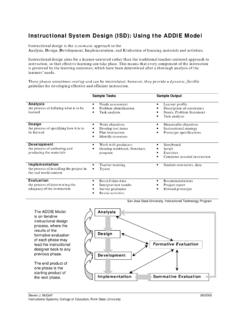
2 Here are five steps to developing an effective training plan , based on the ADDIE model. The ADDIE steps represent a dynamic, flexible guideline for building any effective training and performance support tools. When creating a training plan , your assigned Client Success Team or Client Success Manager will be available to assist with resources and provide guidance to help you achieve your training : e ve phases1. Analysis3. Development5. Evaluation2. Design4. ImplementationADDIE: The five phases Analysis, Design, Development, Implementation, and Evaluation. ANALYZEC onduct your training needs analysis by answering the following questions: 1. What is the business goal? Always tie your training to a key business goal whether it s saving time, cutting costs, being environmentally friendly, accelerating the sales process or improving the customer experience.
3 Let your business goal be the driver for your training plan , and make sure you communicate this goal to your trainees. 2. Who is the audience, and what are their learning characteristics? For example, HR employees will have different skills and logistical availability than outside sales Success: Best Practices2 Consider:- Geographic location- Schedules- Work habits and access to computers- Frequency of travel- Skillsets- Preference for self-guided or instructor-led training3. What tasks do trainees need to accomplish, and what workflows do they need to know how to use? This question is otherwise known as a task assessment. Look at each trainee group and identify the new tasks and workflows the groups need to master using Document Cloud eSign services. Take the time to create a specific and comprehensive list, as you will be building your training plan around What are the training activities that will help the workers learn the tasks, and what delivery options are available?
4 Think about your audience and how best to help them learn. Product demonstrations and walkthroughs are a very effective way to train end users via webinars, in-person training or self-paced learning using recorded demos. Tip: Adult learners share certain characteristics to keep in mind. They: Are self-directed Already have a lifetime of experience and learning Are goal-oriented and task-oriented Want training that s relevant they want to see how it will improve their work5. What is the timeline for training completion? 6. What are the constraints? This is the point where you can clearly identify any limitations that will impact the training . Constraints will often flow from the identified audience characteristics but may also include things like compacted timeline, geographic disparity of trainees, time of year or staffing.
5 Output from analysis phase:1. Who you are going to What tasks and/or workflows you want to train What methods you are going to use to When the training will be completed is where you take your output from the analysis phase and create a training blueprint following these steps :1. A critical first step is defining the learning objectives for your training . Your objectives should always be measurable so that learners can be assessed for competency. For example, upon completion of the training , end users should be able to: Use the MegaSign feature with a CSV file to send a document for signature. Initiate and send an agreement from Salesforce and utilize in-person signing on the mobile Then, map each learning objective and training group to the most appropriate training method, keeping in mind your timelines and constraints.
6 Here are some of the most commonly used options for eSign services training : training MethodConsiderationsLive online webinars What assets are needed to complete any demos? Will supplementary PowerPoint slides be required? Need the demos be recorded for future trainings?In person training What will be taught in person? Can interactive exercises, breakout sessions, and hands-on practice be incorporated? What types of assets do you need, such as a trainer deck and handouts? Do you need train-the-trainer sessions?Self-paced training How will you track completion? How can the training be made to be as engaging as possible?3. Consider assessments. How will you assess mastery? What form will the assessments take? One method of assessment is the demo-back, where learners demonstrate specific tasks in eSign services or a full use case (for example, how to send a sales contract, set a reminder, and run a report) for the assessor.
7 4. Consider who will conduct and/or deliver the training . Is additional expertize required for certain demos or content?Tip: A blended approach, where you utilize a mix of training methods, can help you cover different learning styles and mitigate from design phase:A blueprint for the training method you will use to address each learning objective for each identified group of trainees. (You ll know who will be taught what and how.)DEVELOPThis is where you create all the content and materials for the MethodAssets to createLive online webinars For demos, set up a demo environment. Create any required resources for a successful demo, including templates, users and so on. Conduct a walkthrough of the demo in advance. Create any PowerPoint slides required.
8 Set up a time to conduct a dry run of the live webinar in advance to check timing, audio and additional person training Create any PowerPoint slides required. Create any trainer notes, handouts and slides. Develop workshop activities and overviews for breakout sessions. List and secure any hardware, software or audio-visual equipment required. Self-paced training Create slides, recorded demos or other multimedia-based training Write the assessment questions and put them into the most appropriate delivery format, such as an online survey or poll or printed handout. For demo-backs, create the use cases and tasks for trainees to : 1. Reuse existing content as much as For effective learning, incorporate the following into your materials: Provide hands-on practice; people learn by doing.
9 Keep learners engaged by facilitating interaction. Keep sessions relatively short, and mix it up with different training formats. Be sure to offer opportunities for from Development phase:The training materials you need to conduct the training , such as demo environment and demo script, recorded demos, completed PPT slides, trainer guides, handouts, documented assessments and so on. IMPLEMENTNow it s time to put your training plan into action. In this phase you will:1. Schedule the training . Make sure you schedule any additional expertize required for certain demonstrations or Conduct the train-the-trainer Upload the self-paced training to an LMS (Learning Management System) or other hosted location and assign to Consider all the logistics. Do you need to inform supervisors, book rooms or order food and drinks?
10 5. Conduct the training . It s helpful to have a training -day checklist to make sure that everything is ready and in order prior to beginning the : 1. Make sure to give plenty of advance warning to trainees so that schedules will be For webinar sessions, be sure to have your virtual webinar room ready in advance and that hosts and speakers are situated in a quiet For in-person training , arrive well in advance to allow for set up and EThis is where you evaluate your own training plan and its effectiveness. Ultimately, you will want to know if the training achieved the business goal you defined at the methods: Employee reactions: Conduct a poll or survey, or solicit feedback in person. Utilize online tools like SurveyMonkey or the polling features in your webinar tool.