Example: biology
BAR 48
The BAR 48 is designed to quickly connect to your TV. Simply plug in the included HDMI cable or an optical cable to seriously upgrade your TV sound, using your TV’s remote to control it. SLIM PROFILE DESIGN The BAR 48 is crafted from high-quality wood materials, just like legendary Klipsch speakers.
Information
Domain:
Source:
Link to this page:
Documents from same domain

R-52C
d2um2qdswy1tb0.cloudfront.netLINEAR TRAVEL SUSPENSION (LTS) ALUMINUM TWEETER WITH KAPTON SUSPENSION The exclusive Linear Travel Suspension (LTS) minimizes distortion for enhanced, detailed performances. Kapton ® is an extremely light and rigid material used in the tweeter suspension to provide high efficiency and improve resolution and detail.

R-100SW
d2um2qdswy1tb0.cloudfront.netFREQUENCY RESPONSE 32Hz - 120Hz +/- 3dB MAXIMUM ACOUSTIC OUTPUT 112 dB AMPLIFIER All Digital AMPLIFIER POWER (CONT/PEAK) 150W/300W AMPLIFIER FEATURES Volume, Low-pass, 0/180 phase, Auto Power On DRIVER COMPONENTS 10” high excursion spun-copper IMG woofer ENCLOSURE MATERIAL MDF ENCLOSURE TYPE Bass-Reflex via …

LA SCALA
d2um2qdswy1tb0.cloudfront.netKlipsch only uses book-matched wood veneers for the Heritage series. The veneer leaves are kept in order as they are delicately sliced from the timber and precisely arranged to provide a mirror image at the splice joint — like turning the pages of a book. This gives each speaker an aesthetically appealing and

CINEMA 400 SOUND BAR
d2um2qdswy1tb0.cloudfront.netMOUNTING OPTIONS 1/4 20 Thread Keyhole hooks Using Klipsch proprietary technology and offering easy installation, the Klipsch Cinema 400 Sound Bar is a simple solution to seriously upgrade your TV sound and hear every detail of your movies and music. EASY PLUG AND PLAY SET UP The Cinema 400 sound bar is designed to quickly connect to your TV.

PRO MEDIA 2.1 THX CERTIFIED
d2um2qdswy1tb0.cloudfront.netSatellites: Sealed Subwoofer: Bass Reflex High Frequency Horn 90° x 40° MicroTractrix® Inputs 3.5mm miniplug Typical Maximum Output 110dB SPL (in-room) Outputs 3.5mm miniplug Headphone Dimensions Satellite: 8.5” (21.59cm) x 4.2” (10.67cm) x 5.67” (14.4cm) Subwoofer: 9.5” 24.13cm) x 9.8” (24.9cm) x 10.2” (25.9cm) Finish Black
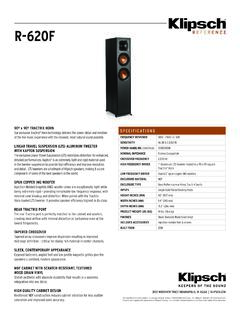
R-620F
d2um2qdswy1tb0.cloudfront.netFREQUENCY RESPONSE 38Hz - 21kHz +/- 3dB SENSITIVITY 96 dB @ 2.83V/1M POWER HANDLING (CONT/PEAK) 100W/400W NOMINAL IMPEDANCE 8 ohms Compatible CROSSOVER FREQUENCY 2,000 Hz HIGH FREQUENCY DRIVER 1” Aluminum LTS tweeter mated to a 90 x 90 square Tractrix® Horn LOW FREQUENCY DRIVER Dual 6.5” spun-copper …

FORTE
d2um2qdswy1tb0.cloudfront.netleave the factory as a meticulously crafted set. BUILT TO LAST While each and every component of the Forte IV is built to last, Klipsch has always recognized the unique and critical role of a loudspeaker’s cabinet in the sound reproduction process. From the craftsmen in Hope, AR to the engineers in Indianapolis,

R-4B II
d2um2qdswy1tb0.cloudfront.netAn included digital optical cable connects to your TV’s digital output to the back of the soundbar. Once a connection to your TV is made, you just plug the soundbar into a standard electrical outlet and turn it on. The built-in Dolby Digital Decoder takes over and allows the Klipsch R-4B II to automatically reproduce detailed, high-output sound
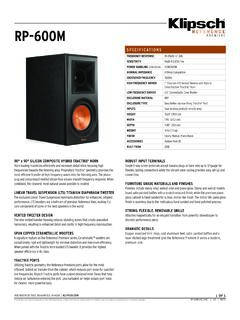
RP-600M
d2um2qdswy1tb0.cloudfront.netFinishes include ebony vinyl, walnut vinyl and piano gloss. Ebony and walnut models boast satin painted baffles with a scratch resistant finish, while the premium piano gloss cabinet is hand-sanded for a clear, mirror-like finish. The mirror-life piano gloss finish is seamless due to the meticulous hand sanded and hand polished process.

The Sixes
d2um2qdswy1tb0.cloudfront.netdesigned to maximize system performance and eliminate the need for external amplification. That means that world-class Klipsch engineers have full control of the signal path. We’ve picked and tuned the components to be an absolute perfect match throughout, making the system sound incredibly immersive and complete.
Related documents

AT&T U-verse Wireless TV Receiver self-installation guide
www.att.comSet up the Wireless TV Receiver. The next step is to connect your Wireless TV Receiver to your TV. A. Connect the Wireless TV Receiver to your TV with an HDMI cable (not included). You may also use . Component or Coaxial cables. B. Power up your TV. Select the connection type you used in step 2A. For instance, if you used an HDMI . cable ...

DIRECTV WIRELESS VIDEO BRIDGE GEN2 - AT&T
www.att.comProduct Manual—Wireless Video Bridge Gen2 I. OVERVIEW A. WIRELESS VIDEO BRIDGE The Wireless Video Bridge Gen2 (WVB2) is a second-generation Wireless Video Bridge. It is a direct replacement of the WVB Gen1 and has enhanced networking features. The WVB2 provides the ability to stream DIRECTV programming from a Genie server to the Genie Mini ...

Logitech® G933 Artemis Spectrum™
www.logitech.com1. Set switch to Wireless Off mode for passive audio mode, or set to Wireless On mode for active audio mode with additional features (see “Wireless On/ Off” section). 2. Connect the headset to the mobile device via the 3.5mm cable. 3. 3.5mm inline controls can be used to adjust audio. Mic select • Select “microphone” position

User Guide - The Sharper Image
cdn4.sharperimage.comFor optimum performance, the TV Wireless Headphones must be fully charged before the first use. This can take 5 hours. CONNECTING YOUR TV 1. The TV Wireless Headphones can be connected to the TV three different ways: Headphone Jack — Use the included 3.5mm audio cable. Plug one end into the TV headphone jack.

Instructions for use - Oticon
www.oticon.comThe TV Adapter is intended as a wireless transmitter of sound from a TV or from other electronic audio devices to hearing aids. The TV Adapter is intended to be used by children (> 36 months) and adults together with their hearing solution.

Installation instructions - Verizon: Wireless, Internet ...
www.verizon.comon the Fios TV remote. Then turn on your TV and tune to channel 3 using the remote control that came with your TV. • To complete activation, call 1.855.372.2181 and provide the activation code found on your Verizon customer receipt. CableCARD Get hooked up Read through any instructions for your CableCARD-ready device and complete any set up.

Wireless Desktop Mouse User Manual Product Features
www.verbatim.com2. Connect wireless mouse receiver to USB port 3. Ensure batteries are installed in the mouse and mouse power is turned on (See instructions below). 4. Hold mouse close to the receiver 5. Click the ID button at the end of the receiver once, (See …

Using TV Adapter 3 - Oticon
www.oticon.comP1 P2 TV Adjust the volume by pressing up or down briefly. Repeat the brief press for further adjustments. Connect the TV Adapter 3.0 box to your television See the Instructions for Use booklet that comes with the TV adapter. Four methods are available to support a wide variety of connection needs. Using TV Adapter 3.0 1 2 3 4