Bell Customer Support Centre
Philips Phili s Ma Pilot Pioneer Polaroid Portland Price Club Prism Proscan Proton Proview Pulsar Quasar navox 525 827 782 652 502 766 505 680
Information
Domain:
Source:
Link to this page:
Documents from same domain

Installation and Setup -- A 5 Step Process
support.bell.ca7. Ground the satellite antenna, and wire it to the ExpressVu™ receiver (see pages 4-38). 8. Aim the satellite antenna for the strongest possible signal (see pages 4-29 through 4-33). 9. Connect the receiver to an active telephone connection (see page 4-39). With the receiver wired to the TV and the antenna properly installed, you will be ...
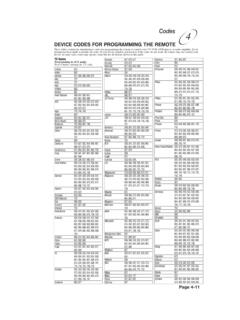
Remote Codes - Device codes for programming the Bell …
support.bell.caDEVICE CODES FOR PROGRAMMING THE REMOTE These tables contain the manufacturer codes for programming the remote to control your TV, VCR, DVD player, or audio amplifier. Every attempt has been made to include all codes. If your device brand is not listed or if the codes do not work, the remote may not control your device.

Control Setup Remote - Bell
support.bell.ca4. Press POWER on the remote controls to turn on/off receiver. ADJUSTING THE REMOTE ANTENNA Be sure to set the remote control antenna (back of the receiver) straight up so you can use the remote control from as far away as possible. Don't let the antenna touch anything. If your UHF Pro Remote Control isn't working very well from far away,
User’s Guide PlugLink 9650 Ethernet Adapter
support.bell.caand other Powerline devices on your network. The screen displays the Device Name, MAC Address, and Type (local or remote; 14mbps or 85mbps) of connection for each device on your network. To refresh the list of Powerline devices, Click on the ‘Rescan’ icon. (Note: Devices set up with a different network password will NOT show up on this list.)

Slim Remote Programming | Bell TV
support.bell.caFibe™ TV remote instructions Programming the remote to your TV 1. Turn on your TV and Fibe receiver. 2.Press and hold the options key for 3 seconds, until the green light flashes twice. Within 10 seconds, enter the Ll-digit code for the brand of your TV (see table below), or use 0001 to search through all brands.
User Guide - Bell
support.bell.ca3 Disclaimer ZTE Corporation expressly disclaims any liability for faults and damages caused by unauthorized modifications of the software. Images and …
Related documents
Owner's Manual MAGNAVOX
dig.abclocal.go.comApr 06, 2009 · owner's manual magnavox s m a r t . very s m a r t . tb100mw9 dtv digital to analog converter (set top box) thank you for choosing m agnavox. need help fast? read your q uick g uide and /or o wner 's m anual first for quick tips that make using your magnavox product more enjoyable.
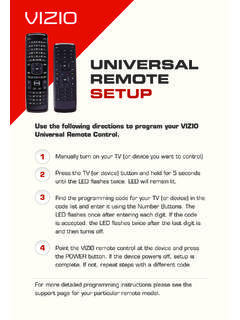
UNIVERSAL REMOTE SETUP - VIZIO
cdn.vizio.commagnavox 1174 0062 0004 0009 0183 1133 0226 0288 0456 0008 0068 0075 0141 majestic 0031 0000 0001 marantz 0062 0181 0004 0009 maxent 0046 medion 0213 0198 0158 megatron 0004 0009 0059 mei 0014 memorex 0004 0009 0049 0051 0135 0031 0000 1007 0268 0310 0001 0394 1025 mga 0004 0005 0009 0051 0012 0022 ...

HD Digital Cable Set-Top-Box N8783C
help.suddenlink.comPhilips/Magnavox 4 Toshiba 9 Samsung 5 Vizio 0 . 9 Method 2: Auto Search 1. Hold the TV & VOL+ keys for 3 seconds then release. Status light illuminates and remains on, release the keys. 2. Press and release the number 1 key. 3. Press and hold the TV key until TV turns off. 4. Press ...

6-DEVICE UNIVERSAL REMOTE
www.datocms-assets.comPhilips, Magnavox Pioneer Samsung Sony Toshiba VIZIO, RCA Yamaha To set up your device: 1. Turn on your device (not on standby) and point the ONN remote towards it. If you are setting up a Streaming device, make sure a movie or TV show is playing. 2. Press the Device key you wish to set up (for example TV). 3. Hold down the Setup key until the ...

SELF-INSTALL KIT Spectrum Receiver
d15yx0mnc9teae.cloudfront.netSTEP 2 Update Receiver A Using the included remote, turn on the receiver. B Turn on your TV, and then select the HDMI source for the receiver using INPUT or SOURCE on your TV or TV remote. C The receiver will automatically start downloading a firmware upgrade, which takes about six minutes. Important: To avoid activation issues, make sure the upgrade is complete …

1 Explore Your Remote 2 Control Your Altice One 3 Control ...
help.suddenlink.comVoice Remote User Guide Gen2 1 Explore Your Remote Home Displays or exits main menu Altice One Power DVR Displays or exits DVR menu Options Displays or exits options