Transcription of Color Multifunction Printer Copy, Print, Scan, Fax ...
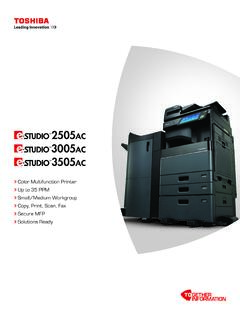
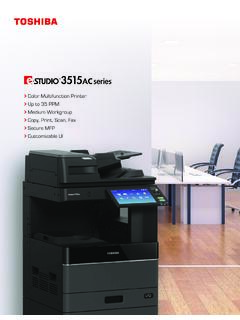
1 Color Multifunction Printer Up to 25 PPM Small Workgroup Copy, Print, Scan, Fax Secure MFP Solutions ReadySimple, smart and new 9 tablet-style touch screen with an embedded web browser is easy to use and customizable to meet your needs. And, it is part of the bold new look being introduced across the e-STUDIO for every office, delivering advanced functionality, ease of use and peace of industry has unique workflow needs. Toshiba has developed customizable MFPs to make your job easier. Intuitive and smartly integrated, our products simplify complex tasks and give you control while providing the reliability Toshiba is known for. Toshiba s latest series delivers on our promise of Together Information our commitment to collaborate with clients in order to provide tailored, cost-effective solutions that meet your print, document management and content needs while helping you meet your green objectives.
2 20 and 25 PPM Affordable, high-resolution Color High-volume black & white Advanced e-BRIDGE Next technology Fast dual-core processorColor commands makes it possible. It s important that an MFP is powerful, reliable, and efficient. Add Color to that and you have even more ways to make your documents impactful. Up to 600 dpi x 1,200 dpi Toshiba e-BRIDGE Color Profile Tool allows for the creation of profiles to adjust Color for varying media types, lighting or even to match Pantone colors, unique spot colors or output from another device 256 gradations provide ultra smooth transitions in photos and illustrations Auto-calibration ensures consistency of Color across small and large print jobse-STUDIO2000AC/e-STUDIO2500 ACCONNECT. INTEGRATE. SIZE, ALL-NEW LOOK, AND A POWERFUL small and medium businesses and workgroups that demand Color along with a small footprint, Toshiba has answered the call.
3 The e-STUDIO2500AC series is packed with industry-leading technology and innovations designed to help workgroups connect, integrate and Around eliminates printing bottlenecks by allowing other print jobs to go around one job that s held-up due to requiring a specific paper size or type or, in some cases, even colored Job Reservation will queue up multiple copy or print jobs so users can send jobs Capabilities offer saddle-stitch finishing and the option to fold without Paper Support handles 16 lb bond to 90 lb index through drawers and LCF and up to 110 lb index in Duplex Support can also handle 16 lb bond to 90 lb index for heavy duty and Print-from USB lets you print straight from your USB drive or scan documents to Feature takes the hassle out of checking for depleted supplies or maintenance Volume Indicators on the front panel make it easy to see the paper sizes, types and levels in each Help Button provides instant, thorough explanations straight from the manual to help as Module Design significantly reduces the cost and time spent servicing the Print Enabler allows you to retrieve your print job from a series of networked MFPs via simple authentication.
4 CONVENIENCE AND workgroups looking for quality Color will appreciate the fact that the e-STUDIO2500AC series is easily integrated, customizable and solutions ready, with an open e-filing lets users store jobs that are frequently printed and access finishing s exclusive e-BRIDGE Print & Capture application enables mobile device users to take advantage of the broad feature set when they re in the office and on the universal driver along with PCL 6, PS3, and XPS support provide fast and easy connectivity to Windows , Macintosh and universal print driver works for all users. Tandem print comes standard, and you can choose from a variety of time-saving, function-adding plug-ins that enable productivity from the driver. For instance: Job Point quickly split up large jobs with up to 10 Toshiba MFPs Job Replicator use multi-part form replacement (3 prints) Job Separator perform batch printing easily using any Windows app Job Build conveniently print different document types all togetherIndustry-Leading SecurityAlong with all of the new and innovative Toshiba technologies, we keep the security of your business top of mind.
5 A 320GB Self-Encrypting Drive (SED) with Automatic Drive Invalidation (ADI) & Data Overwrite capability provides top level security FIPS 140-2 Validated SED meets and exceeds government requirements IPsec is available to securely encrypt data sent to and from the MFPW orld-Leading Environmental StandardsInnovation that is truly innovative makes certain that our environment is part of the equation, which is precisely what we do here at Toshiba. RoHS compliance, the use of recycled plastics, and Low-Power ( ) Super Sleep Mode work to help the environment EPEAT Gold Registered in the global registry for greener electronics, designed to help purchasers choose products that reduce environmental impact Energy Star meets the latest, more stringent requirementsSEE WHAT THE e-STUDIO2500AC SERIES IS MADE work out of the box to find innovative ways to make your business run more efficiently. In fact, we ve found quite a and Swipe with EaseAn easy to see, tablet style 9 Color touch screen panel works intuitively, helping you find instructions, functions, and commands with the swipe of the Print EnablerToshiba s internally developed Multi-Station Print Enabler allows users to send print jobs from their desktop and retrieve them at any convenient MFP by simply swiping their badge and authenticating at that device.
6 Envelopes the Perfect FitA special envelope cassette is available to hold up to 60 envelopes, making sure each one is fed and printed in the same place, every and VolumesA high monthly copy volume up to 84,000 pages. Toner yields are 33,600 CMY and 38,400 K pages (at 5%) e-BRIDGE Next TechnologyBuilt on Linux , this latest e-BRIDGE Next architecture features an Embedded Web Browser, a fast dual-core processor, 4GB RAM and a 320GB FIPS 140-2 Validated SED enabling the MFP to easily drive Toshiba s internally developed solutions or even third-party Clever Inside PocketWe ve put the Authentication Card Reader inside the machine for a cleaner look and safer Document Feeder Options MR3031 Reversing Automatic Document Feeder (RADF) KA5005PC Platen Cover2 Accessory Tray & Options GR1250 Accessory Tray GR9000 Bluetooth Keyboard GR1260 10-Key Numeric Keypad3 Finishing Options MJ1042 50-Sheet Inner Finisher MJ1110 50-Sheet Saddle-Stitch Finisher MJ5014 Job Separator4 Additional Paper Options KD1058 Paper Feed Pedestal KD1059LT 2,000-Sheet Large Capacity Feeder MY1048 Additional Drawer Module for PFP MY1049 Envelope CassetteAdditional Option Highlights Embedded OCR Enabler Multi-Station Print Enabler Wireless LAN/Bluetooth IPsec Security Enabler Single & Dual-Line Facsimile Hidden Card Reader Pocket Expansive Third-Party Solutions List Designs and specifications subject to change without notice.
7 For best results and reliable performance, always use supplies manufactured or designated by Toshiba. Not all options and accessories may be available at the time of product launch. Please contact a local Authorized Toshiba Dealership for availability. Toner yields are esti-mates based on 5% coverage, letter-size page. Driver and connectivity feature support varies by client/network operating system. Product names may be trademarks of their respective companies. This is a Class 1 laser product complying with IEC60825-1. 2017 Toshiba America Business Solutions, Inc. Electronic Imaging DivisionInv. Code 22298 2000AC/2500AC Brochure 5K PG 7/17 Main SpecificationsCopy System Indirect Electrostatic Photographic Method/OPC/LED Printing/ Heat Roller FusingDisplay 9 Color WVGA Touch Screen Tilting Display Copy Speed 20/25 PPM (LT)First Copy Out Color : Monochrome: Time Approx. 21 Seconds Copy Resolution 600 x 600 dpiStack Feed Bypass ST-R to LD, Envelope Multiple Copying Up to 999 CopiesPaper Capacity Standard 350 Sheets/Max.
8 2,900 SheetsOriginal Feed Optional 100-Sheet RADFScan Speed & Weights RADF Scan: Up to 73 IPM (Monochrome or Color ), Simplex: lb Bond, Duplex: lb Bond Max. Original Size LDPaper Feed Sizes Drawer 1: 250 Sheets-ST-R to LD Stack Feed Bypass: 100 x to LD Opt. Paper Feed Unit: 550 Sheets-ST-R to LD Opt. 550-Sheet Paper Feed Pedestal-ST-R to LD Opt. 550-Sheet Drawer for PFP -ST-R to LD Opt. Envelope Cassette for PFP-Approx. 60 Envelopes/550 Sheets-ST-R to LG Opt. 2,000-Sheet Tandem LCF (Pedestal Type)-LT Only Paper Weights Standard: 250 Sheets-16 lb Bond-90 lb Index Stack Feed Bypass: 100 Sheets-16 lb Bond-110 lb Index Opt. Paper Feed Unit: 550 Sheets-16 lb Bond-90 lb Index Opt. 550-Sheet Paper Feed Pedestal: 16 lb Bond-90 lb Index Opt. 550-Sheet Drawer for PFP: 16 lb Bond-90 lb Index Opt. Envelope Cassette for PFP: 16 lb Bond-lb Index Opt. 2,000-Sheet Tandem LCF (Pedestal Type): 17-28 lb BondDuplex Standard Automatic Duplex Unit: 16 lb Bond-90 lb Index Reproduction Ratio 25% to 400%Max Duty Cycle Max.
9 Month (e-STUDIO 2000AC) Max. 84K Month (e-STUDIO 2500AC)Weight Approx. 126 lbApprox. Dimensions (W) x 23 (D) x (H) CMYK Toner Yield CMY: , BK: @ 5%Power Source 120 Volts, 50/60 Hz, 12 AmpsPower Consumption Maximum (120V) CPU Intel Atom (Dual-Core)Memory 4 GBHard Disk Drive 320GB Self-Encrypting Drive FIPS 140-2 Validatede-BRIDGE Next Print SpecificationsPDL PCL5e, PCL5c, PCL6 (PCL XL), PS3, PDF, XPS, JPEGP rint Speed 20/25 Pages Per Minute (LT)Print Resolution 600 x 600 dpi (5 bit) 600 x 1,200 dpi (1 bit) PS3 OnlyOperating Systems Windows Vista, Windows Server 2008/R2, Windows 7, 8, , 10, Windows Server 2012/R2, Macintosh (Mac OS , , , , , 10,11), Unix , Linux Network Protocols TCP/IP (IPv4, IPv6), NetBIOS over TCP/IP, IPX/SPX for Novell Environments, EtherTalk for Macintosh EnvironmentsPrinting Protocols SMB, LPR/LPD, IPP ( ) w/Authentication, AppleTalk PAP or EtherTalkTM, Port 9100 (bi-directional)
10 , NetWare P-SERVER LPD w/ iPrint, WS Print, FTP Print Drivers Windows Vista SP2 (32-bit, 64-bit), Windows Server 2008 SP2 (32-bit, 64-bit), Windows Server 2008 R2 SP1 (64-bit), Windows 7 SP1 (32-bit, 64-bit), Windows 8 (32-bit, 64-bit), Windows Server 2012/R2 (64-bit), Windows 10 (32-bit, 64-bit), Mac OS X , , , , RJ-45 Ethernet (10/100/1000 Base-T), USB (High-speed), Optional , Wireless LAN, Optional BluetoothWireless Device AirPrint , Mopria , e-BRIDGE Print & Capture Application on iOS and Android (Available via Apple App Store or Google Play) Device Management TopAccess, EFMS (e-BRIDGE Fleet Management Software) Account Control Up to 10,000 users or 1,000 Departments Supports User Authentication (on Device), Login Name/Password (via Windows domain) or Login Name/Password (via LDAP Server) for Copy, Print, Scan, Fax, List, and User Function Accessibility Features Tilt Front Panel, Job Programs, Universal Grip for Paper Trays, Disable Screen Timeout and Audible Beep Message AlertsSecurity Features User Authentication, On-Board Data Scramble Function, SCEP, Disable e-Filing, Disable Copy, Disk Overwrite, IP Address Filtering (10 Sets), MAC Address Filtering (10 Sets), Network Service Control, Network Port Control, SMB Packet Signing, SSL (HTTP, IPP, LDAP, SMTP, POP, FTP, DPWS), IPsec (IKEv1, IKEv2), Security Mode Change, CC Certified (ISO/IEC15408 EAL3+)*, , , Digital Signature for Client Utilities, Password Policy, Password Lock, Password Expiration, Self Testing, Job Access Control, Log Access Control for Job Log, Security Stamp * Compliant with in High security mode.