Example: biology
DirecTV RC65 Remote Control - AT&T
flashes twice, then release both keys. 5. Using the number keys enter the 5-digit code for your brand of TV. If performed correctly, the green light under TV flashed twice. 6. Aim the remote at your TV and press the PWR key once. Your TV should turn off. If it does not turn off, repeat steps 3 and 4, trying each code for your brand
Tags:
Information
Domain:
Source:
Link to this page:
Documents from same domain
Note to System Installer Cisco Wireless Access …
www.att.comCisco Wireless Access Point Quick Reference Guide ... For use with your AT&T U-verse TV service. 1 Power Green = Power is on Off = Power is disconnected from its ...
FAMILY GUIDE TO Mobile Safety - AT&T® Official
www.att.comFAMILY GUIDE TO . Mobile Safety. SPONSORED BY: 2 | ... to mobile phone safety. Educating your child is the most important thing you can do. You can

User Guide - AT&T® Official - Entertainment, TV, …
www.att.comUser Guide AT&T Wireless Home Phone. i Wireless Home Phone (“WHP”) ... Quick Start User Guide Specifications ...
PadFone X - AT&T® Official
www.att.comPadFone X. 2 May 2014 First Edition ... Quick Settings ... ASUS is not responsible for any loss or damage incurred to your micro-SIM card.
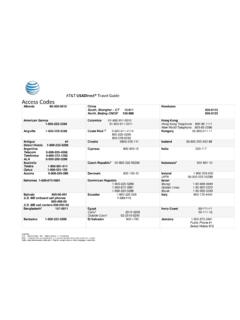
AT&T USADirect® Travel Guide Access Codes
www.att.comCalls using these access codes are in English, ... Cypress 800-900-10 India 000-117 Australia Telstra ... Axtel 01-800-112-2020

AT&T Compensation in a Competitive Marketplace
www.att.comAT&T Compensation in a Competitive Marketplace ... Continuing to lose access lines to cable and non- ... (Short & Long-Term Disability,
USER GUIDE LG-B471 - AT&T® Official
www.att.comMFL69393501 (1.0) www.lg.com ENGLISH USER GUIDE LG-B471. ... purchaser/end user. (3) ... numbers from anywhere in the continental United States:
USEr GUIdE - AT&T® Official
www.att.comWelcome! Thank you for choosing LG. Please carefully read this user guide before using the device for the first time to ensure safe and proper use.
Nokia Lumia 635 User Guide - AT&T® Official
www.att.comThere's a user guide in your phone – it's always with you, available when needed. ... These instructions may not apply to all phone models and manufacturers.
4G LTE SMARTPHONE User Manual - AT&T
www.att.comPlease read this manual before operating your phone, ... Choice of an e-mail, master data management, and virtual private network solution is at the sole
Related documents

Treating Hot Flashes - North American Menopause Society
www.menopause.orgHot flashes get better with time. Although most women have hot flashes for a few years, some women have them for decades. It is not known why some women have severe hot flashes for many years while others have no hot flashes or mild ones that resolve quickly. If your hot flashes are mild or moderate, you may find relief by changing your ...

VARIA REARVIEW RADAR RTL515/ Owner’s Manual RTL516
www8.garmin.comSolid (default) High None Light flashes Peloton (group ride) Moderate None Light flashes softly Night Flash High Slow Light flashes quickly Day Flash Maximum Occasional Light flashes quickly Standby None None The device does not detect vehicles. The Varia 516 has the solid mode only and the light does not flash when a vehicle approaches.

www.intermatic.com ST01/ST01K/EI600
dtrermj9469s.cloudfront.netevent number flashes on the display. Note: If this is the first event, you will see 01. 3. Press ON/OFF to confirm the event number. An event type flashes on the display. 4. Use + to select the event type. • ON - sets an ON event • SKIP - stops the event • OFF - sets an OFF event 5.for the continental United States.
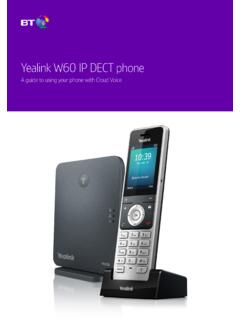
Yealink W60 IP DECT phone - BT
business.bt.com• Fast red flashes = there’s an incoming call. • Slow red flashes = you have a voicemail or missed call. • Solid red light = the handset’s battery is charging. 3 Find out more about the screen from page 9. 4 These soft keys help you use the phone’s features. 5 The message button opens your voicemail and missed calls. 6

Operation Guide 5081 - CASIO
support.casio.comflashes in the lower left display. • This is the distance value setting mode. 3. Press C to move the flashing between the values on the left side and right side of the distance value digit decimal point. 4. While either the left or right distance value is flashing, use D (+) and B (–) to change it.

Cisco RV320/RV325 Quick Start Guide
www.cisco.comFlashes green when the port is sending or receiving data. RESET—Reboot or reboot and restore defaults: • To reboot the unit and retain the current configuration, press and hold RESET for at least 3, but no more than 10 seconds, by using a paper clip or a pen tip.
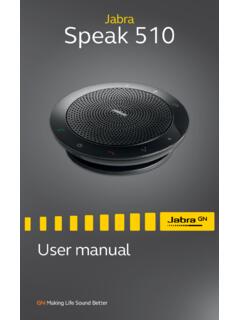
Jabra Speak 510
www.jabra.comlight flashes blue. Release the button when you hear the connection instructions. 2.Enable Bluetooth on your mobile device, and select the Jabra Speak 510 from the list of available Bluetooth devices. If prompted for a password enter 0000.

HIPAA Security - HHS.gov
www.hhs.govVolume 2 /Paper 1 3 11/2004:rev. 3/2007 1 Security 101 for Covered Entities NOTE: Security is not a one-time project, but rather an on-going, dynamic process that will …
Understanding “Arc Flash”
www.osha.govThis material was produced under grant number SH-16615-07-60-F-12 from the Occupational Safety and Health Administration, U.S. Department of Labor.