Example: tourism industry
fx-300ES PLUS Users Guide Eng - support.casio.com
E-5 Using Menus Some of the calculator’s operations are performed using menus. Pressing N or w, for example, will display a menu of applicable functions.
Tags:
Information
Domain:
Source:
Link to this page:
Documents from same domain

© 2014 CASIO COMPUTER CO., LTD. Operation …
support.casio.comOperation Guide 5146 5425 E-10 3. Press & to change the fl ashing screen content in the sequence shown below to select the other settings. Seconds

© 2016 CASIO COMPUTER CO., LTD. Operation …
support.casio.comOperation Guide 5229 5518 E-9 To set the digital time and date 1. In the Timekeeping Mode, hold down A for about three seconds until the currently selected city code flashes in

fx-570ES PLUS fx-991ES PLUS Users Guide Eng
support.casio.comE fx-570ES PLUS fx-991ES PLUS User’s Guide CASIO Worldwide Education Website http://edu.casio.com CASIO EDUCATIONAL FORUM http://edu.casio.com/forum/

FC-200V 100V Users Guide Eng - CASIO Official …
support.casio.comE-1 About this Manual • This User’s Guide covers use and operation of the CASIO FC-200V and FC-100V. Operations apply to both models, except in cases indicated by the text “FC-200V only”.

START 1. RÜCKSETZEN L HS-70W VORGANG …
support.casio.comENGLISH Timekeeping Mode Stopwatch Mode Recall Mode Press . Press . Year Month Day Second Minute Seconds Time Display Stopwatch Display Minutes

Operation Guide 3054 - support.casio.com
support.casio.comOperation Guide 3054 1 MO0606-EA Getting Acquainted Congratulations upon your selection of this CASIO watch. To get the most out of …

CTK2080 CTK2200 CTK2300 CTK3200 e - …
support.casio.comGeneral Guide E-4 Use the number buttons and the [–] and [+] keys to change the settings of the parameters that appear in the upper left area of the display.

MA1703-EA Operation Guide 5444/5524 - …
support.casio.comOperation Guide 5444/5524 E-29 x You can use the procedure under “To turn auto receive on and off” (page E-34) to enable or disable auto receive.

User's Manual SE-G1 - support.casio.com
support.casio.comE-4 •ongratulations upon your selection of this CASIO product. Be sure to read the C following safety precautions before using it for the first time.

fx-9860GII SD 9860GII 9860G AU PLUS ... - …
support.casio.comSitio web educativo para todo el mundo de CASIO http://edu.casio.com Los manuales están disponibles en varios idiomas en http://world.casio.com/manual/calc
Related documents

fx-83GT PLUS 85GT PLUS Users Guide Eng
support.casio.comE-5 Important: For some type of calculation that takes a long time to execute, the display may show only the above indicators (without any value) while it performs the calculation internally. Using Menus Some of the calculator’s operations are performed using menus.

Production Records in School Meals
www.schoolnutritiontoolbox.org9 Formats vary but should include: Site name, date, meal, and menu type Age/grade group to be served Meals planned and served Reimbursable
A419 Series Electronic Temperature Controls with Display ...
cgproducts.johnsoncontrols.comA419 Series Electronic Temperature Controls with Display and NEMA 1 or NEMA 4X Watertight Enclosures Product/Technical Bulletin For example, if the anti-short cycle delay is set for

pfSense: The Definitive Guide - Reed Media
www.reedmedia.netpfSense: The Definitive Guide The Definitive Guide to the pfSense Open Source Firewall and Router Distribution Christopher M. Buechler and Jim Pingle
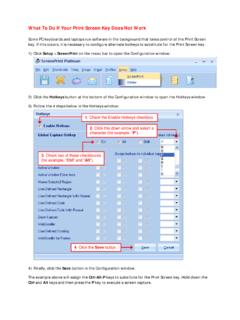
What To Do If Your Print Screen Key Does Not Work
www.softwarelabs.comWhat To Do If Your Print Screen Key Does Not Work Some PC keyboards and laptops run software in the background that takes control of the Print Screen

STALKER II MDR Moving Radar
www.stalkerradar.com006-0349-00 STALKER® II MDR Moving Radar GENERAL SPECIFICATIONS Type: Handheld Moving/Stationary Doppler Radar Operating Frequency: 34.7 Ghz (Ka-band) Stability: ±100 Mhz Battery Type: Removable/rechargeable sealed battery handle containing a 7.2 Volt Li-Ion battery Cell Capacity: 2000 mah Power