Example: quiz answers
GPSMAP 62 series - Garmin
Navigating with Waypoints and Routes Routes A route is a sequence of waypoints that leads you to your final destination. Creating a Route 1. From the main menu, select Route Planner > Create Route > Select First Point. 2. Select a category. 3. Select the first point in the route. 4. Select use. 5. Select Select Next Point. 6.
Tags:
Information
Domain:
Source:
Link to this page:
Documents from same domain

EDGE® 1030 Owner’s Manual - Garmin International
static.garmin.comCharging the Device NOTICE To prevent corrosion, thoroughly dry the USB port, the weather cap, and the surrounding area before charging or connecting to

Owner’s Manual - Garmin International
static.garmin.comIntroduction WARNING See the Important Safety and Product Information guide in the product box for product warnings and other important information.

Lidar Lite v3 Operation Manual 2 and Technical …
static.garmin.com1 Lidar Lite v3 Operation Manual and Technical Specifications Laser Safety WARNING This device requires no regular maintenance. In the event that the device

Printing a Mounting Template - Garmin
static.garmin.comPrinting a Mounting Template Notice It is not recommended that you print a mounting template on your own. Use the template that came in the product box.

GPSMAP 62 series - Garmin
static.garmin.comGPSMAP 62 Series Quick Start Manual 3 3. Replace the battery cover. For best results, after you install new batteries, update the battery type in the

Important Safety and Product Information 2 …
static.garmin.comIMPORTANT SAFETY AND PRODUCT INFORMATION WARNING Failure to heed the following warnings could result in an accident or collision resulting in death or

Important Safety and Product Information 2 …
static.garmin.comImportant Safety and Product Information 2 Informations importantes sur le produit et la sécurité 3 guida Informazioni importanti sulla sicurezza e sul

Instructions - Garmin
static.garmin.com1 GLO™ GLONASS and GPS Sensor Instructions August 2012 190-01492-00_0B Printed in Taiwan

GNS 430(A) - Garmin International
static.garmin.com190-00140-00 Rev. P GNS 430(A) Pilot’s Guide and Reference i RECORD OF REVISIONS Revision Date of Revision Description A 12/98 Initial Release B 4/99 Update to conform to recent SW changes

GNS 530(A) - Garmin International
static.garmin.com190-00181-00 Rev. H GNS 530(A) Pilot’s Guide and Reference i RECORD OF REVISIONS Revision Date of Revision Description A 5/00 Initial Release B 5/01 Update to reflect software changes through 2.06
Related documents

configuring static routes - Router Alley
routeralley.comAdvanced Static Routes Parameters The Administrative Distance of a static route can be changed to form a floating static route, which will only be used if there are no other routes with a lesser AD in the routing table. A floating static route is often used as a backup route to a dynamic routing protocol.
Lab – Configuring IPv4 Static and Default Routes (Solution ...
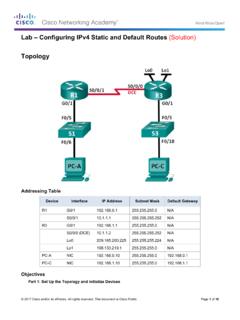
www.radford.edurecursive static routes, use the following syntax: Router(config)# ip route network-address subnet-mask ip-address a. On the R1 router, configure a static route to the 192.168.1.0 network using the IP address of the Serial 0/0/0 interface of R3 as the next-hop address. Write the command you used in the space provided.

5600 SECURITY GATEWAY - Check Point Software
www.checkpoint.com• Static routes, Multicast routes • Policy-based routing • PIM-SM, PIM-SSM, PIM-DM, IGMP v2, and v3 . Physical . Power Requirements • Single Power Supply rating: 275W • AC power input: 90 to 264V (47-63Hz)

Basic Router Configuration - Cisco
www.cisco.com† Configuring Static Routes, page 23 ... The loopback interface acts as a placeholder for the static IP address and provides default routing information. For complete information on the loopback commands, see the Cisco IOS Release configuration guide documentation set.
Configuring VRF-lite
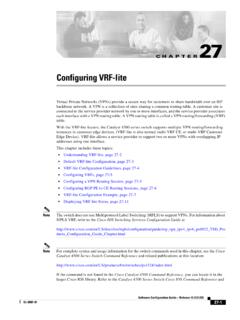
www.cisco.comCAM space, use the maximum routes command. † A Catalyst 4500 series switch using VRF can support one global network and up to 64 VRFs. The total number of routes supported is limited by the size of the TCAM. † Most routing protocols (BGP, OSPF, EIGRP, RIP and static routing) can be used between the CE and the PE.
national rail network diagram
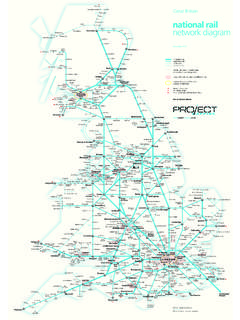
www.nationalrail.co.ukPrincipal routes Regional routes Local routes Limited service Not all lines shown in London area denoted by area within grey line Places with multiple stations on different lines London Underground Circle Line Glasgow Underground Airport interchange Ferry interchange Railair coach link with Heathrow Airport Not all stations shown www ...
owner’s manual - Garmin
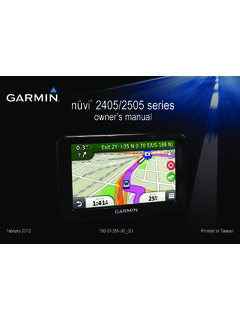
static.garmin.comon your device, pedestrian routes may include public transit (page 25). Choosing a Transportation Mode Select or . nüvi 2405/2505 Series Owner’s Manual 7 Battery Information After the device is connected to power, it begins to charge. in …
Using PRESTO on GO Transit
www.gotransit.comroutes with no transfers, off a single adult GO fare paper ticket. Actual discount may be .1% lower due to rounding. Co-fare Discounts with PRESTO The co-fare discount program between GO Transit and participating local transit systems is even better for PRESTO card users. PRESTO users get an automatic discount when transferring between GO