Example: bankruptcy
GPSMAP 78 series - Garmin
Navigating with Waypoints and Routes navigating a route 1 Press FinD. 2 Select routes. 3 Select a route. 4 Select Go. Viewing the active route 1 From the main menu, select active route. 2 contain millions of points of interest, such Select a point in the route to view additional details. Stopping navigation of a route 1 From any page, press FinD.
Tags:
Information
Domain:
Source:
Link to this page:
Documents from same domain

EDGE® 1030 Owner’s Manual - Garmin International
static.garmin.comCharging the Device NOTICE To prevent corrosion, thoroughly dry the USB port, the weather cap, and the surrounding area before charging or connecting to

Owner’s Manual - Garmin International
static.garmin.comIntroduction WARNING See the Important Safety and Product Information guide in the product box for product warnings and other important information.

Lidar Lite v3 Operation Manual 2 and Technical …
static.garmin.com1 Lidar Lite v3 Operation Manual and Technical Specifications Laser Safety WARNING This device requires no regular maintenance. In the event that the device

Printing a Mounting Template - Garmin
static.garmin.comPrinting a Mounting Template Notice It is not recommended that you print a mounting template on your own. Use the template that came in the product box.

GPSMAP 62 series - Garmin
static.garmin.comGPSMAP 62 Series Quick Start Manual 3 3. Replace the battery cover. For best results, after you install new batteries, update the battery type in the

Important Safety and Product Information 2 …
static.garmin.comIMPORTANT SAFETY AND PRODUCT INFORMATION WARNING Failure to heed the following warnings could result in an accident or collision resulting in death or

Important Safety and Product Information 2 …
static.garmin.comImportant Safety and Product Information 2 Informations importantes sur le produit et la sécurité 3 guida Informazioni importanti sulla sicurezza e sul

Instructions - Garmin
static.garmin.com1 GLO™ GLONASS and GPS Sensor Instructions August 2012 190-01492-00_0B Printed in Taiwan

GNS 430(A) - Garmin International
static.garmin.com190-00140-00 Rev. P GNS 430(A) Pilot’s Guide and Reference i RECORD OF REVISIONS Revision Date of Revision Description A 12/98 Initial Release B 4/99 Update to conform to recent SW changes

GNS 530(A) - Garmin International
static.garmin.com190-00181-00 Rev. H GNS 530(A) Pilot’s Guide and Reference i RECORD OF REVISIONS Revision Date of Revision Description A 5/00 Initial Release B 5/01 Update to reflect software changes through 2.06
Related documents
Configuring Static and Default Routes - Cisco
www.cisco.comChapter 25 Configuring Static and Default Routes Configuring Static and Default Routes Configuring a Static Route Static routing algorithms are basically table mappings established by the network administrator before the beginning of routing. These mappings do not change unless the network administrator alters them.
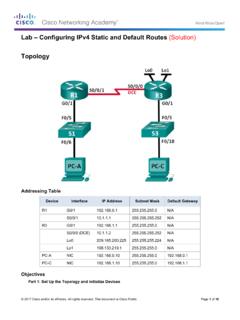
Lab – Configuring IPv4 Static and Default Routes (Solution ...
www.radford.eduA default route is a type of static route that specifies a gateway to use when the routing table does not contain a path for the destination network. Note: This lab provides minimal assistance with the actual commands necessary to configure static routing.

Basic Router Configuration - Cisco
www.cisco.com† Configuring Static Routes, page 23 ... The loopback interface acts as a placeholder for the static IP address and provides default routing information. For complete information on the loopback commands, see the Cisco IOS Release configuration guide documentation set.

configuring static routes - Router Alley
routeralley.com- Configuring Static Routes - Configuring Static Routes The basic syntax for a static route is as follows: Router(config)# ip route [destination_network] [subnet_mask] [next-hop] Consider the following example: RouterA will have the 172.16.0.0/16 and 172.17.0.0/16 networks in its routing table as directly-connected routes. To add a static route ...

eTrex H - static.garmincdn.com
static.garmincdn.comDefault—the factory setting saved in the unit’s memory. You can change the settings, but you can revert to the factory settings when you select Restore Defaults. Manual Conventions In this manual, when you are instructed to select an item, small arrows (>) appear in the text. They indicate that you should select a series of items on
GPS 72H owner’s manual - static.garmincdn.com
static.garmincdn.comwaypoints to routes, and you can navigate directly to a selected waypoint. You can create waypoints using three methods. You can mark your current location, create a waypoint on the map, or enter coordinates for a waypoint manually. Marking Your Current Location You must have a valid position fix to mark your current location. Waypo nt name ...
Using PRESTO on GO Transit
www.gotransit.comdefault Trip If you travel between the same two GO stations consistently, you can have a default trip set to your card. • If you have a default trip set, you only have to tap ON at the start of each trip. • Default trips can only be set in-person by GO Station Attendants or at participating GO ticket agencies.

INREACH Owner’s Manual MINI
static.garmin.com1. Create an account, and select a satellite subscription at explore.garmin .com. 2. Turn on the device. 3. Follow the on-screen instructions. 4. When prompted, go outdoors to an open area with a …