Example: stock market
HP Pavilion dv6 Entertainment PC
Safety warning notice WARNING! To reduce the possibility of heat-related injuries or of overheating the computer, do not place the computer directly on your lap or …
Information
Domain:
Source:
Link to this page:
Documents from same domain

HP Pavilion PC User™s Guide - HP® Official Site
h10032.www1.hp.com2 HP Pavilion PC User’s Guide Putting Your Computer Together For step-by-step instructions on putting your computer together, refer to the Welcome Poster that came in your computer box.

Quick Start Guide - HP
h10032.www1.hp.comHP Web Sites. Quick Start Guide Filename: ma2usqs.doc Title: HP-Print2k.dot Template: HP-Print2K.dot Author: jiml Last Saved By: WASSER, Inc. ® ® Start. ...

HP 9250C Digital Sender - HP® Official Site
h10032.www1.hp.comDevice information The HP 9250C Digital Sender connects directly to your network converts black-and-white and color documents, drawings, and photographs into an electronic form and then distributes them directly to

Technical Reference Guide HP Compaq dc7800 …
h10032.www1.hp.comTechnical Reference Guide HP Compaq dc7800 Series Business Desktop Computers ... deal with the system board and the power supply assembly.

Reference Guide - HP
h10032.www1.hp.comReference Guide A–1 A Troubleshooting This section provides three methods for resolving issues you may encounter when using your docking station. Use the methods

HP Pavilion 15 Notebook PC - HP® Official Site
h10032.www1.hp.com1 Product description Category Description Computer models equipped with an AMD processor Computer models equipped with an Intel processor Product Name HP Pavilion 15 Notebook PC √√

HP MINI User Guide
h10032.www1.hp.comSafety warning notice WARNING! To reduce the possibility of heat-related injuries or of overheating the device, do not place the device directly on …

User Guide - HP
h10032.www1.hp.comproprietor and used by Hewlett-Packard Company under license. Google, ... bound by the terms of the HP End User License ... see the printed Quick Start guide included ...

Manuel de l'utilisateur de l'ordinateur portable HP
h10032.www1.hp.comAvis d'avertissement sur la sécurité AVERTISSEMENT ! Pour éviter tout risque de blessure liée à la chaleur ou tout risque de surchauffe de l'ordinateur, ne le posez pas directement sur vos genoux et n'obstruez pas les ouvertures d'aération.

Manuel de l'utilisateur - HP® Official Site
h10032.www1.hp.comL'ordinateur et l'adaptateur secteur sont conformes aux limites de température de surface accessible à l'utilisateur, définies par la norme internationale sur la …
Related documents
MiniKeyboard Instructions - RS Components
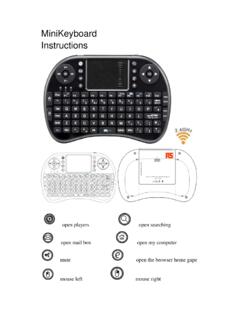
docs.rs-online.comThis is a wonderful combo,2.4GHz MiniWireless QWERTY . keyboard, TouchPad combo, with USB interface Adapter For the . lectuer, sales manager, presenter, from within a 30' radius make a . presentation and operate PC wirelessly. Change slides and screen . options, write on the screen, emphasize words and objects just by
ideapad S340-15IWL Platform Specifications - Lenovo
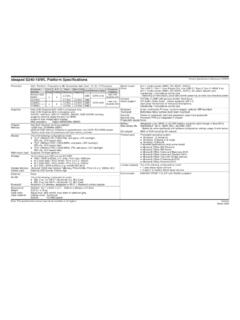
psref.lenovo.comheadphone / microphone combo jack Keyboard Touchpad 6-row, multimedia Fn keys, numeric keypad, optional LED backlight Buttonless Mylar surface multi-touch touchpad Security Security chip Fingerprint reader Power-on password, hard disk password, supervisor password Firmware TPM 2.0 integrated in chipset None Battery Max battery life

ideapad 330-15ICH Platform Specifications - Lenovo
psref.lenovo.comsingle microphone, audio combo jack Keyboard Touchpad 6-row, multimedia Fn keys, numeric keypad, optional backlight One-piece multi-touch touchpad Security Security chip Fingerprint reader Supervisor password, power-on password, hard-disk password, security keyhole Firmware TPM 2.0 None Battery Max battery life AC adapter Integrated Li-ion 45Wh ...

XPS 15 9500 Setup and Specifications - Dell
dl.dell.comTouchpad. Move your finger on the touchpad to move the mouse pointer. Tap to left-click and two fingers tap to right-click. NOTE: The top and the sides of the touchpad—8.20 mm (0.32 in.) from the edges—are disabled. This prevents unintended movements of the mouse pointer when using the keyboard. NOTE:

Inspiron 15 3542 Specifications - Dell
dl.dell.com2 Touchpad Move your finger on the touchpad to move the mouse pointer. Tap to left‑click. 3 Right‑click area Tap to right‑click. 4 Power button Press to turn on the computer if it is turned off or in sleep state. Press to put the computer in sleep state if it is turned on. Press and hold for 10 seconds to force shut‑down the computer.

HP 15 Laptop PC (AMD)* Model numbers: 15-bw0xxHP 15g …
h10032.www1.hp.comHP 15 Laptop PC (AMD) * Model numbers: 15-bw0xx HP 15g Laptop PC * Model numbers: 15g-bx0xx HP 15q Laptop PC * Model numbers: 15q-by0xx Maintenance and Service Guide