Example: air traffic controller
Join the GoPro Movement
Heads Up: You can’t delete the preloaded presets, but you can customize them any way you want. You can also create your own custom presets. To learn more, see Creating Your Own Presets (page 27). PRO TIP: From the capture screen, you can press and hold the capture settings to skip straight to the settings menu.
Tags:
Information
Domain:
Source:
Link to this page:
Documents from same domain
Download the User Manual at gopro.com/support
gopro.comrecording video or playing back footage on an LCD Touch BacPac. HiLight Tags help you quickly find the highlights later for easy playback, editing and sharing. *Playback only appears when the camera is connected to a TV or LCD Touch BacPac (sold separately). / Selecting Camera Modes 2. If necessary, select a different capture mode: a.
MANUEL DE L'UTILISATEUR - gopro.com
gopro.com4 5 / Table des matières Utilisation des supports 91 Dépannage 95 Assistance clientèle 98 Marques déposées 98 Information réglementaire 98 L'essentiel 6

MANUEL DE L’UTILISATEUR 1 - GoPro Official …
gopro.comÀ partir de l’écran principal, appuyez sur l’icône dans le coin inférieur gauche. 2. Appuyez sur l’une des icônes de mode en haut de l’écran (Vidéo,
USER MANUAL - gopro.com
gopro.comTo download this user manual in a different language, visit ... PRO TIP: When the camera is off and QuikCapture is enabled, you can ... You can also select max video as the interval. With this option, the camera records until the memory card is full, then overwrites the content.
DECLARATION OF CONFORMITY - gopro.com
gopro.com3000 Clearview Way San Mateo, CA 94402 USA DECLARATION OF CONFORMITY The product specified above complies with the essential requirements and other relevant requirements of the RED 2014/53/EU and the following Directives. The product carries the CE mark accordingly.
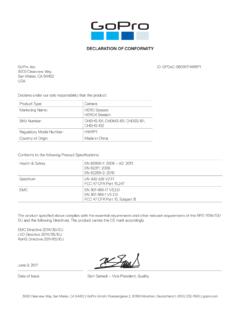
DECLARATION OF CONFORMITY - gopro.com
gopro.comGoPro, Inc. 3000 Clearview Way San Mateo, CA 94402 USA DECLARATION OF CONFORMITY The product specified above complies with the essential requirements and other relevant requirements of …

HERO 1080 INSTRUCTIONS - GoPro Official Website
gopro.comFree downloadable camera updates may be available at gopro.com. Be sure to insert an SD card into the camera or else you won’t be able to record photos or video. POWER/MODE BUTTON ˜ Front of Camera POWER/MODE button turns camera on and off and works as …
USER MANUAL - GoPro
gopro.com2 3 To download this user manual in a different language, visit gopro.com/support. Pour télécharger ce manuel de l’utilisateur dans une autre langue,

USER MANUAL 1 - GoPro
gopro.comUsing Your Camera with an HDTV 33 Connecting to the Capture App 35 Offloading Your Content 36 Video Mode: Capture Modes 39 Video Mode: Settings 41 Video Mode: Advanced Settings 48 Photo Mode: Capture Modes 50 Photo Mode: Settings 52 Photo Mode: Advanced Settings 54 Time Lapse Mode: Capture Modes 56 Time Lapse Mode: Settings 58 TABLE OF CONTENTS

Join the GoPro Movement
gopro.com3. Insert the battery. 4. Connect your camera to a USB charger or computer using the included USB-C cable. It takes about 2 hours for the battery to fully charge. The camera status light will turn off when it’s done. To learn more, see Battery Information (page 105). PRO TIP: For the fastest charging, use the GoPro Supercharger (sold separately).
Related documents
Gambling Winnings Fact Sheet 1104
www.revenue.wi.govJan 04, 2022 · What You Should Know About the Taxation of Gambling Winnings in Wisconsin ... only a reporting requirement, not a requirement that the casino withhold tax from your winnings. If you win $1,200 or more on a bingo or slot machine, the casino must report the amount of cash winnings to the Internal ... you play the following gambling sessions ...
Sky±HD User Guide
storage.sky.comWhether you need to make sure you’re set up correctly, or simply ... Picking up from where you left the last recording 63 The Play symbol 63 Checking the remaining viewing time 63 ... so you can watch all the Sky TV channels you’re entitled to. The viewing card slot is under the flap on the front of your Sky±HD
MobileLabeler User Guide - DYMO
download.dymo.com4 Getting to Know the LabelMaker 5 Power 5 Power Status Light 5 Battery Status Light ... you will need the serial number, which is located on the bottom of the label maker. See Figure1 on page4. ... Do not insert objects into or block the label exit slot. Do not touch the cutter blade. Personal injury could result.
Hot Pepper Poblano VLE5 Quick Start Guide - Q Link Wireless
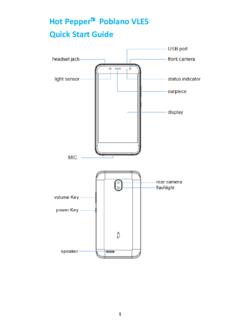
resources.qlinkwireless.com3. Insert the nano SIM card into the SIM card slot as shown. 4. Insert the memory card into the card slot as shown (If you need). 5. Reload the battery. 6. Reattach back cover of the phone. Important Notes: The nano SIM card is a small SIM card. Do not use a micro-SIM or SIM card adaptor which may damage your device.

ROMED8-2T
download.asrock.comIf you need to contact ASRock Rack or want to know more about ASRock Rack, you’re welcome to visit ASRock Rack’s website at www.ASRockRack.com; or you may contact your dealer for further information. ASRock Rack Incorporation 6F., No.37, Sec. 2, Jhongyang S. Rd., Beitou District, Taipei City 112, Taiwan (R.O.C.)

Dell S2716DG Monitor User's Guide
downloads.dell.comHDMI Display Modes DP Display Modes Model S2716DG/S2716DGR IBM VGA,640 x 480p 31.5 60 25.2 -/-VESA, 720 x 480p 29.83 60 26.25 +/-VESA, 720 x 576p 29.55 50 26 +/-

User Guide - Cricket Wireless
www.cricketwireless.comWhen you first power on your phone after you purchase it or reset it to factory settings (see Phone settings – Backup & reset), you need to set up your phone settings before using it . 1 . Scroll the language list to highlight the language you need and then tap Start. 2 . Select a Wi-Fi ® account to connect your phone to or tap Skip.