Example: air traffic controller
Mirage Quattro™ - ResMed
WARNINGS • The Mirage ... point of application and leak rate. ... It is not necessary to remove the headgear clips from the headgear. 3emove the elbow assembly from the mask frame R (Fig. C-3). It’s easier to pivot the bottom of the elbow away from the mask frame than to pull the
Tags:
Information
Domain:
Source:
Link to this page:
Documents from same domain

Indications for use System requirements Compatible ResMed ...
document.resmed.com• Android™ 5.0 and later. Compatible ResMed devices • AirSense 11 • AirSense 10 • AirCurve 10. Note: Bluetooth features are only available on AirSense 11. Security : Built-in security features, steps you take to protect your smart device against malware, and keeping

User guide - document.resmed.com
document.resmed.comUse only ResMed parts (eg, air inlet filter, power supplies), masks and accessories with the machine. Non ResMed parts may reduce the effectiveness of the treatment, may result in excess carbon dioxide rebreathing and/or damage the machine. For compatibility information, refer to ResMed.com for more information. When using the humidifier tub:
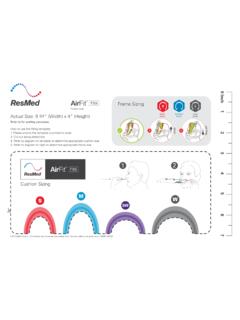
AirFit F30i - Fitting guide - ResMed
document.resmed.comTitle: AirFit F30i - Fitting guide Created Date: 8/13/2019 10:03:58 PM
Sleep Lab Titration Guide - ResMed
document.resmed.comFemale patients with mild to moderate OSA weighing more than weighing more than 66 lb (30 kg) 4–20 cm H 2O AutoSet/APAP (automatic positive airway pressure) Automatically adjusts pressure in response to flow limitation, snore and obstructive apneas OSA Patients weighing more than 66 lb (30 kg) 4–20 cm H 2O VAuto Automatically adjusts ...

Travel Compliance Letter for ResMed Therapy Devices
document.resmed.comPage 3 of 4 ResMed Corp 9001 Spectrum Center Blvd. San Diego, CA 92123 USA T 1 800 424 0737 F 1 858 836 5000 ResMed Pty Ltd 1 Elizabeth Macarthur Drive Bella Vista NSW 2153 Australia T +61 (2) 8884 1000 F +61 (2) 8884 2000 ResMed (UK) Ltd 8 Wimpole Street, London W1G 9SP, UK T +44 (1235) 862 997 F +44 (1235) 831 336 ResMed.com ...
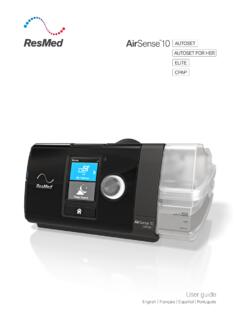
User guide - ResMed
document.resmed.comThe AirSense 10 CPAP device is indicated for the treatment of obstructive sleep apnea (OSA) in patients weighing more than 66 lb (30 kg). It is intended for home and hospital use. The humidifier is intended for single patient use in the home environment and re. use in a - hospital/institutional environment. Contraindications
Home Oxygen Qualifying Guidelines - ResMed
document.resmed.comThe qualifying blood gas study/oxygen saturation test was performed by a physician, qualified provider or supplier of laboratory services that is registered and able to bill for the test, and the necessity for such testing must be documented in the patient’s medical record. C. All three qualifying exercise tests should be performed during the ...

User guide - ResMed
document.resmed.com• The Astral device may be used in the vicinity of electronic article surveillance (EAS) systems during mobile situations when attached to th e patient or patient’s wheelchair. The Astral device may experience interference in the vicinity of EAS. Keep the Astral device at least 8” (20 cm) away from the EAS.

User guide - ResMed
document.resmed.comWhen Pressure Relief is enabled, you may find it easier to breathe out. This can help you get used to therapy. SmartStart* When SmartStart is enabled, therapy starts automatically when you breathe into your mask. When you remove your mask, it stops automatically after a

S9 Series AutoSet & Elite - ResMed
document.resmed.com• Do not wash the air tubing in a washing machine or dishwasher. Weekly: 1. Remove the air tubing from the S9 device and the mask. 2. Wash the air tubing in warm water using mild detergent. 3. Rinse thoroughly, hang, and allow to dry. 4. Before next use, reconnect the air tubing to the air outlet and mask. Monthly: 1.
Related documents

DCD791 DCD796 - Free Instruction Manuals
www.free-instruction-manuals.comRead all safety warnings and all instructions. Failure to follow the warnings and instructions may result ... clips, coins, keys, nails, screws or other ... correct power tool for your application. The correct power tool will do the job better and safer at the rate for which it
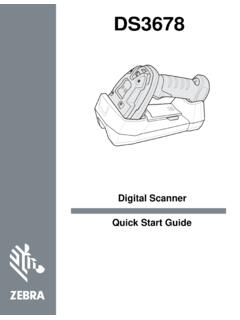
DS3678 Quick Start Guide (en) - Ingram Micro
inquirecontent2.ingrammicro.comcircuit, or application described herein. No license is granted, either expressly or by implication, estoppel, or otherwise ... Warnings for Use of Wireless Devices ... The use of th ird-party belt clips, holsters, and similar accessories may not ...

QMS Aspects of the MDR (& IVDR) - BSI Group
www.bsigroup.comDate of Application (26 May 2020) Last MDD/AIMD ... wires, pins, clips and connectors), shall provide together with the device the following: device name, serial number, lot number Unique Device Identification, device model manufacturer name, address and website any warnings, precautions or measures to be taken by the patient or a healthcare ...
Installation Instructions - Carrier
www.carrier.comAPPLICATION A00071 Fig. 5 - Conversion for Horizontal Right Applications Using A-Coil 2. Remove metal clip securing fitting panel to condensate pan. Remove fitting panel. 3. Remove 2 snap-in clips securing A-coil in unit. 4. Slide coil and pan assembly out of unit. 5. Remove horizontal drain pan support bracket from coil sup-
Installation Guide - Windows -- 400 Series - Complementary ...
www.andersenwindows.comapplication, and temperature when applying sealant. Failure to do so may result in water infiltration. 4. Position Installation Clips Windows and doors can be heavy. Use safe lifting techniques and a reasonable number of people with enough strength to lift, carry and install window and door products to avoid injury and/or product damage.

FRAMES - Bose
assets.bose.comWARNINGS/CAUTIONS • Do NOT use the frames at a high volume for any extended period. – To avoid hearing damage, use your frames at a comfortable, moderate volume level. – Turn the volume down on your device before wearing the frames or placing them near your ears, then turn the volume up gradually until you reach a comfortable listening level.