Example: air traffic controller
Quick Guide - Ingram Micro
The result is a fresh experience that’s quick to learn, easy to use, and great for doing the things that matter most to you. Familiar and up to date Windows 10 is the Windows you know, plus the Windows that’s designed to stay new. It has a friendly familiar feel that makes it a breeze to use.
Tags:
Information
Domain:
Source:
Link to this page:
Documents from same domain

Solution Guide HP in Healthcare - Ingram Micro
usa.ingrammicro.comAndroid and Windows user environments across the ... HP Retail Tablets HP ePrint Point-of-Care Analytics HP Mini Desktop PCs HP ... Solution Guide | HP ...
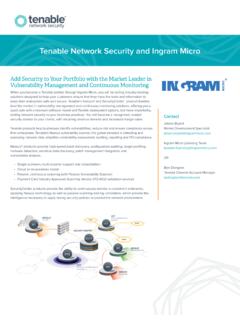
Tenable Network Security and Ingram Micro
usa.ingrammicro.comTenable Network Security and Ingram Micro ... Tenable’s Nessus vulnerability scanner, the global standard in detecting and assessing network data, simplifies vulnerability assessment, auditing, reporting and PCI compliance. ... traffic and detects devices on your network, including virtual and cloud-based devices.

Help Me Upgrade! - usa.ingrammicro.com
usa.ingrammicro.comSP C262DNw, SP C262SFNw $50 $25 $25 $100 SP C340DN, SP C342DN $60 $25 $25 $110 SP C435DN $100 $50 $50 $200 SP C440DN $125 $50 $50 $225 SP C840DN, SP C842DN $300 $100 $75 $475 . Author: Ricoh Created Date: 6/27/2017 12:59:49 PM ...

MSRP Price List - usa.ingrammicro.com
usa.ingrammicro.comMSRP Price List. Suggested Retail Price List ... SP 377DNwX. SP 3600DN SP 4510DN. SP 6430DN SP 5300DN/SP 5310DN. SP 8400DN Color Printers. SP C250DN SP C262DNw. SP C340DN SP C342DN. SP C435DN SP C440DN. SP C840DN/SP C842DN Multifunction Printers. Color SP C261SFNw. SP C262SFNw Black & White SP 325SFNw. SP 377SFNwX SP 3610SF. SP 4510SF …

SMARTnet and Smart Net Total Care Convergence FAQ for ...
usa.ingrammicro.comSMARTnet and Smart Net Total Care Convergence . FAQ for Cisco Partners and Distributors . June 8, 2015 . The information in this Frequently Asked Questions document is Cisco Confidential.

RSA AUTHENTICATION MANAGER - Ingram Micro
usa.ingrammicro.comRSA Authentication Manager is designed to deliver choice and flexibility including a range of authenticators: hardware tokens, software tokens, on-demand authentication and Risk-Based Authentication.
Related documents
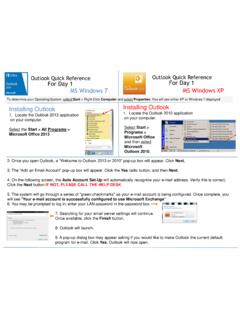
Outlook Quick Reference For Day 1 MS Windows 7 ... - …
w3.assurant.comOutlook Quick Reference For Day 1 Outlook Quick Reference For Day 1 MS Windows 7 MS Windows XP Installing Outlook 1. Locate the Outlook 2013 application on your computer. Select the Start > All Programs > Microsoft Office 2013 Installing Outlook 1. Locate the Outlook 2010 application on your computer. Select Start > Programs > Microsoft Office ...

Adobe Photoshop 7.0 Quick Reference Card for Windows
www.cheat-sheets.orgVersion 7 for Windows ® QUICK REFERENCE CARD Adobe Online Move (V) (M) Rectangular Marquee Magic wand (W) Slice (K) Brush (B) History brush (Y)* Gradient (G)*

MiCollab Client Quick Reference Guide Q - Mitel Edocs
edocs.mitel.comMiCollab Client Quick Reference GuideQ About MiCollab Client MiCollab Client is a software comm unications product integrated with advanced call management features. The following clients are available: • MiCollab for PC Client (Windows 10 only) • MiCollab MAC Desktop Client • MiCollab Web Client

Windows 7 Quick Reference - SharePoint Training
www.customguide.comWindows 7 Quick Reference Card Windows Explorer Keyboard shortcuts General Start menu My Computer + E Create new folder Ctrl + Shift + N Zoom + + Connect to projector + P Flip 3D + Tabnavigation to Window management Peek at the desktop + Space Show/Hide desktop + D Minimize all windows + M Minimize other + Home windows

Windows 7 Quick Reference Guide - Hobbs Municipal Schools
hobbsschools.netWindows 7 Quick Reference Guide Updated: April 2010 Windows Explorer Keyboard Shortcuts • To Search for a File or Program: Click the Start button and type a keyword for the file or program. Results are displayed immediately in the menu. • To Search for a …

Windows 7 Quick Reference Guide - Lehman College
wp.lehman.eduWindows 7 – Quick Reference Guide Windows Explorer Desktop shortcuts Gadgets Start menu Start menu search box T Start button Active program buttons ndows Explorer icon askbar T askbar Notific tion area Show Desktop button Starting Programs and Opening Files To open the Start menu: 1.
Detailed Guide to Office 2010 - Word - Renfro Corporation
www.renfro.comBy design, this guide can be used as a replacement for the Windows 7 and Microsoft Office 2010 Quick Start Guide section for “Microsoft Word 2010” and the Word-related pieces of “Microsoft Office 2010 – Common Features” .
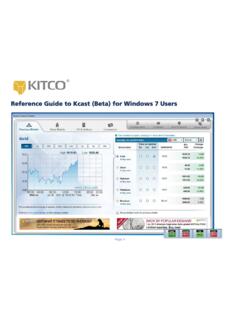
Reference Guide to Kcast (Beta) for Windows 7 Users
www.kitco.comRecommended Windows 7 Settings for Kcast Users To get the most out of your Kcast application, Kitco strongly recommends the following default settings for your Windows 7 operating system: Note: The Kcast for Windows 7 Taskbar always appears on your Application Tray (bottom left of your window). Taskbar Settings 1. Right-click the Windows taskbar 2.
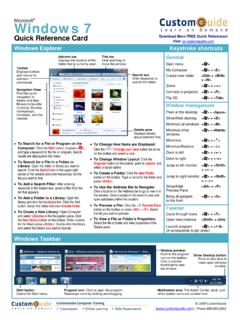
Windows 7 QR - CustomGuide
www.customguide.com• Jump Lists are quick shortcuts to files and commands that a program uses program selected. For example, Internet Explorer displays frequently visited pages, Microsoft Word displays frequently opened documents. • To View a Jump List: Right-click an icon on the Windows 7 taskbar. Or,
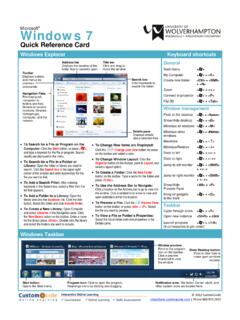
Windows 7 - University of Wolverhampton
www2.wlv.ac.ukTo Flip through Windows with Flip 3D: Press < > + <Tab>; continue to hold down the < > key while pressing <Tab> to scroll through the open windows. Personalization To Personalize Windows 7 Appearance and Sounds: Right-click the desktop and select Personalize. The …
Related search queries
Outlook Quick Reference For Day, Windows 7, Windows, Quick Reference Card for Windows, QUICK REFERENCE, MiCollab Client Quick Reference, Windows 7 Quick Reference, Windows 7 Quick Reference Guide, Windows 7 – Quick Reference Guide Windows, Detailed Guide to Office 2010 - Word, Quick, Reference Guide to Kcast (Beta) for Windows 7, Kitco