Example: air traffic controller
UniFi Cloud Key UCK-G2 Quick Start Guide
Quick Charge 2.0 or Quick Charge 3.0-compliant USB power adapter is required. microSD Slot Optional slot used for external backup (microSD card not included). Ethernet Port Connects to a gigabit switch port on your LAN. Power can be provided by an 802.3af PoE switch, such as the UniFi PoE Switch.
Tags:
Information
Domain:
Source:
Link to this page:
Documents from same domain

U-Installer Quick Start Guide - Ubiquiti Networks
dl.ubnt.comLEDs Wi-Fi Lights blue if the U-Installer has a Wi-Fi connection to your mobile device. Battery Four blue LEDs indicate the internal battery’s charge level: Full charge Low charge* * Recharge the battery by connecting a power source,

Advanced Gigabit Ethernet Router - Ubiquiti …
dl.ubnt.comThis Quick Start Guide is designed to guide ... Advanced Gigabit Ethernet Router Model: ER-X EdgeRouter X Power Adapter (12V, 0.5A) Quick Start Guide

TOUGHCable PRO Quick Start Guide - Ubiquiti Networks
dl.ubnt.com2 TOUGHCable™ PRO Quick Start Guide TOUGHCable Box The Tension Knob is set to High by default. If necessary, the tension can be set to to Low or None. Tension Knob TOUGHCable PRO Cross-Section Conductor Insulation ESD Drain Wire

802.11ac Dual Radio Access Point
dl.ubnt.comThis Quick Start Guide is designed to guide you through ... 802.11ac Dual Radio Access Point Model: UAP-AC-LITE Gigabit PoE* (24V, 0.5A) with Mounting Bracket

UniFi AC AP Datasheet - dl.ubnt.com
dl.ubnt.com3 D atasheet UniFi Controller Packed with Features Use the UniFi Controller to provision thousands of UniFi APs, map out networks, quickly manage

Wide-Angle 1080p Dome IP Camera with Infrared
dl.ubnt.comIntroduction Thank you for purchasing the Ubiquiti Networks® UniFi® Video Camera G3 Dome. This Quick Start Guide is designed to guide you through installation and includes warranty terms.

1080p Wireless IP Security Camera with Infrared
dl.ubnt.comIntroduction Thank you for purchasing the Ubiquiti Networks® UniFi® Video Camera G3 Micro. This Quick Start Guide is designed to guide you through installation and also includes warranty terms.

Datasheet - Ubiquiti Networks
dl.ubnt.comDatasheet www.ubnt.com/airmax 3 Software airOS is an intuitive, versatile, highly developed Ubiquiti firmware technology. It is exceptionally intuitive and …

802.11n Wi-Fi Access Point - Ubiquiti Networks
dl.ubnt.comHardware Installation The UniFi AP can be mounted to the wall or ceiling. Perform the steps for the appropriate installation: Wall Mount 1. Position the Mounting Bracket at the desired location on the wall with the cable feed slot pointed towards the floor.

Rocket ac Datasheet - Ubiquiti Networks
dl.ubnt.comD atasheet 4 Technology Unlike standard Wi-Fi protocol, Ubiquiti’s Time Division Multiple Access (TDMA) airMAX ac protocol allows each client to send and receive
Related documents

Am I Buying the Correct Size Natural Gas Hose & Quick ...
mbsturgis.comnatural gas quick disconnect with an inside diameter of 5/8”, you actually have a 3/8” Quick Disconnect and the 3/8” is actually reflecting the inside diameter of the hose it connects with. On the opposite side of the female quick disconnect socket is the Female Pipe Thread side of

Dual-Band 802.11ac Wi-Fi Access Point with PoE In/Out
dl.ubnt.comQuick Start Guide is designed to guide you through installation and also includes warranty terms. ... 24V PoE OUT Connects to and powers a 24V PoE airMAX device. The Power Adapter connects to this port. Hardware Installation ... Never use an adapter plug to connect to a 2-wire outlet as this will defeat the continuity of the grounding wire.

Symbol LS4278 Quick Reference Guide, p/n 72-69835-01 Rev B
pdfs.metrolinedirect.comQuick Reference Guide 13 Radio Communications Host Types Scan a bar code below to choose how the scanner connects to a remote device. Scan Cradle Host if connecting to the Symbol STB4278 cradle. Pairing When the scanner is configured as an SPP or HID Master, a 'pairing bar code' must be created for the remote Bluetooth device to which the ...

1 Dial 4 Transfer 7 Voicemail - Cisco
www.cisco.comQuick Start Cisco IP Phone 8811, 8841, ... to pair and connect your smartphone or tablet. After your smartphone or tablet connects, its name displays on the second line label and you use this line to manage your smartphone or tablet calls. You …

Mighty Quick Start Guide - Fetch TV
www.fetchtv.com.auConnect the Fetch box to your broadband modem Connect the Fetch box to your TV Antenna Connect the Fetch box to your TV Power up your Fetch Mighty Start up your Fetch Mighty This guide tells you all you need to know about setting up and turning on your Fetch Mighty. It also has important safety and usage information.

Mini Quick Start Guide - Fetch TV
www.fetchtv.com.auConnect the Fetch Mini to your broadband modem Connect the Fetch Mini to your TV Antenna Connect the Fetch Mini to your TV Power up your Fetch Mini Start up Fetch This guide tells you all you need to know about setting up and turning on Fetch. It also has important safety and usage information. It’s Fetch and it’s ready when you are. 1 2 3 ...

Quick Install Guide - D-Link
support.dlink.comQuick Install Guide If any of the above items are missing, please contact your reseller. • Make sure the area that you want to plug the extender into has a solid connection to your router. Use a wireless laptop, tablet, or mobile phone in that area to test the connection to verify. • If your wireless router or access point does not support WPS,
Programmable Digital-7 Plus PN 7531 - Holley
documents.holley.comcontroller can make extremely quick compensations to the output voltage, multiple spark series, timing and rpm limits while maintaining accurate timing signals to within +/- 0.1° and +/- 10 rpm. The circuits and controller of the ignition have been thoroughly debounced and suppressed to create protection against Electro Magnetic Interference ...
QUICK GUIDE TO GASTROSTOMY FEEDING TUBES AND …
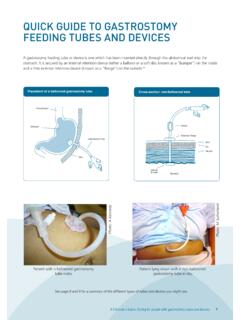
aci.health.nsw.gov.auA gastrostomy feeding tube or device is one which has been inserted directly through the abdominal wall into the stomach. It is secured by an internal retention device (either a balloon or a soft disc known as a “bumper”) on the inside . and a firm external retention device (known as a “flange”) on the outside. 11. QUICK GUIDE TO ...