Transcription of USB to RS232 DB9 Serial Adapter Cable - StarTech.com
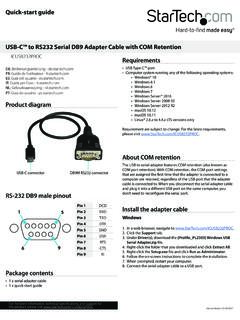
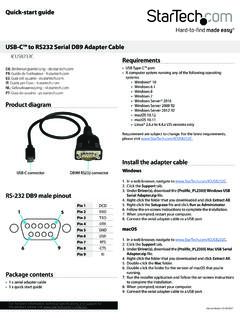
1 Instruction ManualDE: Bedienungsanleitung - : Guide de l'utilisateur - : Gu a del usuario - : Guida per l'uso - : Gebruiksaanwijzing - : Guia do usu rio - Revision: 04/10/2014 For the most up-to-date information, please visit: Contents 1x USB to Serial Converter 1x Instruction ManualSystem Requirements windows 7 (32/64bit), Vista (32/64), XP(32/64), 2000, ME, 98SE, CE , ; windows Server 2008 R2, 2003(32/64); Mac OS , ; Linux Available USB port on your computerInstallationWindows1. Open a web browser and go to Enter your product ID (ICUSB232) and click Select the product from the search results, and download the available Once downloaded, right-click the zip file and extract the Browse to the windows folder and run the PL2303_Prolific_DriverInstaller application, following the on-screen instructions to complete the Connect the USB Serial Cable to an available USB port.
2 Mac1. Open a web browser and go to Enter your product ID (ICUSB232) and click Select the product from the search results, and download the available Once downloaded, double-click the zip file to extract the Browse to the Mac folder and choose the appropriate folder for the version you are Run application and follow the on-screen instructions to complete the Connect the USB Serial Cable to an available USB to RS232 DB9 Serial Adapter Cable *actual product may vary from photosVerifying Successful Installation ( windows )1. Open the System folder (My Computer, Control Panel, System).
3 2. Click the Device Manager tab at the top of the dialogue Click the + in front of the Universal Serial Bus Controller heading to see the USB controller listing. If the Installation is completed successfully, you should see an entry for USB to Serial Peripheral DevicesWith the computer booted up and the USB Serial Adapter already plugged into the computer s USB port, plug the peripheral into the USB Serial Adapter ; then turn the peripherals : This procedure only occurs the first time you connect up your peripheral. If your peripheral was previously connected and configured for the RS-232 (COM) port, after you perform the Adapter Installation and click Finish, the driver will detect it and install it Pin AssignmentsPinAssignment1CD2 RXD3 TXD4 DTR5 GND6 DSR7 RTS8 CTS9 RIFCC Compliance StatementThis equipment has been tested and found to comply with the limits for a Class B digital device, pursuant to part 15 of the FCC Rules.
4 These limits are designed to provide reasonable protection against harmful interference in a residential installation. This equipment generates, uses and can radiate radio frequency energy and, if not installed and used in accordance with the instructions, may cause harmful interference to radio communications. However, there is no guarantee that interference will not occur in a particular installation. If this equipment does cause harmful interference to radio or television reception, which can be determined by turning the equipment off and on, the user is encouraged to try to correct the interference by one or more of the following measures: Reorient or relocate the receiving antenna.
5 Increase the separation between the equipment and receiver. Connect the equipment into an outlet on a circuit different from that to which the receiver is connected. Consult the dealer or an experienced radio/TV technician for of Trademarks, Registered Trademarks, and other Protected Names and SymbolsThis manual may make reference to trademarks, registered trademarks, and other protected names and/or symbols of third-party companies not related in any way to Where they occur these references are for illustrative purposes only and do not represent an endorsement of a product or service by , or an endorsement of the product(s)
6 To which this manual applies by the third-party company in question. Regardless of any direct acknowledgement elsewhere in the body of this document, hereby acknowledges that all trademarks, registered trademarks, service marks, and other protected names and/or symbols contained in this manual and related documents are the property of their respective s lifetime technical support is an integral part of our commitment to provide industry-leading solutions. If you ever need help with your product, visit and access our comprehensive selection of online tools, documentation, and downloads.
7 For the latest drivers/software, please visit InformationThis product is backed by a two year warranty. In addition, warrants its products against defects in materials and workmanship for the periods noted, following the initial date of purchase. During this period, the products may be returned for repair, or replacement with equivalent products at our discretion. The warranty covers parts and labor costs only. does not warrant its products from defects or damages arising from misuse, abuse, alteration, or normal wear and of LiabilityIn no event shall the liability of Ltd. and USA LLP (or their officers, directors, employees or agents) for any damages (whether direct or indirect, special, punitive, incidental, consequential, or otherwise), loss of profits, loss of business, or any pecuniary loss, arising out of or related to the use of the product exceed the actual price paid for the product.
8 Some states do not allow the exclusion or limitation of incidental or consequential damages. If such laws apply, the limitations or exclusions contained in this statement may not apply to A PlugSerialDB9 MaleData Transfer RateOver 230 KbpsCable Length35 cmPower ModeUSB PoweredUSB CompliantOperating Temperature50C ~ 400 CStorage Temperature-200C ~ 600 CHumidity0% ~ 80% x x IDProlific PL-2303OS CompatibilityWindows 7 (32/64bit), Vista (32/64), XP(32/64), 2000, ME, 98SE, CE , Server 2008 R2, 2003(32/64)Mac OS.