Example: dental hygienist
USER GUIDE - AT&T
sides of the TV back panel rather than down the middle once connected. Try not to coil any twin-lead cables and keep them away from A/V cables as much as possible. • Never insert objects of any kind into any openings in the DIRECTV ® Receiver (other than the DIRECTV Access Card as detailed in this manual).
Tags:
Information
Domain:
Source:
Link to this page:
Documents from same domain
Note to System Installer Cisco Wireless Access …
www.att.comCisco Wireless Access Point Quick Reference Guide ... For use with your AT&T U-verse TV service. 1 Power Green = Power is on Off = Power is disconnected from its ...

FAMILY GUIDE TO Mobile Safety - AT&T® Official
www.att.comFAMILY GUIDE TO . Mobile Safety. SPONSORED BY: 2 | ... to mobile phone safety. Educating your child is the most important thing you can do. You can
User Guide - AT&T® Official - Entertainment, TV, …
www.att.comUser Guide AT&T Wireless Home Phone. i Wireless Home Phone (“WHP”) ... Quick Start User Guide Specifications ...

PadFone X - AT&T® Official
www.att.comPadFone X. 2 May 2014 First Edition ... Quick Settings ... ASUS is not responsible for any loss or damage incurred to your micro-SIM card.
AT&T USADirect® Travel Guide Access Codes
www.att.comCalls using these access codes are in English, ... Cypress 800-900-10 India 000-117 Australia Telstra ... Axtel 01-800-112-2020

AT&T Compensation in a Competitive Marketplace
www.att.comAT&T Compensation in a Competitive Marketplace ... Continuing to lose access lines to cable and non- ... (Short & Long-Term Disability,
USER GUIDE LG-B471 - AT&T® Official
www.att.comMFL69393501 (1.0) www.lg.com ENGLISH USER GUIDE LG-B471. ... purchaser/end user. (3) ... numbers from anywhere in the continental United States:
USEr GUIdE - AT&T® Official
www.att.comWelcome! Thank you for choosing LG. Please carefully read this user guide before using the device for the first time to ensure safe and proper use.
Nokia Lumia 635 User Guide - AT&T® Official
www.att.comThere's a user guide in your phone – it's always with you, available when needed. ... These instructions may not apply to all phone models and manufacturers.
4G LTE SMARTPHONE User Manual - AT&T
www.att.comPlease read this manual before operating your phone, ... Choice of an e-mail, master data management, and virtual private network solution is at the sole
Related documents

Synology DiskStation DS918+
global.download.synology.comPackage Contents Main unit x 1 AC power cord x 1 ... 1 Status Indicator Front Panel Displays the status of the system. For more information, see "Appendix B: LED Indicator Table ". 2 Disk Indicator Displays the status of the installed drive. For more information, see ... Then insert the fastening panels to secure the drive in place. Hardware ...

The Future of Public Health - Centers for Disease Control ...
www.cdc.govMay 10, 2005 . HIGHLIGHTS . ... Care Is Key . PANEL DISCUSSION . Challenges in improving the health of all Supported by an educational grant from AstraZeneca Pharmaceuticals LP . Ca M A N A G E D re e ... sources and may not be the same as indicated on the approved package insert. Please consult the com

FLIGHT INSTRUMENT PANEL - Logitech
www.logitech.comInstalling the Instrument Panel To use the Instrument Panel as a standalone device, simply extend the support stand at the back of unit as shown. You can also fix the panel to the supplied mounting bracket. Insert the screws through the holes at the corners of the panel into the bracket behind and tighten.

FLIGHT INSTRUMENT PANEL - Logitech
www.logitech.comTo use the Instrument Panel as a standalone device, simply extend the support stand at the back of unit as shown. You can also fix the panel to the supplied mounting bracket. Insert the screws through the holes at the corners of the panel into the bracket behind and tighten.
Start Here - XP-6100
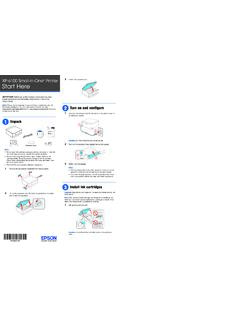
files.support.epson.com5 Insert the cartridges at an angle in the holder for each color. Press each cartridge down until it clicks. 6 Lower the scanner unit. 7 Select Installed and press the OK button to start charging the ink. Ink charging takes approximately 10 minutes. When you see a completion message on the printer’s LCD screen, charging is complete.

Artisan 1430 User's Guide - files.support.epson.com
files.support.epson.com• Mac OS X 10.6/10.7: In the Apple menu or the Dock, select System Preferences. Select Print & Fax or Print & Scan, select your product, and select Options & Supplies. Select Utility and select Open Printer Utility. • Mac OS X 10.4/10.5: In the Apple menu or the Dock, select System Preferences. Select Print &