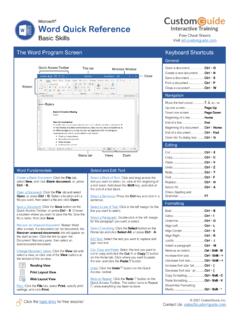
Microsoft Word Quick Reference - CustomGuide
Ribbon Free Cheat Sheets Visit ref.customguide.com ... tab, type the text you want to find in the Search box, and click an item to jump to it in the document. the Replace Text: ... Add Page Color: Click the Design tab, click the Page Color button, and select a page color. Add Page Borders: ...
Download Microsoft Word Quick Reference - CustomGuide

Information
Domain:
Source:
Link to this page:
Documents from same domain

Microsoft PowerPoint 2013 - CustomGuide
www.customguide.comMicrosoft® PowerPoint 2013 Quick Reference Card The PowerPoint 2013 Screen Keyboard Shortcuts The Fundamentals To Create a New Presentation: Click the File tab, click New.

Word 2013 Quick Reference - SharePoint Training
www.customguide.comMicrosoftWord 2013 ® Quick Reference Card The Word 2013 Screen Keyboard Shortcuts General Open a Document Ctrl + O Create New Ctrl + N …

Quick Reference Card Visit: qr.customguide
www.customguide.comMicrosoftWord 2016 ® Quick Reference Card The Word 2016 Screen Keyboard Shortcuts General Open a Document Ctrl + O Create New Ctrl + N …

Windows 10 Quick Reference - CustomGuide
www.customguide.comMicrosoft® Windows 10 Quick Reference Card Start Menu Keyboard shortcuts Basic Commands Start Menu Copy a Folder/File Ctrl + C Cut a Folder/File Ctrl + X

Your Organization’s Name Here - SharePoint Training
www.customguide.com©CustomGuide 2015 3 Table of Contents Table of Contents ..... 3

Project 2013 Quick Reference - CustomGuide
www.customguide.comMicrosoft® Project 2013 Quick Reference Card Project 2013 Screen Common Views To Display a View: Select the View tab and choose from the Task Views available.

Windows 8 Quick Reference - CustomGuide
www.customguide.comicrosof inos uic eference Car For Personal Use Only ustomuide Contact Us at info@customguide.com for organizational use. Free Quick References! Visit: qr.customguide.com The Start Screen

Word 2007 Quick Reference - SharePoint Training
www.customguide.comMicrosoft® Word 2007 Quick Reference Card Word 2007 Screen [Grab your reader’s attention with a great quote from the Shortcuts The Fundamentals Open a Document …

uic eference Car Free Quick References! - …
www.customguide.comicrosof nc uic eference Car For Personal Use Only ustomuide Contact Us at info@customguide.com for organizational use. Free Quick References! Visit: qr.customguide.com The Lync 2013 Window

Excel 2013 Quick Reference - CustomGuide
www.customguide.comMicrosoftExcel 2013 ® Quick Reference Card The Excel 2013 Screen Keyboard Shortcuts Close button General Open a Workbook Ctrl + O Create New Ctrl + N
Related documents
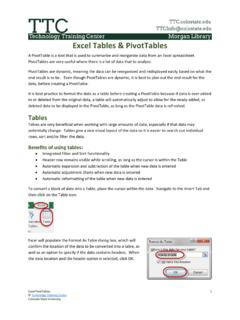
Excel Tables & PivotTables - Colorado State University
wsnet2.colostate.eduTables give a nice visual layout of the data so it is easier to search out individual rows, sort and/or filter the data. ... place the cursor within the data. Navigate to the Insert Tab and then click on the Table icon. Excel will populate the Format As Table dialog box, which will ... side of the ribbon. To make any changes to a table, the ...
Introduction to COMSOL Multiphysics
cdn.comsol.comThe Windows drop-down list in the Home tab of the ribbon gives you access to all COMSOL Desktop windows. On OS X and Linux®, you will find this in the Windows menu. In addition to the windows described earlier you can access the following windows: † Add Physics and Add Multiphysics: Expand the physics interfaces in a model.
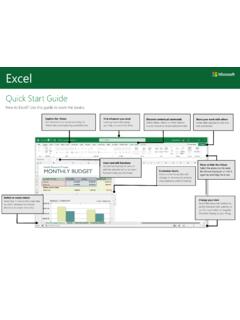
Quick Start Guide
download.microsoft.comExplore the ribbon. See what Excel can do by selecting the ribbon tabs and exploring available tools. Find whatever you need. Look up Excel commands, get Help, or search the Web. Discover contextual commands. Select tables, charts, or other objects in a workbook to reveal additional tabs. Share your work with others. Invite other people to view and
Introduction to Microsoft Office 2016: Word
www.twinsburglibrary.org(3) and click the magnifying glass symbol to search for it. NOTE: Search will only look through one drive at a time. To search your flash drive, you need to click the icon located on the left side NOW YOU TRY: Opening a file o Click on the File tab in the upper-left corner. o Click Open.
MOS 2016 Study Guide for Microsoft Excel ... - Asciutto.com
www.asciutto.comthe ribbon might require a little adaptation. Simple procedural instructions use this format: On the Insert tab, in the Illustrations group, click the Chart button. If the command is in a list, our instructions use this format: On the Home tab, in the Editing group, click the Find arrow and then, in the Find list, click Go To.
OneNote 2016 Tips & Tricks
download.microsoft.com12. Add a table of contents to a notebook Create a new Table of Contents page. Right-click any page tab to copy its link. You’re done! 1 2 Repeat for other page or section tabs. 4 Share your notes so others can browse. 5 Press Ctrl+V to paste the link to the Table of …
OnBase Quick Reference Guide - University of Northern Iowa
it.uni.eduClick Custom Queries in the ribbon ... appropriate search criteria and Press the Enter key, or click the search button configured on the Customer Query. Your search result(s) will be displayed on a tab. Double-click on a ... NOTE: Click on the keyword label (or within the keyword box press F6) to add additional search fields of the same keyword ...
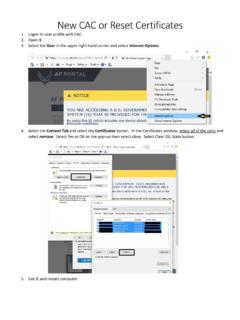
New CAC or Reset Certificates
www.usafa.eduSearch Language Advanced Customize Ribbon Quick Access Toolbar Add-Ins Trust Center Help keep your documents safe and your computer secure and healthy. Protecting your privacy Microsoft cares about your privacy. For more information about how Microsoft Outlook helps to protect your privacy, please see the privacy statements.

SC-CC-42 - Submission of Advance Import Payments ...
www.sars.gov.zaB) If the correspondence is not found in the list the importer can start a new search by: I) Clicking on the Clear button; and II) Inserting new information. C) When the relevant correspondence is found the importer clicks the View button next to the SARS correspondence. D) SARS eFiling displays the correspondence in a new tab.