
Operating Instructions Troubleshooting
Troubleshooting Provides a guide to solving common problems, and explains how to replace paper, toner, and other consumables. Security Reference This manual is for administrators of the machine. It explains security func-tions that the administrators can use to protect data from being tampered with, or prevent the machine from unauthorized use.
Download Operating Instructions Troubleshooting

Information
Domain:
Source:
Link to this page:
Documents from same domain

Istruzioni per l’uso Risoluzione dei problemi
support.ricoh.comIstruzioni per l’uso Risoluzione dei problemi Leggere attentamente questo manuale prima di utilizzare la macchina e tenerlo a disposizione per …

Operating Instructions General Settings Guide - …
support.ricoh.comOperating Instructions General Settings Guide Read this manual carefully before you use this machine and keep it handy for future reference. For safe and correct use, be sure to …

DDST Unit Type A / Type B - Ricoh
support.ricoh.comDDST Unit Type A / Type B Operating Instructions Printer / Scanner Reference Read this manual carefully before you use this machine and keep it handy for future reference.

Gebruiksaanwijzing Scannerhandleiding - …
support.ricoh.comGebruiksaanwijzing Scannerhandleiding Lees deze handleiding zorgvuldig door voordat u dit apparaat gebruikt en houd hem bij de hand voor toekomstig gebruik.

SP 210/SP 210SU/SP 210SF/ SP 211/SP ... - …
support.ricoh.com5 CTT213 CTT073 CTT074 DCT032 DCT049 CTT029 To connect to the network via wireless LAN, see Wi‑ Fi Settings Guide. Otherwise, see page 7 "2. Install‑

Manuel utilisateur Guide de paramétrage général
support.ricoh.comManuel utilisateur Guide de paramétrage général Lisez attentivement ce manuel avant d’utiliser ce copieur et conservez-le dans un endroit accessible afin de pouvoir vous y référer ultérieure-

SP 212/SP 213 Series Wi-Fi Settings Guide - Ricoh
support.ricoh.com1 Model No. SP 212/SP 213 Series Wi-Fi Settings Guide Introduction There are two wireless LAN modes: infrastructure mode for connection through an access point and ad-hoc mode for establishing direct connection with a wireless LAN-capable device

Operating Instructions General Settings Guide - …
support.ricoh.comOperating Instructions General Settings Guide Read this manual carefully before you use this machine and keep it handy for future reference. For safe and correct use, be sure to …

Operating Instructions Troubleshooting - Ricoh
support.ricoh.comOperating Instructions Troubleshooting Read this manual carefully before you use this machine and keep it handy for future reference. For safe and correct use, be …

Network Guide - Ricoh
support.ricoh.comNetwork Guide Read this manual carefully before you use this machine and keep it handy for future reference. For safe and correct use, be sure to read the
Related documents

CAN-Bus Troubleshooting Guide - ESD Electronics Inc
www.esd-electronics-usa.comNormally the voltage should be between 2.0 V and 4.0 V. If it is lower than 2.0 V or higher than 4.0 V, it is possible that one or more nodes have faulty transceivers. For a voltage lower than 2.0 V please check CAN_H and CAN_L conductors for continuity. For a voltage higher than 4.0 V…
Troubleshooting & Service for EL/VS Systems
balboadirect.comG.F.C.I. Troubleshooting IF CORRECT WIRING IS VERIFIED UÊCheck to see if the proper G.F.C.I. is installed. UÊCheck the label in the system box near TB1 to determine the maximum amperage draw for the system. UÊBe sure the G.F.C.I. is rated for more amperage than the system will draw. UÊFor a 240 V dedicated system, a 2-pole G.F.C.I. with no

vSphere Troubleshooting - VMware vSphere 6
docs.vmware.comvSphere Troubleshooting describes troubleshooting issues and procedures for vCenter Server implementations and related components. Intended Audience This information is for anyone who wants to troubleshoot virtual machines, ESXi hosts, clusters, and related storage solutions. The information in this book is for experienced Windows or Linux

Practical LC-MS Troubleshooting and Maintenance: A Primer
genome.duke.eduHigh V Power Supply Fail Pass 4. MS/MS Fragmentation Go to #4 Pass Key Most Common Causes for Failure ontinued next page… MS System: A Troubleshooting Workflow 2. Signal Stability Check (Signal should not show significant decrease in ~minutes)
Joint Knowledge Online CAC Login Troubleshooting Guide
jko.jten.milEnsure only TLS v 1.0 is checked Open the “Tools – Internet Options” menu item in Internet Explorer and then click the Advanced tab NOTE: If you are unable to open “Tools- Internet Options” menu item, please contact your local help desk.
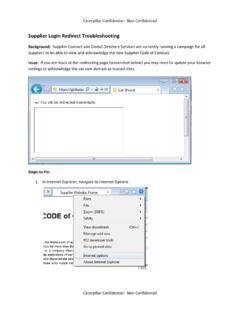
Supplier Login Redirect Troubleshooting - Cat
supplierconnect.cat.comSupplier Login Redirect Troubleshooting Background: Supplier Connect and Global Directory Services are currently running a campaign for all Suppliers to be able to view and acknowledge the new Supplier Code of Conduct. Issue: If you are stuck at the redirecting page (screenshot below) you may need to update your browser
Port Channels and Trunking - cisco.com
www.cisco.comCisco Nexus 1000V Troubleshooting Guide, Release 4.0(4)SV1(1) OL-19427-05 Chapter 7 Port Channels and Trunking Initial Troubleshooting Checklist Trunking Overview Trunking, also known as VLAN trunking, enables inte rconnected ports to transmit and receive frames in more than one VLAN, over the same physical link.
CAN-Bus Troubleshooting Guide
www.esd-electronics-usa.comNormally the voltage should be between 2.0 V and 4.0 V. If it is lower than 2.0 V or higher than 4.0 V, it is possible that one or more nodes have faulty transceivers. For a voltage lower than 2.0 V please check CAN_H and CAN_L conductors for continuity. For a voltage higher than 4.0 V, please check for excessive voltage.

HDHomeRun Troubleshooting Guide (20090415)
www.silicondust.comSymptom: Ethernet LED flashing, connected directly to PC (Windows). 1. Check that the IP address of the network interface is either: Set to “Obtain an IP address automatically” The "obtain an IP address automatically" setting can take up to 3 minutes to choose an AutoIP address.