Transcription of TNCM (Princess Juliana Intl) - FlySea
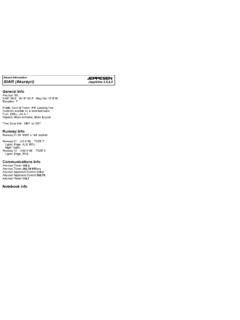
1 JEPPESENJEPPESENJEPPESENJEPPESENJeppView ( princess Juliana Intl) Airport InformationGeneral InfoSt Maarten I, ANTN 18 ' W 63 ' Mag Var: WElevation: 13'Public, Control Tower, IFR, Landing Fee, Rotating Beacon,Customs availble on a restrcted basisFuel: 100-130, Jet A-1 Time Zone Info: Atlantic Time GMT-4:00 no DSTR unway InfoRunway 09-27 7152' x 148' asphaltRunway 09 ( M) TDZE 11' Lights: Edge, REIL Right Traffic Stopway Distance 394'Runway 27 ( M) TDZE 13' Lights: Edge Stopway Distance 262'Communications InfoJuliana Tower Approach Control InfoLicensed to max. Printed on 16 Feb : PRINTED FROM AN EXPIRED REVISION.
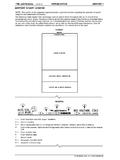
2 Disc 01-2008 JEPPESENJeppView | jeppesen SANDERSON, INC., 2006. ALL RIGHTS DOCKING GUIDANCE GENERAL ITEMS TO CHECK BEFORE ENTERING THE STAND AREA1 DEC THE SBU MESSAGEPRINCESS Juliana intl (PHILIPSBURG)ST MAARTEN I, NETH ANTILLES1. INTRODUCTIONThe Safedock Docking Guidance System (DGS) is an automated "parking aid" system designed tosafely guide the aircraft into gate to its assigned stop-position. It accomplishes this by activelytracking the aircraft while providing the pilot real-time visual feedback of "distance-to-go" andazimuth guidance in relation to the centerline and SAFETY PROCEDURESThe DGS has built-in features of self-diagnostics and gate area scanning checks to inform theaircraft pilot of problems that could affect the safety of the docking procedure.
3 Refer to"section 4. ABNORMAL CONDITIONS" for futher details on these the pilot is unsure of the information being shown on the DGS Display unit, the aircraftSHOULD BE STOPPED IMMEDIATELY UNTIL further information for clearance HAS BEEN the DGS has built-in features of self-diagnostics and gate area scanning checks, thepilot should always use their judgement of safety should there be any items in the "obstacle free"area not captured by the DGS. In general, the aircraft should be stopped prior to further entryinto the gate area if there is a presence of any object posing a question to the safety of theaircraft or personnel on the that the DGS is displaying the vertical running arrows and correct aircraft type.
4 If thereis any concern in these checks, the aircraft should be stopped until the situation is corrected ormanual guidance is provided. During the aircraft docking, the pilot should follow the guidanceof the DGS while staying alert for any items within his view posing a danger to the aircraft orpersonnel on the PRECAUTIONS:THE PILOT SHALL NOT ENTER THE GATE AREA, UNLESS THE DOCKING SYSTEM IS SHOWINGTHE VERTICAL RUNNING PILOT SHALL NOT ENTER THE STAND AREA UNLESS THE AIRCRAFT TYPE AND ANY OTHERDISPLAYED INFORMATION IS CORRECT FOR THE AIRCRAFT THEY ARE PILOT MUST NOT PROCEED BEYOND THE BOARDING BRIDGE CAB, UNLESS THESE ARROWSHAVE BEEN REPLACED BY THE "CLOSING RATE BAR".
5 The message STOP SBU means that docking has been interrupted due to an unexpected error orhardware malfunction and has to be resumed by manual guidance. DO NOT RESUME DOCKINGUNDER DGS-GUIDANCE UNDER THIS AIRCRAFT DOCKING PROCEDUREThe following section is a detailed step-by-step approach to the stages of the docking routineindicating the typical events from start to START OF DOCKING (SELF-TEST)Upon activating the DGS for aircraft docking, a self-test and calibration checkis performed to confirm docking accuracy. During this time, the display willshow "WAIT". CAPTURE (INCOMING AIRCRAFT)The rolling arrows indicate that the SAFEDOCK is searching the gate arealooking to "capture" the arriving that the correct aircraft and sub-type are displayed.
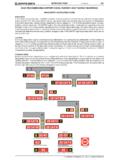
6 If not the dockingmay result in an ID-fail. Following this, the pilot should proceed into the gatearea following the correct lead-in line or NOT PROCEED PAST THE BOARDING BRIDGE CAB IF THE ROLLING ARROWSARE NOT REPLACED BY THE "CLOSING RATE BAR". ALSO, KEEP AWARE OF ANYVISIBLE ITEMS POSING A DANGER TO THE SAFETY OF THE AIRCRAFT ORPERSONNEL ON THE entry to the gate area, the pilot should make a quick visual check of the gate area andYellowRedRedCHANGES:JEPPESENL icensed to max. Printed on 16 Feb : PRINTED FROM AN EXPIRED REVISION. Disc 01-2008 JEPPESENJeppView | jeppesen SANDERSON, INC., 2006. ALL RIGHTS DOCKING GUIDANCE SYSTEMS1 DEC 06 princess Juliana intl (PHILIPSBURG)ST MAARTEN I, NETH TRACKINGWhen the DGS "captures" the approaching aircraft, the rolling arrows arereplaced by a "yellow" closing rate bar".
7 At this point, the DGS has capturedthe aircraft and is actively tracking it. The DGS is also in the process of verifyingthe approaching aircraft against that selected (as shown in the display).The "closing rate bar" consists of a centerline indicator showing the aircraftin relation to the target CLOSING RATED igital countdown begins when the aircraft is 12 meters (or 40 feet) from itsstop position. When the aircraft is within this distance, the "distance-to-go"closing rate indicator decreases by about one LED-row per foot or halfmeter of countdown resolution:20 to 2 meters2 meters to STOP1 meters40 to 8 feet8 feet to STOP4 feet1 footThe example shows the B747 aircraft 10m from the stop-position slightly off-center to the aligned to center, the RED direction arrows disappear indicating ALIGNED TO CENTER aircraft is on example shows the B747 aircraft 8m from the stop-position and the aircraft is approaching faster than the accepted speed.
8 The SLOW DOWN will show SLOW DOWN as a warning to the example now shows the B747 aircraft about 8m from the stop-positionand still on-center yet needing to slow AZIMUTH GUIDANCEC enterline guidance countinues to the example shows the B747 aircraft 4m from the stop-position,slightly off-center to the STOP-POSITION REACHEDWhen the aircraft reaches its assigned stop-position, the display willshow STOP with RED lights to each DOCKING COMPLETEDA fter the aircraft is completely stopped, the OK message will be OVERSHOOT (TOO FAR)If the aircraft overshoots the stop-position, a TOO FAR will be : The overshoot condition is usually triggered by the aircraft goingmore than past the target stop-position.
9 This may or may not createa concern for the boarding bridge to accommodate the overshoot ground crew will be alerted to the situation by this message and thendetermine if the aircraft needs to be pushed pilot should steer the aircraft to the flashing RED arrow provides azimuth guidance and indicates the directionCHANGES:JEPPESENL icensed to max. Printed on 16 Feb : PRINTED FROM AN EXPIRED REVISION. Disc 01-2008 JEPPESENJeppView | jeppesen SANDERSON, INC., 2006. ALL RIGHTS DOCKING GUIDANCE SYSTEMS1 DEC 06 princess Juliana intl (PHILIPSBURG)ST MAARTEN I, NETH CHOCKS ON MESSAGEThe "Chocks On" is displayed to indicate that the chocks have been set inplace to the aircraft wheels.
10 This feature is available via button press on theOperator's Panel to provide or supplement the ground operator's responsibilityto provide the status message to the STOP SHORTIf the aircraft is stopped short and at a standstill but has not reachedthe intended stop position, the message STOP OK will be shown aftera ABNORMAL CONDITIONSIf an object is blocking the view from the SAFEDOCK DGS laser-scanning unit toward the stopposition of the selected aircraft type, the system will be unable to perform the docking an object is detected between the laser scanning unit and the stop position for at least tenseconds, the DGS will halt the docking procedure and display a GATE BLOCK warning the blocking object is removed, the docking procedure will be resumed.