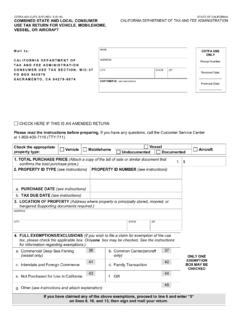
Transcription of CDTFA-401-INST, : Instructions for Completing the CDTFA ...
1 CDTFA -401-INST REV. 26 (7-21) STATE OF CALIFORNIA CALIFORNIA DEPARTMENT OF TAX AND FEE ADMINISTRATION Instructions for Completing the CDTFA -401-A, State, Local, and District Sales and Use Tax return You Can Easily File Your return Online Filing your return online is an easy and effcient method of fling your sales and use tax return . When you fle your return online with the California Department of Tax and Fee Administration ( CDTFA ), the system calculates tax due based on the sales and deduction information you enter. Online fling helps reduce errors by prompting you when items are missed. By ensuring the accuracy of your return , you can avoid interest, overpayment, and penalties due to reporting incorrect information. By fling your return online, you avoid additional cost for postage or having your return lost in the mail.
2 Once you have completed and transmitted your return to the CDTFA , the return is automatically posted to your account. You can also view previously fled online returns, fle amendments, fle your return early, and set a future date to make your payment, as long as the payment is made prior to the due date of the return . To fle your return online, go to , and select File a return . Making Your Payment There are three easy and convenient payment options available. Note: Never send cash payments through the mail. ACH Debit Method You can fle and pay your return in one easy transaction. This is the preferred method for making a payment on a return . Enter your banking information (bank account number and bank routing number). Select a payment date. Payments may be held for any banking day you select up to the tax due Card Payment You can pay by credit card through a third-party vendor: American Express , Discover , MasterCard , and Visa cards are accepted.
3 A service fee of percent of thetransaction amount will be charged by the third-party vendor. This service fee is not paid to, or retained by, the must return to the online fling system after making your credit card payment to complete fling your return . Paper Check Choose this option to print out a payment voucher to mail in with your check. Print the confirmation page and payment voucher. This voucher is only available immediately after filing your return . Mail in your check, with the account number written on the memo line, with the payment voucher. Make your check ormoney order payable to the California Department of Tax and Fee Administration. Keep a copy for your Methods When Filing Paper Returns Check or Money Order: Make your check or money order payable to the California Department of Tax and FeeAdministration, and always write your account number on the check or money order.
4 Be sure to enclose your paymentwith your return . Credit Card: You can charge your tax return payment if you have an American Express , Discover , MasterCard ,or Visa credit card. Other cards cannot be accepted. To make credit card payments, visit our website , or call 1-855-292-8931. The credit card processing vendor will charge a service fee of percentof the amount charged. This service fee is not paid to, or retained by, the you are required by the CDTFA to pay taxes by Electronic Funds Transfer (EFT), you must continue to use that method. Additional information is available on our website at 1 CDTFA -401-INST REV. 26 (7-21) General Information These Instructions are provided to assist you with Completing your CDTFA -401-A, State, Local, and District Sales and Use Tax return . If you need assistance, please call our Customer Service Center toll-free at 1-800-400-7115 (CRS:711).
5 Customer service representatives can help you with questions Monday through Friday from 8:00 to 5:00 (Pacifc time), except state holidays. You must fle a return even if you do not owe taxes for the reporting period. If you are unable to fle your return on time, you may qualify for an extension. A request for an extension of time to fle a tax return may be submitted online by logging in to your account with your username and password on our website at , and select the Relief Request option. Page 1 Due on or before Enter the due date of the return . Period begin date Enter the frst day for the reporting period. For instance, if you are reporting on the frst quarter of 2020, the date would be January 1, 2020. Period end date Enter the last day of the reporting period. For instance, if you are reporting on the frst quarter of 2020, the date would be March 31, 2020.
6 Account number Enter your account number, which can be found on your seller s permit. If you are fling an amended return , check the box to indicate that this fling represents an amended return . Lines 1 through 3 Page 1 Sales Purchases Subject to Use Tax Line 1. Total Sales Enter your total taxable and nontaxable sales for the reporting period, including lease and rental receipts. Report all sales (in any manner) related to doing business in California. You will deduct current period nontaxable transactions in Sections A through D on page 3. Include all charges related to your sales, such as labor, service, and shipping and handling charges. Used Vehicle Dealers: Also include charges related to your vehicle sales(for example, document fees, smog certification fee, mandatory warranties, etc.). If you sold any business assets, such as fixtures and equipment, during the reporting period, you must report thesale.
7 If you are filing your final return and reporting the sale of the business assets, see the last bullet under Line Subject to Use Tax. Your total sales may include amounts for California sales or use taxes. If this is the case, be sure to deduct those taxamounts on Section A, line 9. If you do not, you will overpay 2. Purchases Subject to Use Tax Enter your total purchases that are subject to use tax, as explained below. Your purchases of merchandise, equipment, and other tangible personal property are subject to use tax and must be reported if you: Purchased the property from an out-of-state retailer who did not collect California use tax, or Purchased the property with a resale certificate or other exemption certificate, and used the property in California for apurpose other than: Resale or Demonstration, retention, or display while holding it for sale in the regular course of CDTFA -401-INST REV.
8 26 (7-21) You must also report your purchase of a vessel or aircraft if you: Purchased it from an unlicensed retailer who did not charge tax on the transaction and Used the property for a purpose other than resale as described the amount you paid for the property. Notes: If you paid another state s sales or use tax on your purchase, do not include the tax payment as part of your purchaseprice. You may be eligible for a credit for the other state s tax (see Instructions for line 20c). If you are reporting property purchased with a resale certificate, report the purchase price on the tax return for thereporting period during which you first used the property in California. If you are reporting property purchased from an out-of-state retailer who did not charge you for California tax, reportthe purchase price on the tax return for the reporting period during which you first used the property in California.
9 If you are closing out your seller s permit and have sold fixtures and equipment, you should report the sales price andidentify the sale as fixtures and equipment on line 2 of your final sales and use tax return . You must also report anyinventory you intend to retain for your own use or for use as a gift, that was purchased for resale without the paymentof tax or tax reimbursement, on line 2 of your final sales and use tax return and identify it as retained inventory. Salesof inventory to another retailer or to the purchaser of your business are not taxable but should be reported as Salesfor Resale on line 4 of your return . A resale certificate should be obtained from the buyer and saved in your more detailed information, see publication 74, Closing Out Your 3. Total Add lines 1 and 2 to fnd your total sales and purchases subject to use tax.
10 Enter the result on line 3. Page 3 Nontaxable Sales, Current Period Tax Recovery Adjustments and Deductions, and Current Period Partial Tax Exemptions Full deductions in Section A and B are transactions not subject to tax and will be subtracted from the total on line 3. Report your current period partial tax-exempt transactions on page 3, in Sections C and D (see Instructions below). Enter the total in Section D, line 6 and on page 1, line 20a. Complete CDTFA -531-Q, Schedule Q Tax Recovery, prior period tax recovery credits on page 1, line 20b. You must maintain records that support all claimed deductions. Section A. Nontaxable Sales (deductions) Page 3 Any transaction(s) under this section must be included on line 1, Total Sales, on page 1. If you have no Section B Current Period Tax Recoveries and Deductions or adjustments, the total from this section will be the total for page 1, line 11 (Total Nontaxable Transactions Reported).