Example: quiz answers
Deployment vSAN Planning and - VMware
Creating Static Routes for vSAN Networking 34 Best Practices for vSAN Networking 35 ... Fault domains vSAN supports configuring fault domains to protect hosts from rack or chassis failures when the vSAN cluster spans across multiple racks or blade server chassis in a data center.
Tags:
Information
Domain:
Source:
Link to this page:
Documents from same domain

vSphere Storage - VMware vSphere 6
docs.vmware.comvSphere Storage VMware vSphere 6.5 VMware ESXi 6.5 vCenter Server 6.5 ... 9 Using ESXi with iSCSI SAN 63 iSCSI SAN Concepts 63 How Virtual Machines Access Data on an iSCSI SAN 68 10 Configuring iSCSI Adapters and ... Task instructions in this guide are based on the vSphere Web Client. You can also perform most of the tasks

vSphere Storage - VMware vSphere 6
docs.vmware.comVMware vSphere 6.5 VMware ESXi 6.5 vCenter Server 6.5. vSphere Storage ... vSphere Storage VMware, Inc. 5. Configuring VMFS Pointer Block Cache 199 18 Understanding Multipathing and Failover 201 ... See Target and Device Representations and Chapter 14 Managing Storage Devices.

vSphere Networking - VMware vSphere 6
docs.vmware.comEnable LACP 5.1 Support on an Uplink Port Group 82 Limitations of the LACP Support on a vSphere Distributed Switch 83 6 Backing Up and Restoring Networking Configurations 85

VMware User Environment Manager Administration Guide
docs.vmware.comVMware User Environment Manager Administration Guide ... Windows Explorer and view settings Explorer layout and details pane. 4 Browse to and select a location for the configuration file. ... VMware User Environment Manager Administration Guide, application. and files.

vSphere Storage - VMware vSphere 6
docs.vmware.comSetting LUN Allocations for iSCSI 69 Network Configuration and Authentication 70 ... General Boot from iSCSI SAN Recommendations 111 vSphere Storage VMware, Inc. 4. Prepare the iSCSI SAN 112 Configure Independent Hardware iSCSI Adapter for SAN Boot 113 ... Guide.. target ...

VMware Horizon Client for Linux User Guide - VMware ...
docs.vmware.comThis document, VMware Horizon Client for Linux User Guide, explains how to use VMware Horizon ... n Instructions about whether to turn on a VPN (virtual private network) connection. n Name of server on which you have unauthenticated access to remote applications.

VMware Horizon Client for Windows User Guide - VMware ...
docs.vmware.comVMware Horizon Client for Windows User Guide 04 JAN 2018 VMware Horizon Client for Windows 4.7. VMware Horizon Client for Windows User Guide VMware, Inc. 2 ... n Instructions about whether to turn on a VPN (virtual private network) connection. n Server name to use for connecting to the server.

vSphere Storage - VMware vSphere 6
docs.vmware.comvSphere Storage describes virtualized and software-defined storage technologies that VMware ESXi™ and VMware vCenter Server offer, and explains how to configure and use these technologies.

VMware Horizon Client for Windows 10 UWP Installation and ...
docs.vmware.comVMware Horizon Client for Windows 10 UWP Installation and Setup Guide VMware, Inc. 7. n If you are using a security server, verify that you are using the latest maintenance releases of ... VMware Horizon Client for Windows 10 UWP Installation and Setup Guide.

Management vSphere Resource - VMware Docs Home
docs.vmware.comAbout vSphere Resource Management 7 1 Getting Started with Resource Management 8 Resource Types 8 Resource Providers 8 ... Getting Started with Resource Management 1 ... Shares specify the relative importance of a virtual machine (or resource pool). ...
Related documents
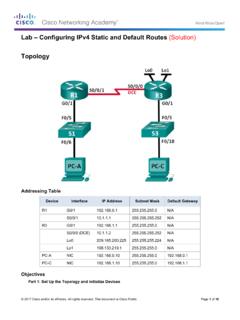
Lab – Configuring IPv4 Static and Default Routes (Solution ...
www.radford.eduPart 3: Configure Static Routes Configure a recursive static route. Configure a directly connected static route. Configure and remove static routes. Part 4: Configure and Verify a Default Route Background / Scenario A router uses a routing table to determine where to send packets. The routing table contains a set of routes

Red Hat Enterprise Linux 8 System Design Guide
access.redhat.comDec 09, 2021 · CONFIGURING LANGUAGE AND LOCATION SETTINGS 4.2. CONFIGURING LOCALIZATION OPTIONS 4.2.1. Configuring keyboard, language, and time and date settings ... Setting up Static IPv4 or IPv6 Settings 4.3.4.5. Configuring Routes 4.3.4.6. Additional resources 4.3.5. Configuring Connect to Red Hat 4.3.5.1. Introduction to System Purpose

Cisco Expressway-E and Expressway-C - Basic Configuration
www.cisco.comwith a static NAT and Dual Network Interface architecture. SIP and H.323 Domain The example deployment is configured to route SIP (and H.323) signaling messages for calls made to URIs which use ... Task 15: Configuring Routes to a Neighbor Zone (Optional), page 38
Configuring Static and Default Routes - Cisco
www.cisco.comConfiguring Static and Default Routes Configuring a Static Route Static routing algorithms are basically table mappings established by the network administrator before the beginning of routing. These mappings do not change unless the network administrator alters them. Algorithms that use static routes are simple to design and work well in ...

DELL EMC POWERSWITCH N2000 SERIES SWITCHES
i.dell.comStatic routes: 256 (IPv4)/128 (IPv6) Dynamic routes: 256 (IPv4) Switch fabric capacity: 172Gbps (N2024 and N2024P) (full duplex); 192Gbps (N2128PXON); 220Gbps (N2048 and N2048P) Forwarding rate: 128 Mpps (86 Gbps) - N2024 and N2024P 164 Mpps (110 Gbps) - N2048 and N2048P 256 Mpps (172 Gbps) - N2128PX-ON Link aggregation: 128 LAG groups, 144 dynamic
ARUBA CX 6100 SWITCH SERIES
www.arubanetworks.com• Static IP routing provides manually configured routes. • Dual stack static IPv4 and IPv6 routing provides simple manually configured IPv4 and IPv6 routing • Dual IP stack maintains separate stacks for IPv4 and IPv6 to ease the transition from an IPv4-only network to an IPv6-only network design Multicast

Configuring the Grandstream UCM6200/UCM6300 for use …
www.exele.como Static IP of the UCM6300 is 192.168.0.160, device will reboot o You can connect a computer directly to the UCM with an Ethernet cable connected to the LAN or WAN port of the UCM6300. The UCM IP address is 192.168.0.160. The computer’s ethernet adapter should be set to a static IPV4 address on the same network.