Example: bankruptcy
Quick Setup - VS250/VS350/VS355
Computer USB cable HDMI cable VGA cable Audio cable Computer port Connect one end of a VGA cable to the projector’s Computer port, and the other end to your laptop or computer’s monitor port. Make sure to switch your laptop to external display (see “Troubleshooting” on this sheet). You can also connect an audio cable. HDMI port
Tags:
Information
Domain:
Source:
Link to this page:
Documents from same domain

User's Guide - XP-410 - Epson
files.support.epson.comChanging or Updating Network Connections ..... 34 Accessing the Web Config Utility..... 35

WF-2630 User's Guide - Epson
files.support.epson.comUsing WPS to Connect to a Network..... 35 Printing a Network Status Sheet..... 36

Manual del usuario L575 - files.support.epson.com
files.support.epson.com3 Contenido Manual del usuario L575..... 13

Manual del usuario de la L555 - …
files.support.epson.comCómo escanear utilizando el panel de control del producto..... 74 Cómo cambiar los ajustes predeterminados de los botones de escaneo ..... 75

User's Guide - WF-100 - Epson
files.support.epson.comWF-100 User's Guide Welcome to the WF-100 User's Guide. For a printable PDF copy of this guide, click here. 9. Product Basics

User Manual - PowerLite S18+/W15+/W18+/X24+
files.support.epson.comCorrección de la forma de la imagen con los botones de corrección trapezoidal ..... 72 Corrección de la forma de la imagen con Quick Corner ..... 74

2 Guía de instalación OK - files.support.epson.com
files.support.epson.com2 Introduzca el CD del producto o descargue y ejecute el paquete de software del producto: global.latin.epson.com/Soporte/L575 3 …

Manual do usuário - files.support.epson.com
files.support.epson.com2 L Todos os direitos reservados. Nenhuma parte desta publicação pode ser reproduzida, armazenada em sistemas de recuperação ou transmitida de alguma forma ou meio

XP-310 User's Guide - Epson
files.support.epson.comAvailable EPSON Papers ... XP-310 User's Guide Welcome to the XP-310 User's Guide. For a printable PDF copy of this guide, click here. 11. Product Basics

User's Guide - WF-7610/WF-7620 - Epson
files.support.epson.comAvailable Epson Papers ... Welcome to the WF-7610/WF-7620 User's Guide. For a printable PDF copy of this guide, click here. 13. Product Basics
Related documents

HRConnect Setup and Troubleshooting Guide for Remote …
www.ccf.orgTroubleshooting Guide for Remote Users 8 External Mac Computer Users Mac users accessing the new HRConnect Portal from external Mac computers have two possible options: 1. Connect to the Cleveland Clinic network using a token through 4|Corners or 4|Corners Lite. * 2.

PeopleSoft Access & Internet Browser Troubleshooting
baptisthealth.netSteps for Troubleshooting your Internet Browser ... home computer, it is recommended to upgrade your home computer as you will not be able to login to PeopleSoft. 13 Determine if your Internet browser version is supported

PC Troubleshooting and Maintenance Guide
h10032.www1.hp.comPC Troubleshooting and Maintenance Guide 3 Windows reports smaller capacity in the Windows Explorer tool and in the My Computer window because it shows information about one partition on the hard disk drive at a time. The first partition contains the System Recovery information. Recommended Maintenance Schedule

i-Ready Technical FAQs and Troubleshooting Guide
www.brevardschools.orgBasic Troubleshooting ... appear on a student’s screen is for the edit to happen on the computer they are currently using. If the screen is refreshed or the student moves to another page, the change disappears. While this may be distressing and can potentially create a distraction in the classroom or lab, unfortunately it’s an issue ...
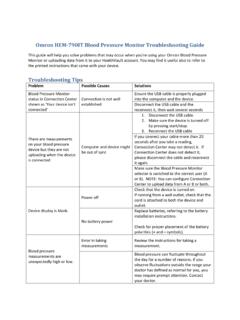
Omron HEM-790IT Blood Pressure Monitor …
omronhealthcare.comTroubleshooting Tips Problem Possible Causes Solutions Ensure the USB cable is properly plugged into the computer and the device. Blood Pressure Monitor status in Connection Center shown as ‘Your device isn’t connected’ Connection is …

Operating Instructions Troubleshooting
support.ricoh.comTroubleshooting Read this manual carefully before you use this machine and keep it handy for future reference. For safe and correct use, be sure to read the Safety Information in "About This Machine" before using the machine. When the Machine Does Not Operate As Wanted Troubleshooting When Using the Copy Function

Configuring your Windows 10 computer for dbRASweb …
dbrasweb.db.comConfiguring your Windows 10 computer for dbRASweb This page provides instructions on how to configure your Windows machine to connect to dbRASweb. Section 1: Installing Citrix Workspace 1. Browse to Citrix Workspace 2. Click Download Citrix Workspace app for …

USER GUIDE and TROUBLESHOOTING
images-eu.ssl-images-amazon.comSound troubleshooting–headphones and earphones 1. Snapping, crackling, popping, or no audio on one side 1. Make sure the 3.5 mm audio jack is fully plugged in. The straight input connects to your headset, and the L-shaped input connects to your audio device. 2. Check that your audio source is on and working. 3.

Troubleshooting Common Problems - OpenOffice
www.openoffice.orgTroubleshooting Chapter. Modifications and updates Version Date Description of Change [1.0] [2006-02-23] [grs: Initial edition issued for comment] [1.1] [2006-08-01] [wam: Edited for clarity/format, added parts from User Guide] [2.0] [2006-08-19] [wam: Added and edited new sections] Troubleshooting Common Problems ii

TROUBLESHOOTING STEPS FOR ACCESSING EPIC FROM THE …
epic.team.uhsystem.comTROUBLESHOOTING STEPS FOR ACCESSING EPIC FROM THE WEB . If you have difficulty launching EPIC Hyperspace Production from the web, please follow the below instructions: *Note that we recommend Internet Explorer 7.0 or 8.0 at this time. 1) Add the Epic URL to the trusted sites in Internet Explorer. a) Click on Start and click on Control Panel.