Example: biology
User's Guide - DS-410
8. If necessary during scanning, adjust the position of the stopper on the output tray extension to fit the ejected originals. Note: If thicker paper does not eject properly or falls from the output tray, push in the output tray and allow the originals to eject freely onto the surface below the scanner. If the scanned images are
Tags:
Information
Domain:
Source:
Link to this page:
Documents from same domain

User's Guide - XP-410 - Epson
files.support.epson.comChanging or Updating Network Connections ..... 34 Accessing the Web Config Utility..... 35

WF-2630 User's Guide - Epson
files.support.epson.comUsing WPS to Connect to a Network..... 35 Printing a Network Status Sheet..... 36

Manual del usuario L575 - files.support.epson.com
files.support.epson.com3 Contenido Manual del usuario L575..... 13

Manual del usuario de la L555 - …
files.support.epson.comCómo escanear utilizando el panel de control del producto..... 74 Cómo cambiar los ajustes predeterminados de los botones de escaneo ..... 75

User's Guide - WF-100 - Epson
files.support.epson.comWF-100 User's Guide Welcome to the WF-100 User's Guide. For a printable PDF copy of this guide, click here. 9. Product Basics

User Manual - PowerLite S18+/W15+/W18+/X24+
files.support.epson.comCorrección de la forma de la imagen con los botones de corrección trapezoidal ..... 72 Corrección de la forma de la imagen con Quick Corner ..... 74

2 Guía de instalación OK - files.support.epson.com
files.support.epson.com2 Introduzca el CD del producto o descargue y ejecute el paquete de software del producto: global.latin.epson.com/Soporte/L575 3 …

Manual do usuário - files.support.epson.com
files.support.epson.com2 L Todos os direitos reservados. Nenhuma parte desta publicação pode ser reproduzida, armazenada em sistemas de recuperação ou transmitida de alguma forma ou meio

XP-310 User's Guide - Epson
files.support.epson.comAvailable EPSON Papers ... XP-310 User's Guide Welcome to the XP-310 User's Guide. For a printable PDF copy of this guide, click here. 11. Product Basics

User's Guide - WF-7610/WF-7620 - Epson
files.support.epson.comAvailable Epson Papers ... Welcome to the WF-7610/WF-7620 User's Guide. For a printable PDF copy of this guide, click here. 13. Product Basics
Related documents

Installation Guide for Cisco TelePresence SX20 Quick Set
www.cisco.compower cable y Codec wall mounting kit (optional) y Camera mounting bracket (optional) y Microphone extension cable (optional) In addition to the SX20 Quick Set you must provide a monitor or projector, and a loudspeaker (external or built-in to the monitor) to ... (Position of the Declaration): 7 ¯+XB$ > User Manual

802.11n Wi-Fi Access Point
dl.ubnt.com1. Position the Mounting Bracket at the desired location on the wall with the cable feed slot pointed towards the floor. 2. Use a pencil to mark the three holes on the wall. Use a 6 mm drill bit to drill the holes. Optional 25 mm Hole for Ethernet Cable Feed through Wall 3. If your Ethernet cable feeds through the wall, cut or drill
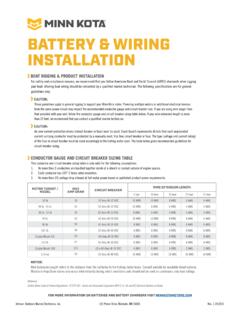
BATTERY & WIRING INSTALLATION - Minn Kota Motors
www.minnkotamotors.com2. Make sure that the trolling motor is switched to the off position or speed selector set to “0”. 3. Wire in series only as directed in wiring diagram, to provide 24 volts. a. Connect a connector cable to the positive (+) terminal of battery 1 and to the negative (-) terminal of battery 2. b.
Rear Derailleur - SHIMANO
si.shimano.comcable is installed or when the coating is damaged during use, but this will not affect its functions. Cover with tongue 2 Remove the initial slack from the cable as shown in the illustration. 3 (A) Reconnect the inner cable to the rear derailleur. Be sure that the cable is securely in the groove. (A) Inner cable Tightening torque 6 - 7 N·m