
Operating Instructions (Remote Panel Operation) The ...
When the administrator requires remote operation while monitoring the device: Remote operation request window (c) appears. To start remote panel operations, have the administrator monitor or operate the device remotely using the following procedures: The user cannot start remote panel operation. (a) When the Monitoring/ remote operation request ...
Download Operating Instructions (Remote Panel Operation) The ...

Information
Domain:
Source:
Link to this page:
Documents from same domain

Istruzioni per l’uso Risoluzione dei problemi
support.ricoh.comIstruzioni per l’uso Risoluzione dei problemi Leggere attentamente questo manuale prima di utilizzare la macchina e tenerlo a disposizione per …

Operating Instructions General Settings Guide - …
support.ricoh.comOperating Instructions General Settings Guide Read this manual carefully before you use this machine and keep it handy for future reference. For safe and correct use, be sure to …

DDST Unit Type A / Type B - Ricoh
support.ricoh.comDDST Unit Type A / Type B Operating Instructions Printer / Scanner Reference Read this manual carefully before you use this machine and keep it handy for future reference.

Gebruiksaanwijzing Scannerhandleiding - …
support.ricoh.comGebruiksaanwijzing Scannerhandleiding Lees deze handleiding zorgvuldig door voordat u dit apparaat gebruikt en houd hem bij de hand voor toekomstig gebruik.

SP 210/SP 210SU/SP 210SF/ SP 211/SP ... - …
support.ricoh.com5 CTT213 CTT073 CTT074 DCT032 DCT049 CTT029 To connect to the network via wireless LAN, see Wi‑ Fi Settings Guide. Otherwise, see page 7 "2. Install‑

Manuel utilisateur Guide de paramétrage général
support.ricoh.comManuel utilisateur Guide de paramétrage général Lisez attentivement ce manuel avant d’utiliser ce copieur et conservez-le dans un endroit accessible afin de pouvoir vous y référer ultérieure-

SP 212/SP 213 Series Wi-Fi Settings Guide - Ricoh
support.ricoh.com1 Model No. SP 212/SP 213 Series Wi-Fi Settings Guide Introduction There are two wireless LAN modes: infrastructure mode for connection through an access point and ad-hoc mode for establishing direct connection with a wireless LAN-capable device

Operating Instructions General Settings Guide - …
support.ricoh.comOperating Instructions General Settings Guide Read this manual carefully before you use this machine and keep it handy for future reference. For safe and correct use, be sure to …

Operating Instructions Troubleshooting - Ricoh
support.ricoh.comOperating Instructions Troubleshooting Read this manual carefully before you use this machine and keep it handy for future reference. For safe and correct use, be …

Network Guide - Ricoh
support.ricoh.comNetwork Guide Read this manual carefully before you use this machine and keep it handy for future reference. For safe and correct use, be sure to read the
Related documents
User Manual - Logitech
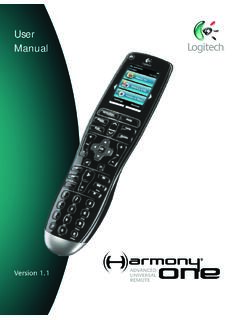
www.logitech.com5 Activities, devices, and inputs The Harmony Advanced Universal Remote is your answer to effortless home entertainment. The Activities button puts control for all your devices in one convenient location. You can go from watching TV to watching a DVD to …
Licensing Windows Desktop OS for Virtual Machines
download.microsoft.comOct 01, 2019 · Any device licensed for Windows 7/8/8.1/10 Pro, Enterprise, or Education, and any Windows tablet with a diagonal screen size of 10.1 inches or less The licensed device only The licensed device only if licensed for Windows 7/8/8.1/10 Pro, Enterprise, or Education Remote access via virtual desktop infrastructure (VDI) or Windows To Go
AT&T TVTM Device and Remote Control
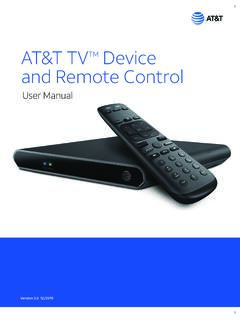
www.att.comRemote Control are: • The RC82V Remote Control works in IR and RF mode. • Basic remote operations can be performed in the IR mode. • The remote uses two-way communication to the AT&T TV. • RF mode eliminates the need for the remote and the paired devices to be in line of sight to each other.
Remote Codes - Device codes for programming the Bell …
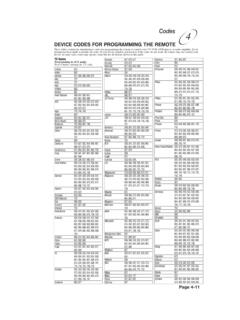
support.bell.caDEVICE CODES FOR PROGRAMMING THE REMOTE These tables contain the manufacturer codes for programming the remote to control your TV, VCR, DVD player, or audio amplifier. Every attempt has been made to include all codes. If your device brand is not listed or if the codes do not work, the remote may not control your device.

HSIS Remote Access Guide - UAB
www.uab.eduBy definition, Remote Access is the ability to access a computer, network, or network resource from outside of the network’s firewall. ... Tap the App Store Icon on your iOS Device. 2. Tap the Search icon and enter RSA SecurID into the search field. 3. Select RSA SecurID then tap Get to download. 12 RSA SecurID for Android

1 Explore Your Remote 2 Control Your Altice One 3 Control ...
help.suddenlink.comThis device complies with Part 15 of the FCC Rules. Operation is subject to the following two conditions: (1) this device may not cause harmful interference, and (2) this device must accept any interference received, including interference that may cause undesired operation. This equipment has been tested and found to comply with the limits
Pico Wireless Control SPEC (369612)
www.lutron.comdevice that allows the user to control Lutron wireless load-control devices from anywhere in the space. This battery-operated control requires no external power or ... – Serena RF remote control shades – Sivoia QS wireless systems • Control available in a variety of button marking options.